Siebel Mobile Products
Several mobile applications are included in the Siebel CRM product line. Each serves a different purpose and runs on different devices. Often, these applications complement each other.
Here's a summary of Siebel Mobile applications, along with the supported server and client components and sytem:
| Product Group | Server Component | Client Component | Supported System |
|---|---|---|---|
| Siebel Mobile Connected | Siebel Mobile application in online mode (connected to Siebel Server). | Siebel application |
|
| Siebel Mobile Disconnected |
Siebel Mobile application in offline mode (disconnected from Siebel Server). Synchronization Object Manager |
Siebel application |
|
| Siebel Remote |
Siebel Remote component group Disconnected Mobile Synchronization component group |
Siebel Mobile Web Client Note that Siebel Mobile connected and disconnected aren't related to the Siebel Mobile Web Client in any way. |
Microsoft Windows only:
|
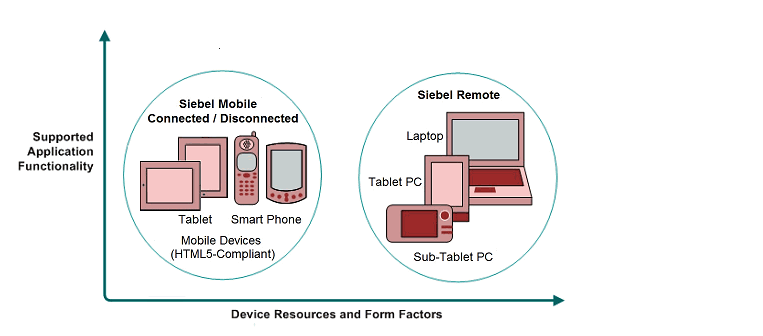
This image illustrates the hardware platforms where these products run. "Form factors" in the image refers to the general capabilities, screen shapes, and sizes of the various devices shown in the illustration.
-
Siebel Mobile applications are supported on iOS (Apple iPad or iPhone) and Android (Samsung Galaxy tablet or smartphone) devices.
-
Siebel Remote applications are supported on Windows desktops, laptops, tablets, and subtablets.
Siebel Mobile Connected Applications
This category includes Siebel Business Applications accessed from a Siebel app downloaded from the Apple App Store or Google Play. This offering from Oracle provides access to Siebel Business Applications, with its native look-and-feel, from tablets and smart-phones.
Siebel supports Responsive Web Design, so any Siebel desktop application will work from any device. For example, the following Siebel Mobile connected applications are supported:
-
Siebel Pharma
-
Siebel Sales
-
Siebel Field Service
-
Siebel Financial Services
-
Siebel Clinical
For more information, see:
- Siebel Mobile Guide: Connected or Siebel Mobile Guide: Disconnected, as appropriate
- Configuring Siebel Open UI
- Siebel Installation Guide
Siebel Mobile Disconnected Applications
This category includes Siebel Business Applications accessed from a Siebel app downloaded from the Apple App Store or Google Play. This offering from Oracle provides access to Siebel Business Applications, with its native look-and-feel, from tablets and smartphones.
These Siebel Mobile disconnected applications are supported:
-
Siebel Field Service
-
Siebel Sales
-
Siebel Clinical
-
Siebel Pharma
For more information, see:
- Siebel Mobile Guide: Connected or Siebel Mobile Guide: Disconnected, as appropriate
- Configuring Siebel Open UI
- Siebel Installation Guide
Siebel Remote and Siebel Mobile Web Client
Siebel Remote lets the Siebel Mobile Web Client run remotely while disconnected. It syncs data that resides on a remote computer with the data that resides on the Siebel Server. Together, these applications provide intelligent transaction routing and data syncing.
These applications support most Siebel Business Applications and Siebel Industry Applications, with the same look-and-feel as those applications.
See the Siebel Remote and Replication Manager Administration Guide for more information.