How Users Run Reports
To run reports, users typically:
- Go to a view.
- Run a search.
- Select the Report button in the application toolbar.
- Select a report to run.
Users can run the report immediately or schedule it to run at a later time. They can monitor reports while they run, view prior reports, or delete prior reports. For more information about running reports, see Running Reports.
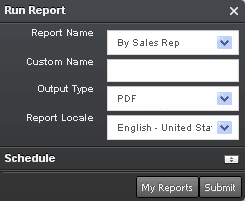
You use the Run Report pane, shown in the following image, to run reports in Siebel Open UI. The Report Name field in the Run Report pane displays the reports that you can run for a view. The Run Report pane remains open while you navigate through the client.