Configuring OpenSearch Integration via YAML File
YAML file for OpenSearch is a human-readable configuration file written in the YAML format, used to define settings and parameters for OpenSearch and search categories for Siebel application. This file provide a structured way to configure and customize the behavior and environment of a Siebel with OpenSearch deployment. This file serves as the source of truth, providing the up-to-date status of indexing and model deployment. Administrators can use it to identify issues in case of failures.
Follow these steps to configure YAML file:
- Go to
<Siebel_Build_Location>/ses/applicationcontainer_internal/webapps. - Open modernsearchconfig.yaml, configure both downstream (OpenSearch) and upstream
(Siebel) sections.Note: A new
modernsearchconfig_template.yamlfile is introduced in Siebel 26.6. This file contains the latest out-of-the-box (OOB) configuration required to support new Intelligent Search functionalities.New Customers – Fresh Installation
- The
modernsearchconfig_template.yamlfile is delivered as part of the installation. - No
modernsearchconfig.yamlfile is created by default. - You must:
- Copy and rename
modernsearchconfig_template.yamltomodernsearchconfig.yaml. - Modify
modernsearchconfig.yamlas needed. - Use this file to enable and configure Intelligent Search.
- Copy and rename
Existing Customers – Upgrading to 26.6 and Later
Scenario 1: Upgrade from pre-26.6 (with OpenSearch enabled)
- The
modernsearchconfig_template.yamlfile is newly introduced and copied during upgrade. - The existing
modernsearchconfig.yamlfile will be deleted during upgrade. - You must:
- Take a backup of their existing
modernsearchconfig.yamlbefore upgrade. - After upgrade, restore the backup file as
modernsearchconfig.yaml. - Manually review and update their configuration to align with the new
template (
modernsearchconfig_template.yaml).
- Take a backup of their existing
- This is a one-time impact during upgrade to 26.6 (or later).
Scenario 2: Subsequent Upgrades (26.6 → 26.7 → 26.8 → 26.9 → 26.10, etc.)
- The
modernsearchconfig_template.yamlfile is updated and replaced with the latest OOB version during each upgrade. - The existing
modernsearchconfig.yamlfile:- Will not be modified or deleted.
- Is treated as a customer-managed custom configuration file.
- You are responsible for:
- Reviewing changes in the updated
modernsearchconfig_template.yaml. - Manually merging any required updates into their existing
modernsearchconfig.yaml.
- Reviewing changes in the updated
- The
- Save changes and restart your Siebel Tomcat Server.
Downstream Settings:
| Category | Settings | Description |
|---|---|---|
| Settings |
clientInitConnectionRequestTimeout: 10 (values in seconds) clientResponseTimeout: 7200 (values in seconds) maxTokenCount: 384000 refreshInterval: 60 (value in seconds) |
clientInitConnectionRequestTimeout : Time the client waits while establishing the initial connection to the search engine. clientResponseTimeout : Maximum time the client waits to receive response from search engine. Set this value based on the maximum time required for a single attachment batch request to complete. maxTokenCount : Maximum token count allowed during text analysis. Set this value based on the largest attachment that must be processed. refreshInterval: Frequency for refreshing or updating the configuration/state. |
| Search |
innerHitsSize: 2 timeZone: "Asia/Kolkata" |
innerHitsSize (2): Number of inner matching records returned per result. timeZone ("Asia/Kolkata"): Time zone used for processing; dynamically derived from the logged-in user’s configuration. |
| IngestPipeline |
- type: text_chunking maxChunkLimit: 100 tokenLimit: 384 overlapRate: 0.1 tokenizer: standard |
text_chunking: Configuration for splitting text into smaller chunks for processing. maxChunkLimit:Maximum number of chunks that can be generated for a document. Increase this value only after validating that the environment can process and index the additional chunks. tokenLimit: Maximum number of tokens in each chunk. Set this value to match the input token limit of the embedding model used by the environment. overlapRate: Percentage of tokens shared between consecutive chunks to preserve context. Valid values are from 0 through 0.5. tokenizer: Tokenizer used for text chunking. Note: Values should be tuned based on attachment content and OpenSearch cluster capacity. |
| Connectivity |
name: OpenSearch username: <CHANGE_ME> password: <CHANGE_ME> version: 2.15.0 url: <CHANGE_ME> port: <CHANGE_ME> |
Connectivity details to access to your OpenSearch instance. |
| Index |
category: - servicerequests: isIndexed: false - contacts: isIndexed: false - accounts: isIndexed: false - opportunities: isIndexed: false - literature: isIndexed: false |
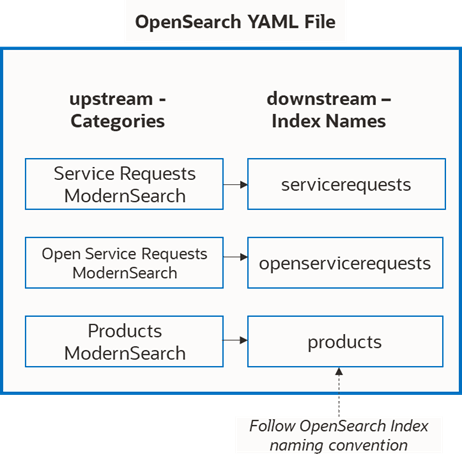
- products: isIndexed: false - orderentryorders: isIndexed: false - orderentrylineitems: isIndexed: false - orderitemxa: isIndexed: false - quote: isIndexed: false - quoteitem: isIndexed: false - quoteitemxa: isIndexed: false - fileingestion: isIndexed: false Provide a unique index name that maps to your search category. This step is required to ensure the newly added category can be indexed properly by OpenSearch.
|
| Language |
|
The value must correspond to a language supported by OpenSearch 2.15.0 language analyzers and match the expected string format defined by OpenSearch. |
| Search |
|
maxResults: Maximum results retrieved from OpenSearch search engine. percentOfTopScore: Threshold expressed as a percentage of the top hit's score. When applied, OpenSearch uses this threshold to decide which documents are close enough in relevance to the highest scoring document to be considered in the rescoring or filtering process.
|
| ML |
modelId: <CHANGE_ME> # DO NOT TOUCH, UPDATED BY SYSTEM modelGroupId: <CHANGE_ME> # DO NOT TOUCH, UPDATED BY SYSTEM modelRegistrationTaskId: <CHANGE_ME> # DO NOT TOUCH, UPDATED BY SYSTEM modelDeploymentTaskId: <CHANGE_ME> # DO NOT TOUCH, UPDATED BY SYSTEM |
NOTE: Don't manually change values in this section. modelId: system field, to be updated by OpenSearch modelGroupId: system field, to be updated by OpenSearch modelStatus: system field, to be updated by OpenSearch. Sample status: INIT, REG_IN_PROGRESS,REG_COMPLETE,DEPLY_IN_PROGRESS, DEPLOY_COMPLETED. Check this value to track model registration status. modelRegistrationTaskId: system field, to be updated by OpenSearch. Refers to a unique identifier for tracking the status of a model registration task modelDeploymentTaskId: system field, to be updated by OpenSearch. Refers to a unique identifier used to track the status of a model deployment task. Note: If user wants to test any new OpenSearch model, make sure to choose the model that supports Siebel application: 768-dimensional dense vector space |
| Pipeline |
|
Multi-Match Weight Factor: used for keyword-based matches Neural Weight Factor: used for semantic-based matches Tuning Weight Factors for Hybrid Search:
|
| Suggester |
numberOfSuggestions: 5 minLength: 3 transpositions: true fuzzyEnabled: true fuzziness: AUTO prefixLength: 3 |
|
- Start with the recommended values and validate them with representative attachment files before indexing large volumes of data.
- Increase clientResponseTimeout and JBSTimeout when attachment indexing requests require more time to complete.
- Increase maxTokenCount only when the largest required attachments exceed the current analysis limit.
- Increase maxChunkLimit only when the environment has been tested to support more chunks.
Upstream Settings:
| Category | Settings | Description |
|---|---|---|
| Category |
SR Attachment ModernSearch: embeddingData: '{{ActivityFileName}}' primaryCategoryDetails: primaryCategory: Service Requests ModernSearch primaryCategoryRowIdField: Activity Id |
This change is mandatory. If the category hierarchy is not defined correctly, categories are treated as parent categories during indexing. Since child categories lack visibility values, this can lead to errors during drill-down operations. To resolve this, the hierarchy definition has been enhanced to support multiple levels, ensuring correct handling of both parent and child categories. This update is critical for proper hierarchical and incremental indexing of child business components. You can verify how categories are interpreted (parent/child) in the
SearchDataExporter logs. For
example: |
| Category |
Order Entry - Orders Modernsearch: embeddingData: '{{Quote Id}} is of type {{Quote Type}}' - Order Entry - Line Items Modernsearch: embeddingData: '{{Product}}' primaryCategoryDetails: primaryCategory: Order Entry - Orders Modernsearch primaryCategoryRowIdField: Order Header Id - Order Item XA Modernsearch: embeddingData: '{{Display Name}} of {{Value}}' primaryCategoryDetails: primaryCategory: Order Entry - Line Items Modernsearch primaryCategoryRowIdField: Object Id - Quote ModernSearch: embeddingData: '{{Quote Id}} is of type {{Quote Type}}' - Quote Item ModernSearch: embeddingData: '{{Product}}' primaryCategoryDetails: primaryCategory: Quote ModernSearch primaryCategoryRowIdField: Quote Id - Quote Item XA ModernSearch: embeddingData: '{{Name}} is having description {{Description}}' primaryCategoryDetails: primaryCategory: Quote Item ModernSearch primaryCategoryRowIdField: Object Id |
Defines hierarchical relationships between categories for indexing, where child entities reference a primary (parent) category using key fields. This enables structured search, preserving parent–child context across orders, quotes, and related line items. Refer to Hierarchical Search section for more details. |
|
Data Source |
- type: SiebelDB |
Reserved Static Value. Do not change. |
|
Category |
- Service Requests ModernSearch: embeddingData: "{{Status}} SR with {{SR Number}} of {{Account}} is having {{Description}}" - Contacts ModernSearch: embeddingData: "{{First Name}} {{Last Name}} of {{Account}} from {{Personal City}}" - Accounts ModernSearch: embeddingData: "{{Name}} located at {{Location}} with {{Account Status}} is assigned to {{Sales Rep}}" - Opportunities ModernSearch: embeddingData: "{{Name}} of {{Account}} is having revenue {{Primary Revenue Amount}} assigned to {{Sales Rep}}" - Literature ModernSearch: embeddingData: "{{Name}} is having content {{Description}}" |
Service Requests ModernSearch, Contacts ModernSearch, Accounts ModernSearch, Opportunities ModernSearch, Literature ModernSearch are all seeded categories, each with 1 pre-defined embeddingData. embeddingData:
Guidelines to define embeddingData:
|