Design Time Workflow and Supporting Artifacts
Siebel Open Integration projects include the following primary artifacts:
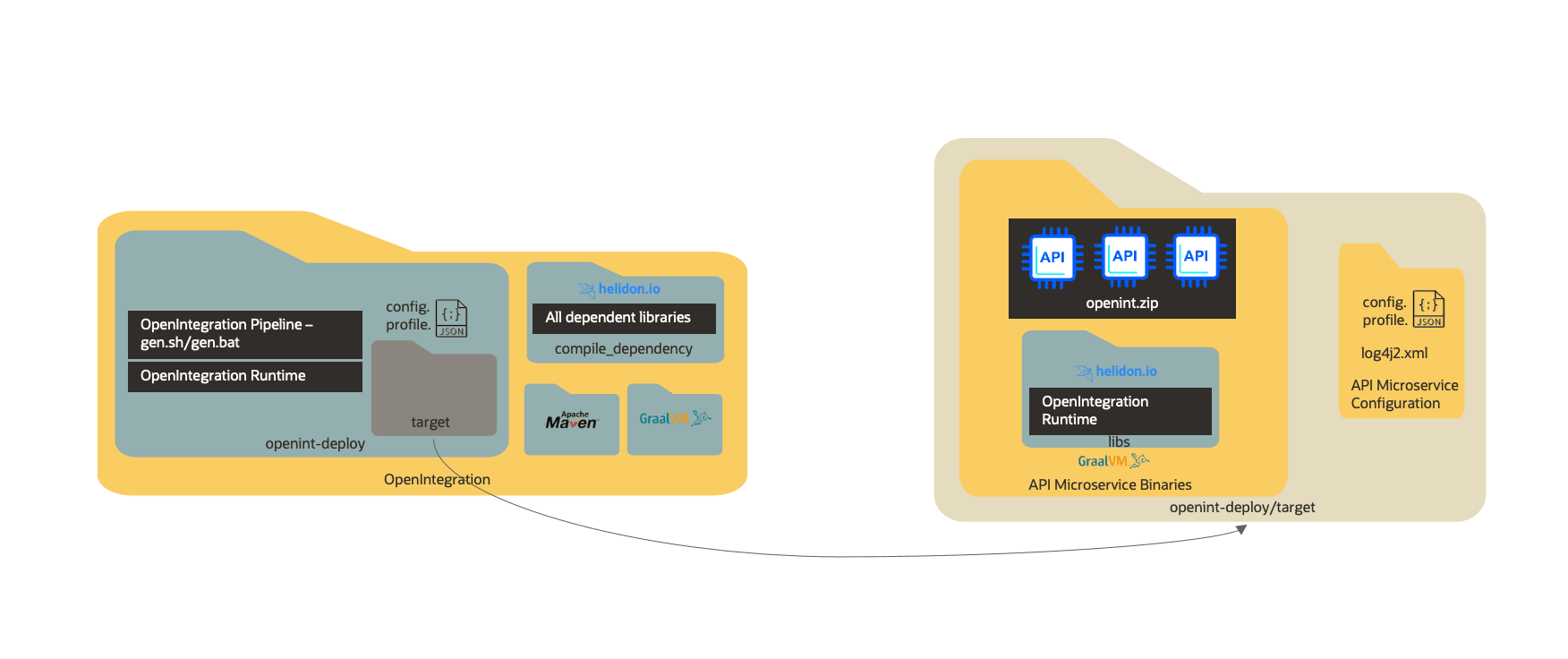
openint_deploy: Useopenint_deployas the main project folder. It contains configuration files, generated source, compilation output, and dependencies. It includes the following files and directories:config-template.json: Template file that you can copy asconfig.jsonto specify Siebel Server connection details and the Siebel CRM artifacts to expose through REST APIs.For more information about
config.json, see Configuring config.json .profile-template.json: Template file that you can copy asprofile.jsonto define Siebel Open Integration security settings and the credentials required to communicate with Siebel CRM.For more information about
profile.json, see Configuring profile.json.gen.batorgen.sh: Run this script to execute the design-time pipeline and build the executable application.target: Created after the pipeline completes. This directory contains the following files and directories:libs: Contains third-party runtime dependencies.logs: Contains log files generated during execution.config.json: Copied from the configured source.profile.json: Copied from the configured source.log4j2.xml: Controls logging levels and severity.openint.jar: The generated executable file.
start.batorstart.sh: Use this script to start the Open Integration application.compile_dependency: Contains compile-time and runtime dependencies. These dependencies are available locally and do not require additional downloads.apache-maven: The build tool used for the Open Integration application.settings.xml.template: A template file that you must rename tosettings.xml.graalvm-jdk: The GraalVM Java Development Kit (JDK) bundled for compilation and runtime execution.