Architecture of the Migration
The Siebel Segmentation Migration Utility converts existing Oracle Analytics Server (OAS) segmentation artifacts into Analysis-based artifacts. This allows migrated Siebel Marketing campaigns to continue using equivalent targeting definitions after the campaign reference is moved from the legacy segmentation artifact to the migrated Analysis or Analysis Collection artifact.
By default, migrated OAS objects are created in the source artifact folder. The generated
artifact name starts with M_, where M_ means Migrated.
For example, a Segment named Contacts in USA is migrated in the same
source folder but named M_Contacts in USA.
Segment to Analysis Migration
For a Segment migration, the migration utility receives the Segment as the input artifact. The Segment already contains a path reference to its Load Format. Thus, the Load Format isn't passed separately to the migration utility.
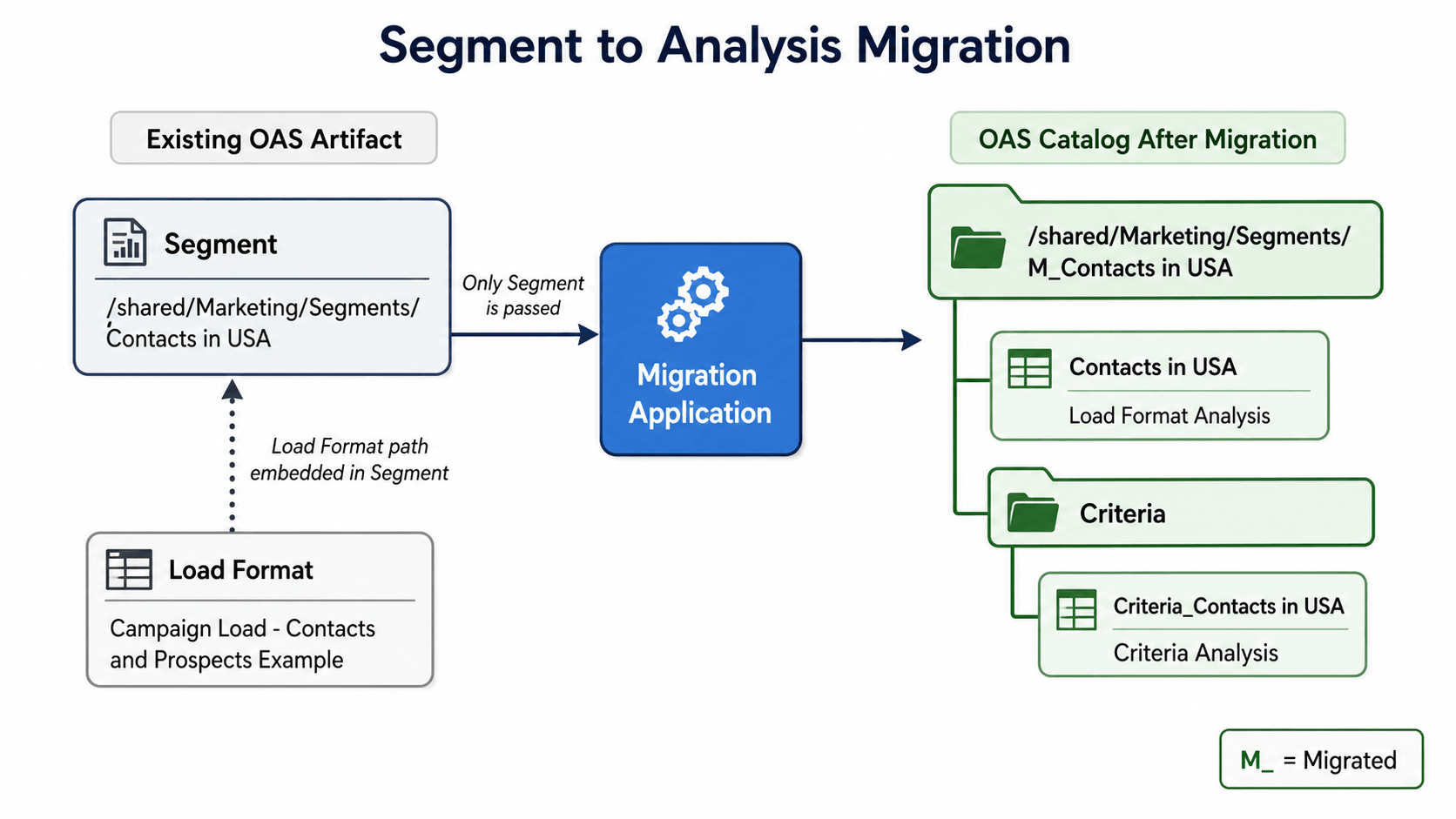
During migration, the application reads the Segment definition and the referenced Load Format and then creates the migrated Analysis artifacts in OAS. This table shows source artifacts and migrated artifact naming:
| Source Artifact | Migrated OAS Artifact |
|---|---|
| Segment | Migrated Analysis container named
M_<SegmentName> |
| Segment criteria | Criteria Analysis named
Criteria_<SegmentName>.Provides qualifying-key results |
| Load Format referenced by the Segment | Load Format Analysis named
<SegmentName>Associated back to the Siebel Campaign |
The Load Format Analysis references the Criteria Analysis through its filter
definition. The filter uses the target-level column, such as Contact
Id, with the operator is based on results of another
analysis. The saved analysis points to the generated Criteria Analysis,
and the filter uses values from the qualifying-key column, such as
ROW_ID, returned by that Criteria Analysis.
After
migration, the Siebel Marketing campaign is associated with the generated Load
Format Analysis named <SegmentName>. The Criteria Analysis named
Criteria_<SegmentName> is created under the
Criteria folder and supplies the qualifying-key result set used
by the Load Format Analysis.
Segment Tree to Analysis Collection Migration
For a Segment Tree migration, the Segment Tree is converted into an Analysis Collection. The migration utility traverses the Segment Tree from the root to each leaf node. Each leaf path becomes a generated set of Analysis artifacts in the migrated OAS catalog structure.
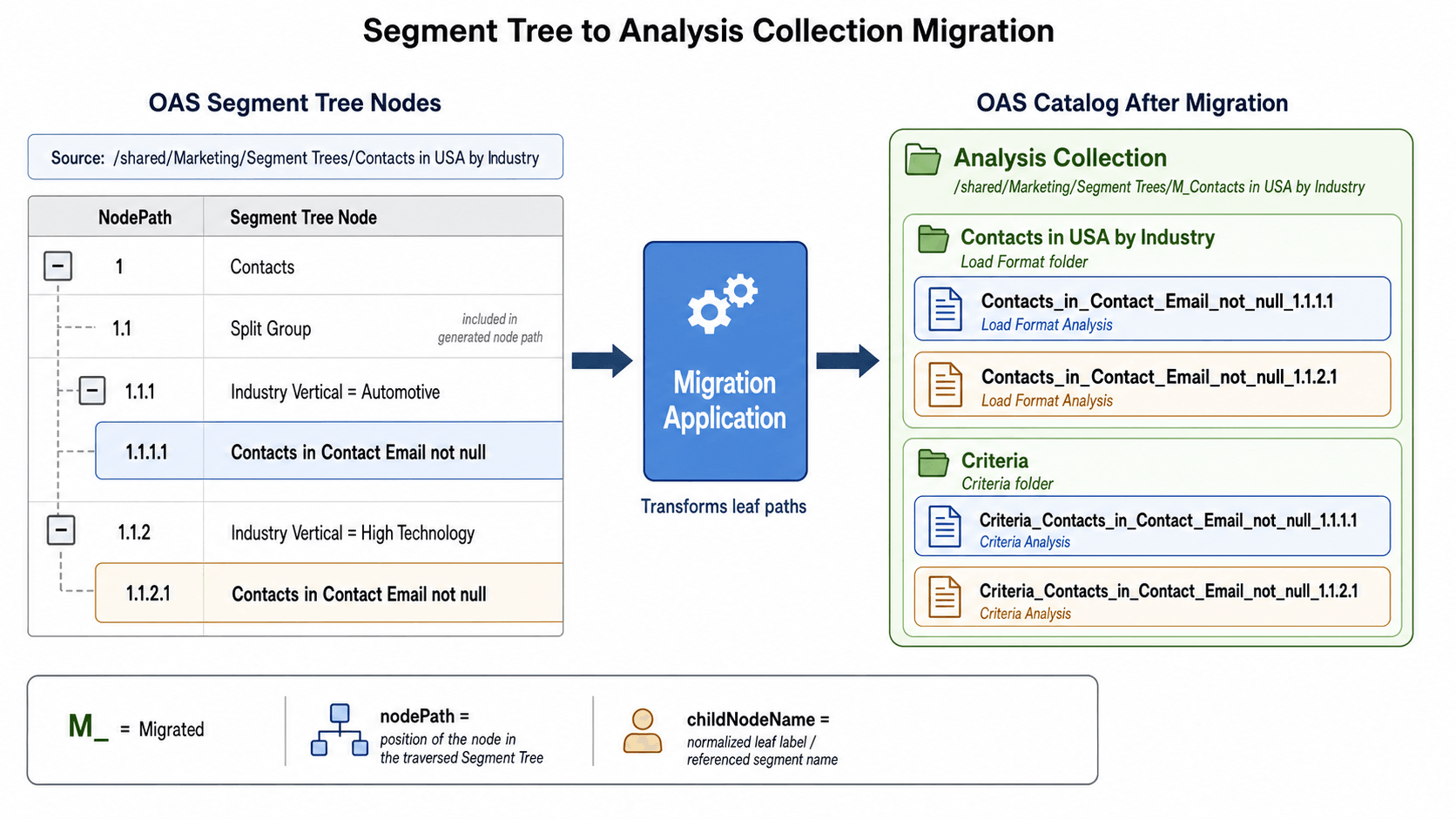
The migrated output is grouped under M_<SegmentTreeName>.
Inside that migrated collection, the original Segment Tree name is used as the Load
Format folder, and a separate Criteria folder stores the generated
Criteria Analysis artifacts.
| Source Artifact | Migrated OAS Artifact |
|---|---|
| Segment Tree | Analysis Collection named
M_<SegmentTreeName>Associated back to the Siebel Campaign |
| Leaf path in the Segment Tree | Load Format Analysis named
<childNodeName>_<nodePath> |
| Leaf path criteria | Criteria Analysis named
Criteria_<childNodeName>_<nodePath>Provides qualifying-key results |
| Original Segment Tree name | Folder that groups generated Load Format Analysis artifacts |
Criteria folder |
Folder that groups generated Criteria Analysis artifacts |
For Segment Tree migration, Siebel Marketing is associated with the generated
Analysis Collection under M_<SegmentTreeName>. Each leaf path
contributes a Load Format Analysis and a Criteria Analysis inside that collection
structure. The Load Format Analysis for each leaf uses the corresponding Criteria
Analysis as its saved-analysis filter source, using the qualifying-key column, such
as ROW_ID.
The nodePath value identifies the
position of a node in the traversed Segment Tree. This makes it easier to trace a
generated Analysis artifact back to the source leaf node. The
childNodeName value is derived from the normalized leaf label
or referenced Segment name.
Naming and Mapping Notes
| Name | Description |
|---|---|
M_ |
Migrated artifact prefix |
nodePath |
Position of the node in the traversed Segment Tree |
childNodeName |
Normalized leaf label or referenced Segment name |
These names are used so that support teams can map migrated OAS catalog objects back to the original Segment or Segment Tree definition during validation or troubleshooting.