Troubleshooting the Migration Results
Review the command-line summary first. If any campaign fails, review the audit log and application log in the configured logs directory.
Campaign Migration Stages
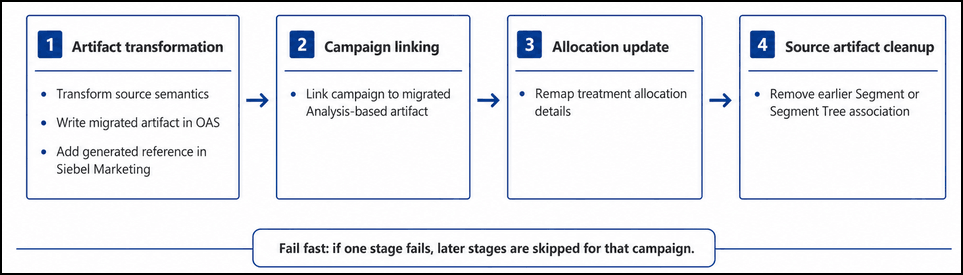
Campaign migration consists of the following stages:
- Artifact transformation: Transforms the source artifact semantics, creates the migrated artifact in OAS, and adds the generated reference in Siebel Marketing.
- Campaign linking: Updates the Siebel Marketing campaign to reference the migrated Analysis-based artifact.
- Allocation update: Re-maps treatment allocation details to the migrated artifact.
- Source artifact cleanup: Removes the earlier Segment or Segment Tree association from the campaign after the migrated artifact is linked successfully.
List Export and Analysis Export
List Export to Analysis Export migration is exempted from adding the generated artifact into the Siebel Marketing Segment screen. Analysis Export artifacts are referenced directly within the campaign.
The Migration Application follows a fail-fast sequence for each campaign. If any stage fails, later stages aren't executed for that campaign and the campaign migration is marked as failed. Use the audit log to identify which campaign and stage failed, and use the application log for detailed exception information.
Headless and Stateless Run Behavior
The Migration
Application runs as a headless CLI process and does not persist run state between
executions. Each run discovers campaign and artifact state from the configured
Siebel and OAS endpoints. The application uses in-memory state only within the
current run; audit and application logs are for review and are not used as
checkpoint data for later runs. If a rerun must target only specific campaigns, use
siebel.campaign.searchspec to scope the run.
Common Issues and Corrective Actions
Thes table lists common migration issues, their typical symptoms, and the recommended corrective actions:
| Run Phase/Area | Issue | Typical Signal | Where to Verify | Corrective Action |
|---|---|---|---|---|
| Startup - Authentication | Invalid password | Siebel REST API or OAS authentication fails. | Command-line summary and application log. | Rerun the Migration Application and enter the correct runtime password. Verify the Siebel and OAS users have the required access. |
| Startup - Configuration | Invalid RPD XML path | The configured RPD XML path does not exist or cannot be read. | Application log and
application.properties. |
Correct rpd.xml.path and confirm the file is
accessible from the migration host. |
| Startup - Configuration | Insufficient write access or disk space | Log files are not created, RPD XML cannot be read, or OAS artifact write fails. | Migration host file system, logs directory, and OAS catalog location. | Use a writable local directory for the RPD XML and logs. Confirm the OAS catalog target location allows artifact creation. |
| Preflight - Siebel REST | Dynamic IO access not enabled | GET request fails with status 500 and SBL-EAI-50297. The response says the Business Object is not enabled for REST access. | Application log and Siebel Inbound REST API Access view. |
Enable Dynamic IO REST access and grant access for Marketing Segment and Mktg List Format. Enable Dynamic IO Access |
| Preflight - Connectivity | Siebel or OAS server not reachable | REST or SOAP preflight fails with host resolution, connection, timeout, or routing errors. | Command-line summary, application log, VPN/network status, DNS, host, and port. | Verify siebel.api.url,
oas.api.url, VPN or network access, DNS
resolution, firewall rules, host and port reachability, and service
availability. |
| Preflight - SSL | SSL or truststore misconfiguration | PKIX path building failed. SunCertPathBuilderException says unable to find valid certification path to requested target. | Application log and truststore configuration. | Import the missing Siebel or OAS certificate chain into the
configured truststore. Verify TRUSTSTORE_PATH,
TRUSTSTORE_PASSWORD, and
TRUSTSTORE_TYPE. |
| Artifact transformation | Missing qualifying-key metadata | Target level not found, or no qualifying keys matched. | Application log and generated RPD XML. | Regenerate the RPD XML from the active OAS repository and confirm the target level and qualifying-key columns exist. |
| Artifact transformation | Unsupported or invalid source artifact | Unsupported criteria in Segment, unsupported List Export criteria, or failed artifact transformation. | Audit log for artifact status and application log for detailed exception. | Review the source Segment, Segment Tree, or List Export definition. Correct unsupported criteria before rerunning. |
| Artifact transformation | Campaign has no supported artifacts | Campaign has no artifacts to transform. | Audit log and Siebel campaign artifact association. | Review the campaign in Siebel Marketing and confirm a supported Segment, Segment Tree, or List Export artifact is associated before migration. |
| Artifact transformation - OAS write | Catalog path too long | Campaign linking or Siebel update fails for a generated OAS catalog path. | Application log, generated artifact path, and source folder or artifact names. | Shorten source folder or artifact names before rerunning. Siebel might not accommodate catalog paths beyond about 250 characters. |
| Artifact transformation - OAS write | Migrated artifact creation fails | Audit log shows artifact transformation failed. | Audit log for campaign and artifact status; application log for the OAS write exception. | Correct the artifact, metadata, OAS catalog path, or OAS access issue and rerun. |
| Campaign linking | Campaign update fails | Failed updating campaign with migrated artifact reference. | Audit log stage status and application log. | Verify Siebel campaign state, campaign permissions, Dynamic IO access, and the generated artifact reference, then rerun the migration. |
| Allocation update | Treatment allocation update fails | Treatment allocation update failed. | Audit log stage status and application log. | Review the campaign allocation records in Siebel Marketing, confirm the source allocations still exist, and rerun after correcting allocation data. |
| Source artifact cleanup | Source artifact deletion fails | Failed deleting existing source artifact from campaign. | Audit log stage status, application log, and campaign artifact association in Siebel Marketing. | Verify the campaign still contains the source Segment or Segment Tree association and that the Siebel user has permission to delete it from the campaign. |
| Rerun - Recovery | Interrupted migration session | The run stops before completing all campaigns. | Audit log for last completed campaign and application log for final exception. | Correct the interruption cause. Rerun with an appropriate
siebel.campaign.searchspec if only a subset
needs to be retried. |
Log Files
The migration utililty writes two log files for each run:
- Application log:
migration-<timestamp>-<log-tag>.log - Audit log:
migration-audit-<timestamp>-<log-tag>.log
Use the audit log for campaign-level migration status and the application log for detailed exception information.