Use Case 1: Identify and Flag PII/PHI in Service Request Description
In this scenario (illustrated in the following image), the OCI Language AI service checks whether the service request (SR) description field contains any PII/PHI, and if so, warns the user before saving the SR to the system.
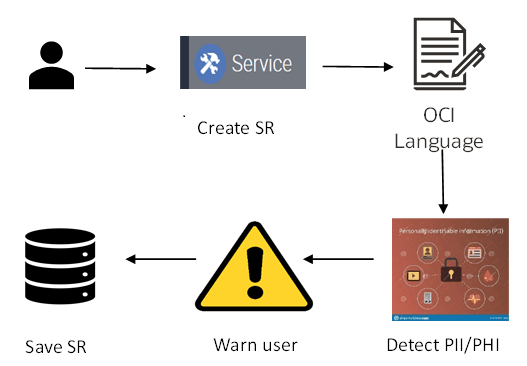
As shown in this image, a typical flow involved in using the OCI Language AI service to identify and flag PII/PHI in the service request (SR) description is as follows:
-
A call center agent creates an SR, for example, where the Description field contains the following PII information:
The customers MEDICAL RECORD NUMBER is MRN:56453241-A and can be reached at 9989898989 or charles@gmail.com. -
When the SR is saved:
-
Siebel invokes the OCI Language AI service to check the Description field to see if it contains any PII/PHI information.
-
If the Descriptions field contains PII/PHI information, then Siebel warns the user before saving the SR with a message similar to the following:
Personally Identifiable Information TELEPHONE_NUMBER: 9989898989 EMAIL: charles@gmail.com MEDICAL_RECORD_NUMBER: MRN:56453241-A OK -
When the user clicks OK to this message, the PII Flag field value for the SR changes to Y.
-
You can extend this functionality to any Siebel business component. Currently, only one field per business component is supported to extract PII from input text, for example, as follows:
-
The 'Description' field in the 'Service Request' business component.
-
The 'Comment' field in the 'Quote' business component.
However, administrators can configure a list of PII/PHI to be identified in the configured field.