Configuring Preprocessing and Postprocessing Steps in Inbound REST API
Sometimes resources, such as business objects, business services and workflows, that are accessed using REST API may change state variables, such as profile attributes, and session global values as part of a custom implementation. As a result, this can affect the functionality of subsequent business service or business object APIs that depend on these state variables in the same session.
State variables are specific to each implementation, and because the REST API framework does not identify any change to state variables, the REST API framework does not undo state changes automatically. To ensure consistent and correct results for all APIs, there is a need to reverse or reset the state changes implemented by these resources in REST API.
Preprocessing and postprocessing steps can be used for all inbound data, service, workspace and workflow REST APIs. They can assist you when you need to perform setup and cleanup operations before and after invoking the REST API, therefore not affecting subsequent REST API calls on the same session. Preprocessing steps are called before the Object Manager instance processing starts, the REST API is executed, and then the postprocessing steps are called after the Object Manager instance is completed.
In order to enable preprocessing and postprocessing steps, you must define the following business service user property on the EAI Rest Adapter Service business service in Web Tools, and deliver the workspace with business service user property changes:
-
Business service user property name. EnablePrePostProcessing
-
Associated business service. EAI Rest Adapter Service
-
User property value.True.
Note: For more information about defining business service user properties, see Integration Platform Technologies: Siebel Enterprise Application Integration.
Preprocessing and postprocessing steps for each resource require preprocessing and postprocessing functions in the form of a business service and business method. In the EAI Rest Adapter Service in Siebel Tools, you must map the URL that identifies the target resource with the business service and business method that is responsible for each preprocessing and postprocessing function.
The following figure shows the Business Service User Props pane and sample resource mapping user property keys and values:
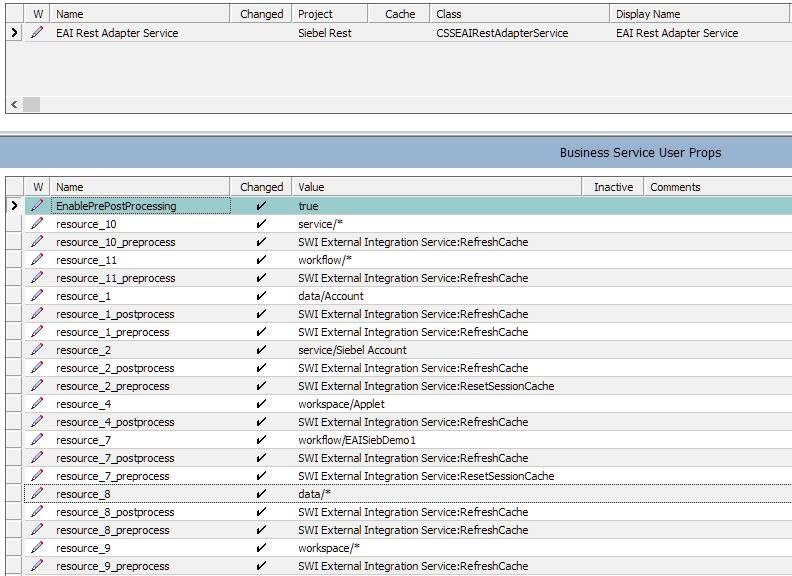
You can define wildcard specification for the URL mapping resource. For example, if
you add an asterisk to a data URL resource (data/*), then
preprocessing and postprocessing applies to all data APIs. In the event where you
list a specific resource and a wildcard, then REST API considers the specific
resource. You can only use wildcard to generalize an API type.
| Requested URL | User Property Key | User Property Value |
|---|---|---|
|
data/Account/Account/..... |
resource_1 |
data/Account |
|
resource_1_preprocess |
Business_Service1:Method |
|
|
resource_1_postprocess |
Business_Service2:Method |
|
|
service/Siebel Account/..... |
resource_2 |
service/Siebel Account |
|
resource_2_preprocess |
Business_Service3:Method |
|
|
resource_2_postprocess |
Business_Service4:Method |
|
|
workspace/Applet/.... |
resource_3 |
workspace/Applet |
|
resource_3_preprocess |
Business_Service1:Method |
|
|
resource 3 preprocess |
Business_Service2:Method |
|
|
workflow/EAISiebDemo1 |
resource_4 |
workflow/EAISiebDemo1 |
|
resource_4_preprocess |
Business_Service1:Method |
|
|
resource_4_preprocess |
Business_Service2:Method |
|
|
data/... |
resource_5 |
data/* |
|
resource_5_preprocess |
Business_Service4:Method |
|
|
resource_5_postprocess |
Business_Service5:Method |
For more information on Siebel CORS security see, Siebel Security Guide.
Steps to Configure the CORS Filter
- Back up the deployed Siebel web.xml before making any changes.
- Locate the out-of-the-box /v1.0/* CORS filter in the Siebel web application's WEB-INF/web.xml.
- Update only the parameters required for the customer deployment:
- cors.allowed.origins
- cors.allowed.methods
- cors.allowed.headers
- cors.support.credentials
- Configure cors.allowed.origins with exact, operator-approved
origins. Use a comma-separated list when more than one origin is
required:Example
<param- value>https://trusted.example.com,https://partner.example.com</param- value> - Configure cors.allowed.methods with only the methods required by the REST integration. Do not enable PUT or DELETE unless browser cross-origin REST access requires those methods.
- Configure cors.allowed.headers with only the headers required by the REST integration. Custom headers will be blocked unless they are added to “cors.allowed.headers”. Add Authorization only if the browser client sends that header.
- Keep cors.support.credentials set to false unless credentialed browser cross-origin requests are explicitly required and approved.
- Restart the Siebel Application Interface after updating web.xml.
- Preserve the customized web.xml.
Tomcat CORS filter parameter reference: https://tomcat.apache.org/tomcat-10.1-doc/config/filter.html#CORS_Filter
The out-of-the-box filter entry is shown below. Customers should update the parameter values as required.
<!-- CORS filter for /v1.0/* -->
<filter>
   <filter-name>SiebelCorsV10Filter</filter-name>
   <filter-class>org.apache.catalina.filters.CorsFilter</filter-class>
   <init-param>
      <param-name>cors.allowed.origins</param-name>
      <param-value></param-value>
   </init-param>
   <init-param>
      <param-name>cors.allowed.methods</param-name>
      <param-value>GET,OPTIONS</param-value>
   </init-param>
   <init-param>
      <param-name>cors.allowed.headers</param-name>
      <param-value>Origin,Accept,Content-Type,Authorization,Access-Control-Request-Method,Access-Control-Request-Headers</param-value>
   </init-param>
   <init-param>
      <param-name>cors.support.credentials</param-name>
      <param-value>false</param-value>
   </init-param>
</filter>
<filter-mapping>
   <filter-name>SiebelCorsV10Filter</filter-name>
   <url-pattern>/v1.0/*</url-pattern>
   <dispatcher>REQUEST</dispatcher>
</filter-mapping>