Remove a Topic
Remove a topic when it's no longer needed and you don't want users to access it in Agent Hub.
Before you remove a topic, consider how the topic is being used and the impact that removing it can have on users and existing conversations.
Before you remove a topic:
- Confirm that users no longer need the topic.
- Review the agents and connected tools and services associated with the topic.
- Consider whether users have existing conversations that they started from the topic.
- Confirm whether the topic is referenced or used by other Agent Hub configuration.
- Open Agent Hub.
- In the navigation panel, click Registry
 .
- On the Registry page, click the Topics tab
 .
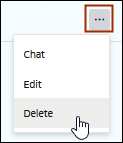
- Locate the topic you want to remove, click More Actions
 .
- Click Delete.