Understand Approvals in Agent Hub
Agent Hub provides approval settings that control when you review agent or tool selections and when Agent Hub can proceed automatically. You can choose how much control you want over the agents and tools used to process your requests.
You can select an approval control setting in the chat prompt field. 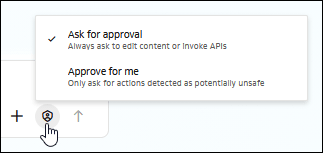
Description of the illustration approval_menu.png
-
Ask for approval: When the orchestrator presents an agent for execution, Agent Hub displays the suggested agent and alternatives regardless of the LLM's confidence in its selection. You can approve the suggested agent or choose another available agent. This approval setting also applies to tools.
-
Approve for me: Agent Hub automatically invokes the agent or tool selected by the LLM. You need to approve an action only when the LLM identifies it as especially sensitive.
In an orchestrated conversation, the approval setting also applies when the orchestrator selects an agent for a follow-up request. Depending on the setting, Agent Hub can present agents for selection or invoke the selected agent automatically.
For information about how Agent Hub selects agents and tools, see How Agent Hub Processes Requests.