About Catalog Storage Limits
Administrators can manage the amount of catalog storage available for personal and shared content through the advanced system setting Catalog Storage Limits. You can set a maximum size in megabytes (MB) to suit your organization's content-management needs for personal content that each user stores under My Folders and each top-level folder available under Shared Folders.
- My Folders — Stores private content for each user. Optionally, set a storage limit for each user.
- Shared Folders — Stores shared content. Optionally, set a storage limit for each top-level folder under Shared Folders.
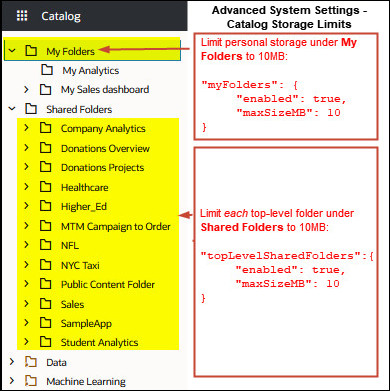
Administrators can enable and configure storage limits for My Folders and top-level Shared Folders independently. You can specify any positive value in MB. You can't set different limits by role, individual user, or lower-level folders.
Leave the Catalog Storage Limits setting value blank to allow unrestricted catalog storage for personal and shared content.
What Happens when a Storage Limit is Reached?
The limit helps ensure predictable catalog storage usage. If a catalog folder reaches its configured quota, requests that would exceed the limit aren't completed and a message is displayed.
Do Content Storage Limits Impact Dataset Storage?
No. The Catalog Storage Limits system setting governs catalog folder content; it doesn't govern dataset management storage or impact the dataset storage allowance.