Manage Oracle Analytics AI Assistants and Models
In Oracle Analytics Cloud, you can monitor, enable, or disable generative AI features. You can also change the AI model that Oracle Analytics Cloud uses to perform AI operations.
- On your home page, click Navigator
 , then click Console.
 - Under Extensions and Enrichments, click Generative AI.
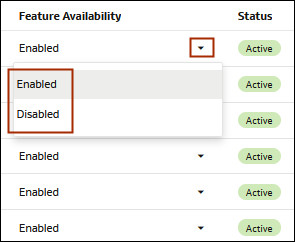
- Optional: In Oracle Analytics AI Assistant Features, locate the Feature Availability
column, locate the feature you want to change availability for, click its
dropdown, and select to enable or disable the feature.
- Under Registered Gen AI
Services, click Options
 and select Set Inactive to disable all
generative AI features.
and select Set Inactive to disable all
generative AI features. - Optional: Under Registered Gen AI Services, click Options and select Use Legacy Model to revert from the
default model to the legacy model.