Troubleshoot Post Migration
This topic describes common problems that you might encounter after migrating to Oracle Analytics Cloud and explains how to solve them.
Report doesn't display as expected. I see the error "BI Server Not Available For Queries"
The error
BI Server Not Available For Queries displays
for two reasons:
- The report contains an extremely large query.
- Oracle Analytics Cloud and Oracle BI Enterprise Edition generate physical queries differently. Oracle BI Enterprise Edition generates inner joins and Oracle Analytics Cloud generates left-outer joins which can cause the performance issue after migration.
To prevent large report queries from getting stuck:
- In Semantic Modeler, navigate to the Physical Layer, right-click the source database, click Edit, and then Advanced.
- Enable the database feature
PERF_PREFER_INTERNAL_STITCH_JOIN.
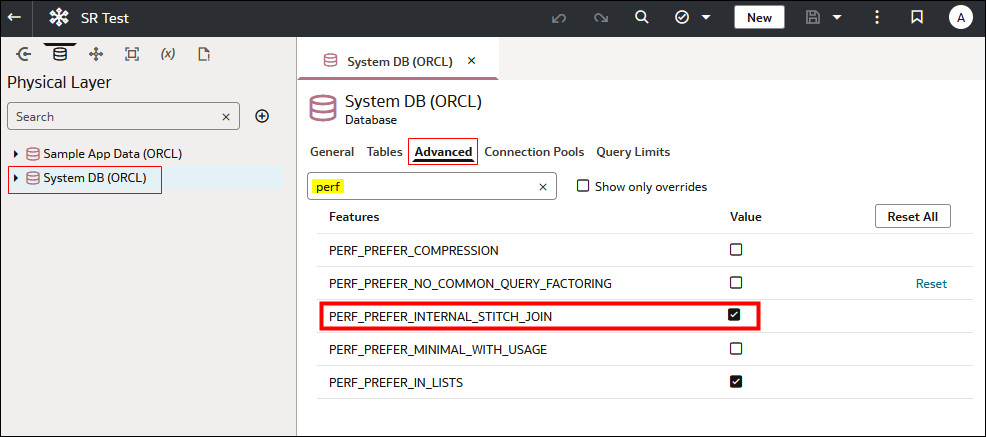
To prevent the performance issue for a single report or all reports:
-
For a single report, enable the property
OBIS_PREVENT_EARLY_NODE_FLATTENING_FOR_OUTER_JOINS=1at the report-level. - For all reports, define a session variable in the semantic
model with:
OBIS_PREVENT_EARLY_NODE_FLATTENING_FOR_OUTER_JOINS=1