Manage Data Gateway Agents
Use the Console to manage Data Gateway agents. For example, you might add agents to improve performance or provide a backup, check the status of agents, and check for remote connection issues.
Data Gateway Agents enable you to use Oracle Analytics Cloud to visualize and model data in remote databases. You deploy Data Gateway in a subnet that gives visibility to both Oracle Analytics Cloud and the remote databases.
- On the Home page, click Navigator , then Console, then Remote Data Connectivity.
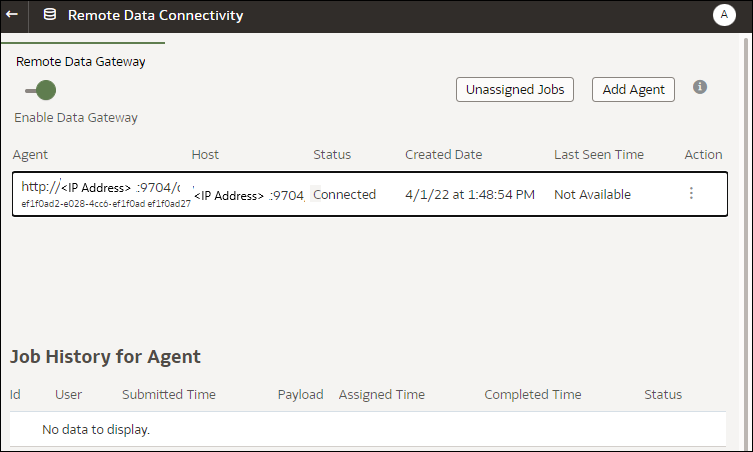
- Use the Remote Data Connectivity page to manage agents.
- To enable remote connection traffic between your Oracle Analytics Cloud instance and remote databases, enable the Enable Data Gateway option.
- To enable or disable a specific agent, click the Action option for the agent (
 ), and select either Enable Agent or Disable Agent. If you disable an agent, in-progress jobs for the disabled agent are halted, and future connection jobs for the instance are automatically reassigned to other agents, if available.
- To add an agent, click Add Agent. See Configure Data Gateway for Data Visualization.
- To view remote connection traffic handled by an agent, select the agent to display a Job History list.
- To check for remote queries that haven't been processed or assigned to an agent, click Unassigned Jobs.