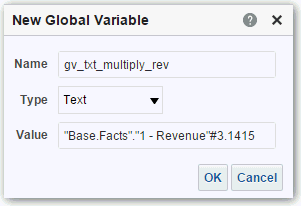
Enter the value for the Name. For example, gv_region, date_and_time_global_variable, or rev_eastern_region_calc_gv.
The name for a global variable must be fully qualified when referencing the variable, and therefore is prefixed by the text "global.variables". For example, a global variable set to calculate revenue is displayed in the Column Formula dialog as follows:
If you’re selecting "Date and Time" as the data type, then enter the value as in the following example: 03/25/2004 12:00:00 AM
If you’re entering an expression or a calculation as a value, then you must use the Text data type, as in the following example: "Base Facts"."1- Revenue"*3.1415
Click OK. The new global variable is added to the Insert Global Variable dialog.
Select the new global variable that you just created, and click OK. The Edit Column Formula dialog is displayed with the global variable inserted in the Column Formula pane. The Custom Headings check box is automatically selected.
Enter a new name for the column to which you have assigned a global variable to reflect the variable more accurately.