Select Workbook Toolbar Options
When you configure the presentation settings for a workbook, you can specify which of the workbook's toolbar options you want to display to consumers.
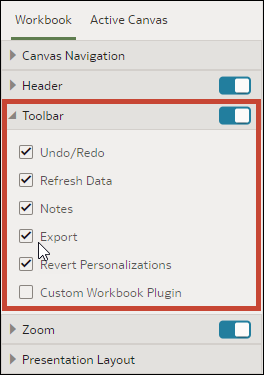
Toolbar options you can enable for consumers include:
- Undo/Redo: Lets consumers undo or redo any changes they make, such as filter selections.
- Refresh Data: Lets consumers refresh the data in the visualizations.
- Notes: Lets consumers show any notes on the canvas.
- Export: Lets consumers access the export options.
- State Menu: Lets consumers create custom states with filter personalizations and select from available states.
- Custom Workbook Extension: Lets consumers open custom workbook extensions if available.
- On your home page, hover over a workbook, click Actions, and select Open.
- From the Preview menu
 , select Configure Presentation.
 - In the presentation settings panel, click the Workbook tab.
- In the Toolbar section, deselect the toolbar options that you want to hide, or select the toolbar options that you want to display.
- Click Save.