Set Visualization Shadow Properties
You can specify shadow properties for one or more visualizations, including where the shadow appears, and other characteristics including shadow color.
- On your home page, hover over a workbook, click Actions, and select Open.
- Select a visualization on the canvas.
- Click Properties to open the Properties pane.
- Click Shadow to display the options, and then define
your shadow settings:
- Click one of the squares to define the position of the
shadow (for example, top-left, or top, or top-right).
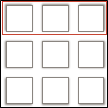
- Click Custom to select Shadow Color, Horizontal Offset (the gap to the side before the shadow begins), Vertical Offset (the gap above before or below before the shadow begins), Blur (how blurred or solid the shadow is), and Spread (how far the shadow spreads).
- Click one of the squares to define the position of the
shadow (for example, top-left, or top, or top-right).
- Click Save.