About Simple Trellis Versus Advanced Trellis
A trellis view can be a Simple Trellis or an Advanced Trellis.
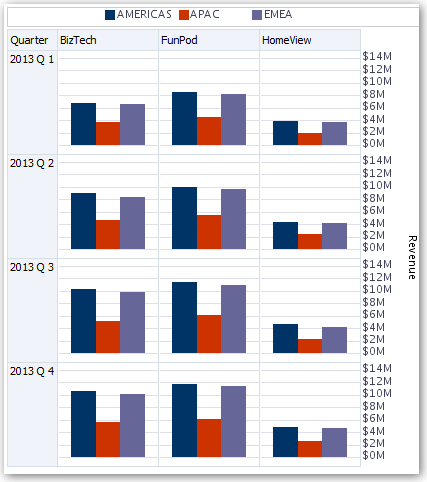
The Simple Trellis displays a single type of inner visualization, for example, all bar graphs. The inner visualization always uses a common axis, so that all inner graphs are viewed on the same scale. Having a common axis makes all graph markers easy to compare across rows and columns.
This figure shows a simple trellis view:
The Advanced Trellis accommodates the display of multiple visualization types within its grid. An advanced trellis that illustrates sales trends might show a grid that contains numbers in the cells of one column (revenue, for example). Another column alongside the numbers column displays Spark Line graphs in its cells. Next to that column, a different microchart might be displayed, such as a column of Spark Bar graphs that visualize a different measure, such as unit totals.
This figure shows an advanced trellis view:
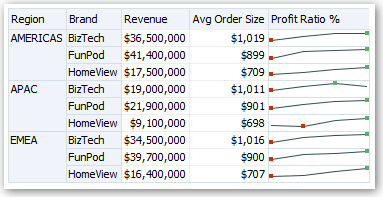
Each measure that is visualized is assigned a different inner graph type. Each cell of the grid is scaled independently.
Think of an advanced trellis as a pivot table with spark graphs inside its data cells. But, for each measure that you add, you can optionally associate a dimension and display it as a microchart visualization. This makes an advanced trellis very different from a simple trellis. In a simple trellis, all of the measures are displayed in the same visualization, along with additional dimensions.