Specify Workbook Assistant Data Source
You can enable the Workbook Assistant and an AI agent to use with a workbook.
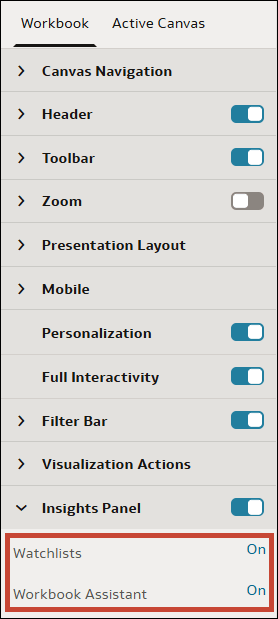
When you make the Insights Panel available to consumers, you can choose whether or not to keep the following features available in the panel:
- Watchlists - Consumers can view watchlists that have been shared with them.
- Workbook Assistant - Consumers can ask natural language questions to the Oracle Analytics AI Assistant to analyze data in the workbook. You need to enable the Workbook Assistant to connect a workbook to an AI Agent.
Note:
A consumer can only use watchlists or the workbook Assistant in the Insights Panel if your administrator has granted them the Use Assistant in Workbooks or the Create and Edit Watchlists permissions. See About Permissions.- On your home page, hover over a workbook, click Actions, and select Open.
- Click Edit to enter author mode.
- Click Present.
- In the Present page, click the Workbook tab.
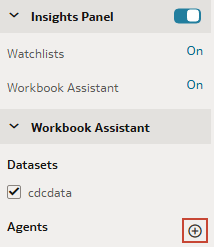
- In the Insights Panel section, make sure the Insights Panel is enabled and Workbook Assistant is set to On.
- In the Workbook Assistant section, click Add Agent.
- Select the agent you want to associate with the workbook, and click OK.
- Click Save.