Before You Begin
This tutorial shows you how to create a data flow with a subject area as the data source in Oracle Analytics.
Background
Use a data flow to organize, manipulate, combine, and aggregate data to produce curated datasets. You can create a data flow with a subject without first creating a local subject area in Oracle Analytics.
Subject areas contain presentation tables, columns, hierarchies, and levels. A subject area represents your business model. Your subject area could represent a single subject or support a specific business role.
Running the data flow generates a dataset that you can use in a workbook.
What Do You Need?
- Access to Oracle Analytics
- Access to the Sample Sales subject area or a subject area on your instance
Create a Data Flow
In this section, you create a data flow with the Sample Sales subject area.
- Sign in to Oracle Analytics.
- On your home page, click Create and click Data Flow.
- In Add Data, click a subject area
 , and then click Add.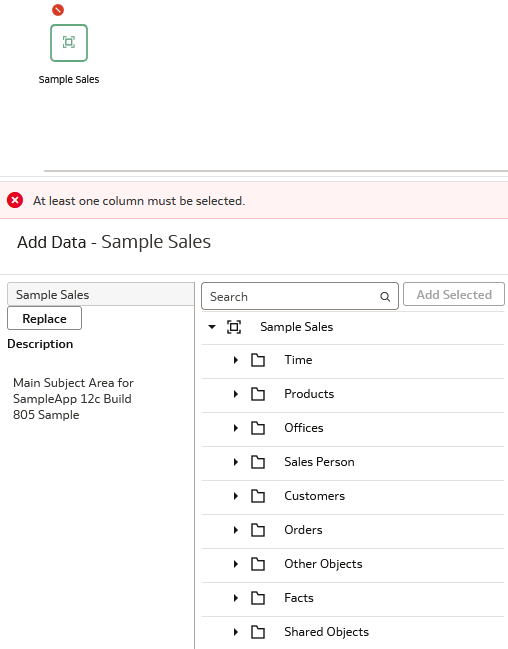
Description of the illustration dataflow_wo_columns.png - Expand the Time folder under Sample Sales and double-click TO5 Per Name Year to add input to the dataset.
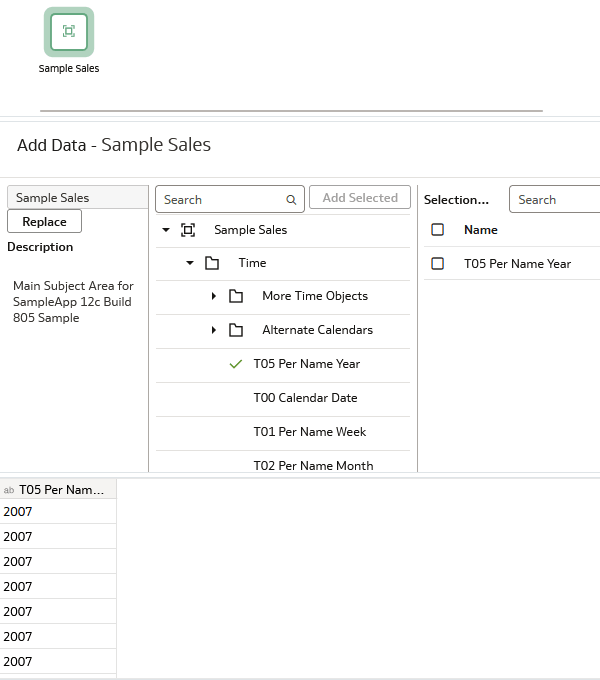
Description of the illustration dataflow_sample_sales.png - Expand Products, hold down the Ctrl key, select P1 Product, P2 Product Type, P3 LOB, and P4 Brand, and then click Add Selected.
A green checks indicate that you have selected these columns to include in the dataset.
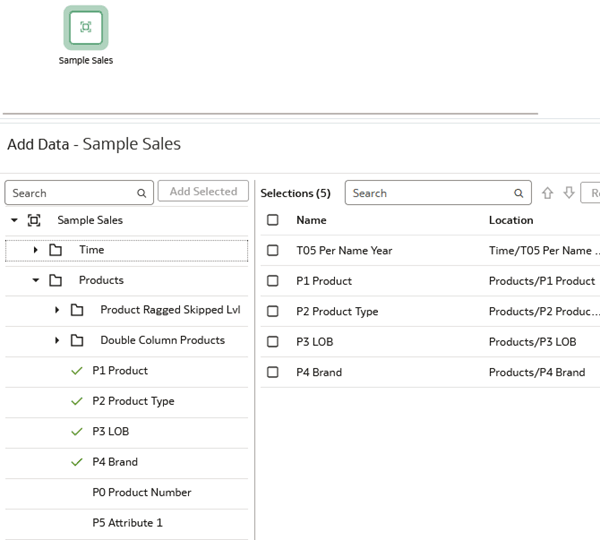
Description of the illustration product_columns.png - Enter
Revenuein Search to find the revenue column. Click Revenue under Basic Facts and click Add Selected. - In Selections, select Revenue, click Action and use Move up, or drag Revenue to the top of the selections list.
You can also use the up and down arrows
 to rearrange the columns.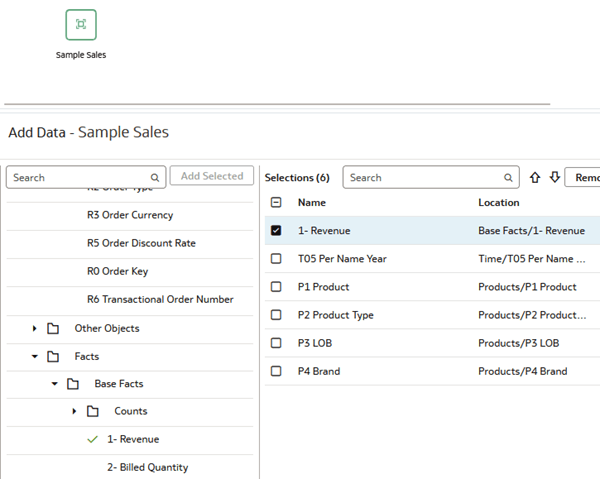
Description of the illustration revenue_basic_fact.png
Rename Column Selections
In this section, you can change the columns names without using the Transform Columns step.
- Double-click the 1-Revenue column, enter
Revenuewithout 1- to rename the column.You can click Reset to revert to the original column name.
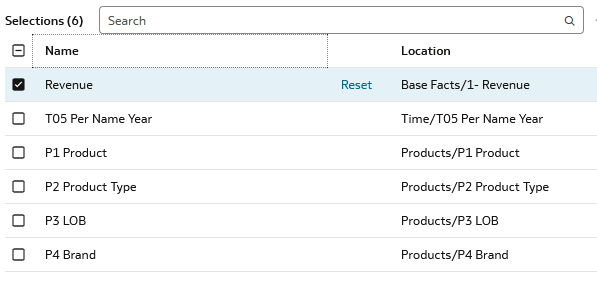
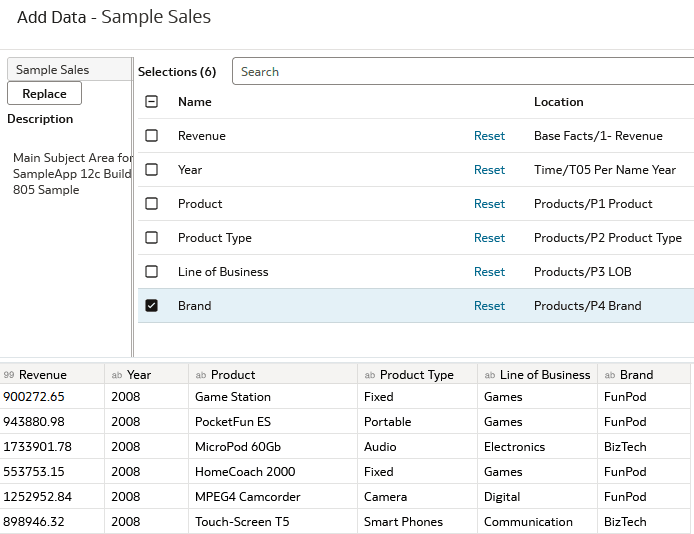
Description of the illustration rename_column.png - Click the T05 Per Year NameDouble-click T05 Per Year Name, delete T05 Per Name, and then enter Year to rename the column to Year.
- Double-click P1 Product, delete P1 to rename the column to Product.
- Double-click P2 Product Type, delete P2 to rename the column to Product Type.
- Double-click P3 LOB, enter
Line of Business. - Double-click P4 Brand, delete P4 to rename the column to Brand.
Add Data Flow Steps
In this section, you add a data flow step and the Save Dataset step required to run the data flow.
- In Data Flow Steps
 , double-click Aggregate
  to add it to the sample sales node.
 - Click the Function list
 in the Revenue row and select Average.
 - On the Aggregate node, click Add Step
 and then click Save Data
  .
. - In Save Dataset - Save Data, enter a Name for the dataset that isn't the same name as the data flow.
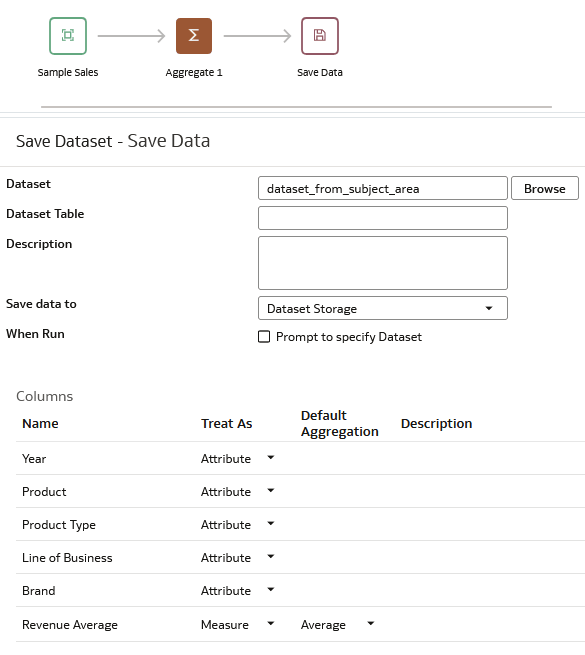
Description of the illustration save_dataset.png - Click Save
 . In Save Data Flow As, enter a Name and click OK.
 - Click Run Data Flow
 .
. - Click Go back
 .
. - On your home page, click Actions
 in the dataset generated by the data flow and click Inspect.
 - In Inspect, click Data Elements to see the dataset's columns.
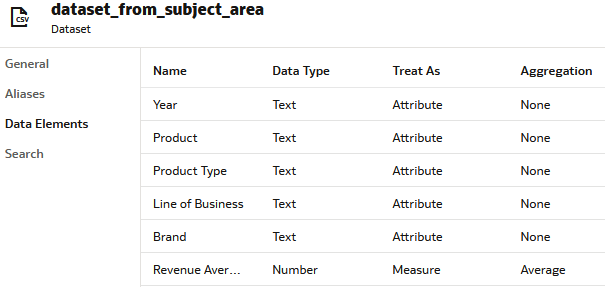
Description of the illustration inspect_data_elements.png
Learn More
Create a Data Flow with a Subject Area in Oracle Analytics
G49226-01
January 2026
Learn how to use a subject area as a data source in an Oracle Analytics data flow.
This software and related documentation are provided under a license agreement containing restrictions on use and disclosure and are protected by intellectual property laws. Except as expressly permitted in your license agreement or allowed by law, you may not use, copy, reproduce, translate, broadcast, modify, license, transmit, distribute, exhibit, perform, publish, or display any part, in any form, or by any means. Reverse engineering, disassembly, or decompilation of this software, unless required by law for interoperability, is prohibited.
If this is software or related documentation that is delivered to the U.S. Government or anyone licensing it on behalf of the U.S. Government, then the following notice is applicable:
U.S. GOVERNMENT END USERS: Oracle programs (including any operating system, integrated software, any programs embedded, installed or activated on delivered hardware, and modifications of such programs) and Oracle computer documentation or other Oracle data delivered to or accessed by U.S. Government end users are "commercial computer software" or "commercial computer software documentation" pursuant to the applicable Federal Acquisition Regulation and agency-specific supplemental regulations. As such, the use, reproduction, duplication, release, display, disclosure, modification, preparation of derivative works, and/or adaptation of i) Oracle programs (including any operating system, integrated software, any programs embedded, installed or activated on delivered hardware, and modifications of such programs), ii) Oracle computer documentation and/or iii) other Oracle data, is subject to the rights and limitations specified in the license contained in the applicable contract. The terms governing the U.S. Government's use of Oracle cloud services are defined by the applicable contract for such services. No other rights are granted to the U.S. Government.
This software or hardware is developed for general use in a variety of information management applications. It is not developed or intended for use in any inherently dangerous applications, including applications that may create a risk of personal injury. If you use this software or hardware in dangerous applications, then you shall be responsible to take all appropriate fail-safe, backup, redundancy, and other measures to ensure its safe use. Oracle Corporation and its affiliates disclaim any liability for any damages caused by use of this software or hardware in dangerous applications.
Oracle and Java are registered trademarks of Oracle and/or its affiliates. Other names may be trademarks of their respective owners.
Intel and Intel Inside are trademarks or registered trademarks of Intel Corporation. All SPARC trademarks are used under license and are trademarks or registered trademarks of SPARC International, Inc. AMD, Epyc, and the AMD logo are trademarks or registered trademarks of Advanced Micro Devices. UNIX is a registered trademark of The Open Group.
This software or hardware and documentation may provide access to or information about content, products, and services from third parties. Oracle Corporation and its affiliates are not responsible for and expressly disclaim all warranties of any kind with respect to third-party content, products, and services unless otherwise set forth in an applicable agreement between you and Oracle. Oracle Corporation and its affiliates will not be responsible for any loss, costs, or damages incurred due to your access to or use of third-party content, products, or services, except as set forth in an applicable agreement between you and Oracle.