Best Practices for Creating Event Filters
Follow these event filter best practices to ensure that your integration is successfully triggered.
- Use the Oracle Fusion Applications public event/wire payload (
TriggerWirePayload_tTextPayload) that is visible in the activity stream to create your event filter, and not the Oracle Integration mapper payload. - Include wrapper elements such as
adf:Valuewhen present. - Declare one prefix per distinct URI. If the
result,Value, anditemfields live in three different namespaces, reusing the same prefix for all of them causes the filter to evaluate to false.
The following example describes successful event filter creation and activation. While this example describes ItemService, it is applicable to configuring the event filter for any CRM/SCM or ERP service.
- Activate an integration without a filter. Ensure that debug tracing is selected.
- Create a filter with one matching record to trigger an integration instance. To include the event filter in an integration, see Trigger Request Page.
- In the activity stream for the instance, open
TriggerWirePayload_tTextPayload.Note:
Do not open theTriggerInternalPayload_tTextPayloadOracle Integration mapper payload.TriggerWirePayload_tTextPayloadis the raw SOAP envelope that Oracle Fusion Applications sends over the wire. This message evaluates the event filter you create.The key structural difference between the wire payload and the Oracle Integration mapper payload is one element: the wire payload includes an extra
Valuewrapper (in the generic ADF types namespace) located between theresultanditemfields.Valueis critical for your event filter to successfully trigger your integration.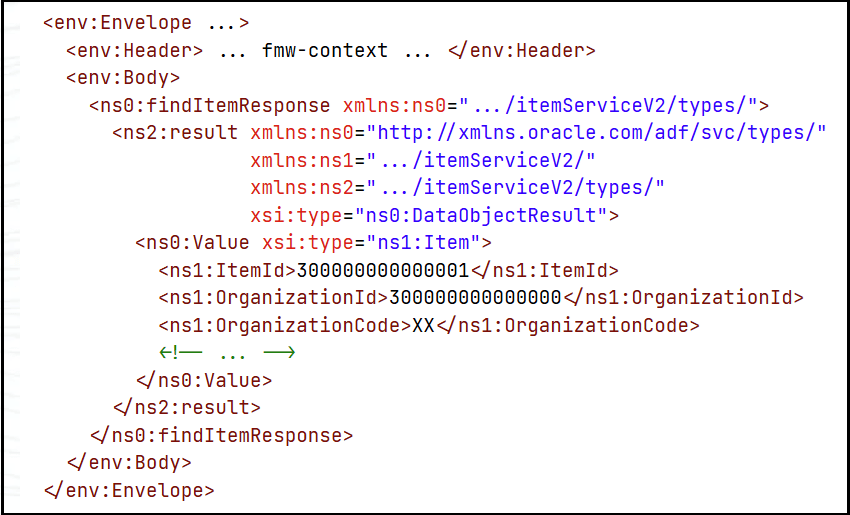
- Read the real path from the SOAP
env:Bodyon down. For Oracle Fusion Application ADF services, it is typicallyresult/Value/<field>. - Read each element's exact namespace URI from the wire payload, and declare a separate prefix per distinct URI. Reusing one prefix for all does not work because it causes the filter to evaluate to false.
- Build the filter. For example:
$eventPayload/<ns:result>/<ns:Value>/<ns:field>=value - Use string values with quotes and numeric values without quotes.
- Save and reactivate the integration to register the subscription in Oracle Fusion Applications.
- Test your integration with both a matching and a non-matching record to ensure it is triggered as designed.