Attach Vault Secret Credentials to Graph Studio
As the ADMIN user, you can attach a credential to Graph Studio which can be later accessed in a Python notebook paragraph.
Perform the following steps as the ADMIN user to upload a secret from Oracle Cloud Infrastructure (OCI) Vault to Graph Studio. The steps assume that you have already created an OCI vault and stored a secret as described in Prerequisites to Use OCI Vault Secret Credentials.
-
Select Credentials from the main navigation menu and go to the Credentials page.
-
Click Attach from OCI Vault.
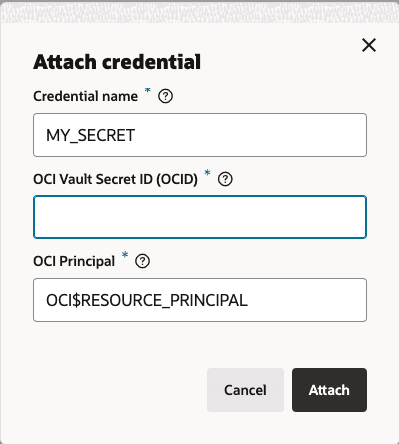
The Attach credential dialog opens as shown:
-
Enter a Credential name.
-
Enter the OCI Vault Secret ID (OCID) (that was copied earlier).
-
Enter the OCI Principal value as OCI$RESOURCE_PRINCIPAL.
-
Click Attach.
Graph Studio will fetch the credential from OCI Vault and the newly created credential gets listed on the Credentials page.