Browse and Search Catalogs
The Catalog Tool aims to allow you to find data quickly and easily, whether or not the data is currently resident in the connected Autonomous AI Database.
Using the Catalog tool, you can discover data in connected systems, preview it, and choose whether or not to load, link or feed the data into the local database.
You can view the search bar on the Catalog’s home page. To enter a search term, click on the search field located at the top. You can filter the search entry by selecting a quick filter displayed below the search field.
You must first select the type of assets you want to search from the filter buttons at the top of the screen, then search for objects by name.
Selecting the quick filters helps you display filtered searches in the display area. You can combine multiple filters. They are:
-
Tables and Views
This filter searches only for the database tables (both internal and external tables) and views (this includes both standard database views and analytic views)
-
Data Objects
This filter searches for data objects in the database and on connected cloud storage. This is a superset of the Tables and Views and Files scopes.
-
Files
This filter searches only for files in connected cloud storage.
-
OCI
This filter searches for other Oracle Cloud Infrastructure objects, such as other Autonomous AI Databases, buckets on OCI cloud storage, or a registered OCI Data Catalog. This field is available if you have an OCI credential. You can create an OCI credential from the Data Studio Settings icon.
-
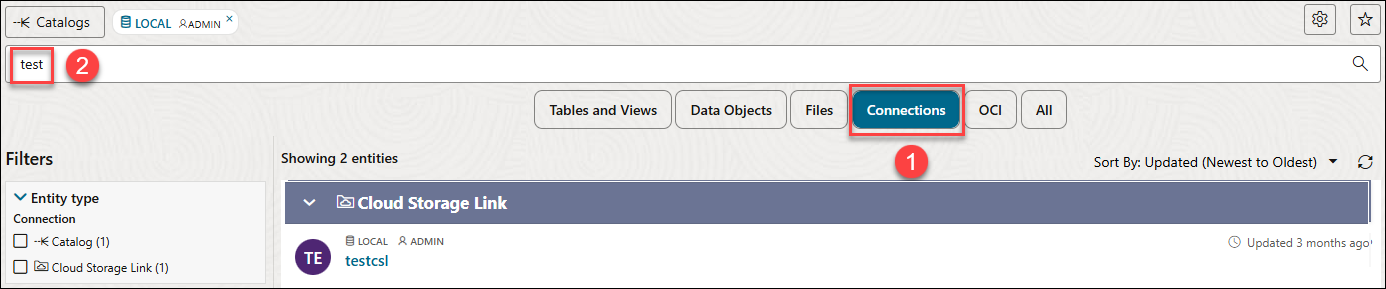
Connections
This filter searches for connections that are registered in Data Studio, such as connections to external Data Catalogs or databases.
-
All
This filter searches for all objects in the catalog. Since there are many thousands of such objects, this scope may be slower to use.
For example, to find all connections that may contain data related to testing, click Connections and search for test:
This displays all connections that contain test data.