Export Data to Cloud
Use the Export Data to Cloud menu in the table actions of the Browse Catalog page to export data as text from an Autonomous Database to a cloud Object Store. The text format export options are CSV, JSON, Parquet, or XML.
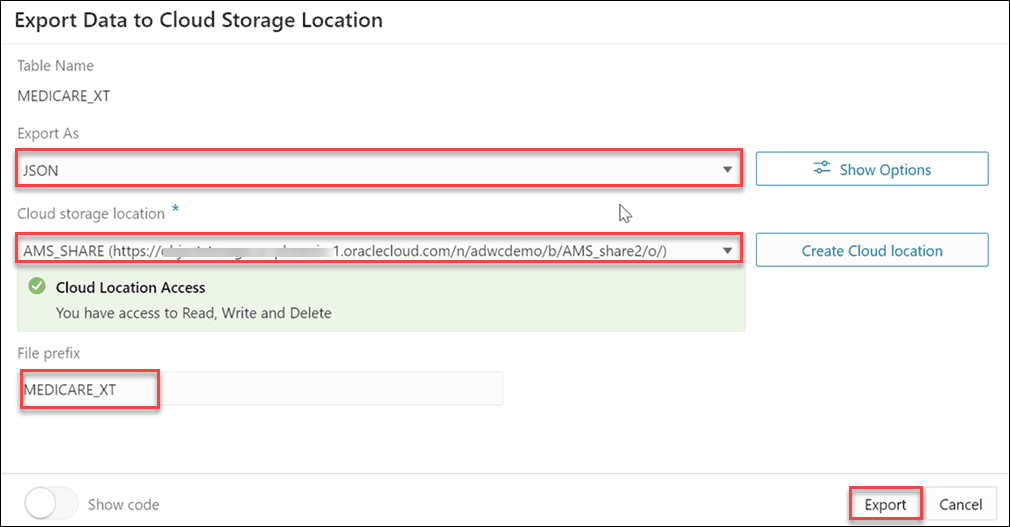
To export data to a cloud storage location, click Actions next to the Table entity on the Browse Catalog page and select Export Data to Cloud.
Description of the illustration export-data-cloud.png
The Export Data to Cloud Storage Location displays the following fields:
-
Table Name: This field displays the table name.
-
Export As: This drop-down displays the list of format options you wish to export the data. You can select CSV, JSON, Parquet, or XML. When you export the data as CSV, and click Show Options, you can:
-
Set the maximum file size value using the slider. The maximum file size you can export is from 10MB to 1GB.
-
Select the header option to write column names as the first line in output files.
-
Select the Escape option to specify the occurrence of the quote character in the field value using the
\character. -
Text Enclosure and Field delimiter: These options are visible only when the selected file is in CSV format. Select or enter the character used in the source file for text enclosure and field delimiter.
-
Compression: Select No Compression to disable compression or GZIP to enable GZIP compression for selected file.
-
-
Cloud storage Location: Select the uri value to the URL for an existing bucket on your Cloud Object Storage from the drop-down. If you do not have a cloud storage location, select Create Cloud Location to create a cloud storage location to export your data. For more details, see Create Credentials.
Note: The Cloud storage location is highlighted in red if the tool doesn’t accept the selected cloud location. In this case, you will receive a Cloud Location Access Error that says “
You do not have access to Read, Write and Delete”. -
File prefix: Specify the File prefix. This will be the prefix of the file you export.
Click Export.
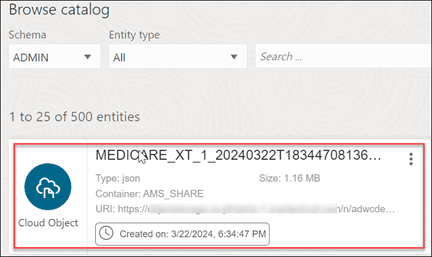
After the file export is complete, you will view the newly created cloud object in the entity list of the Browse Catalog page.
Description of the illustration browse-catalog-export-data.png