Build Supervisor-Led Agent Teams with Select AI
Create a supervisor-led Select AI agent team that routes multi-step requests to specialized worker agents and returns one coordinated response.
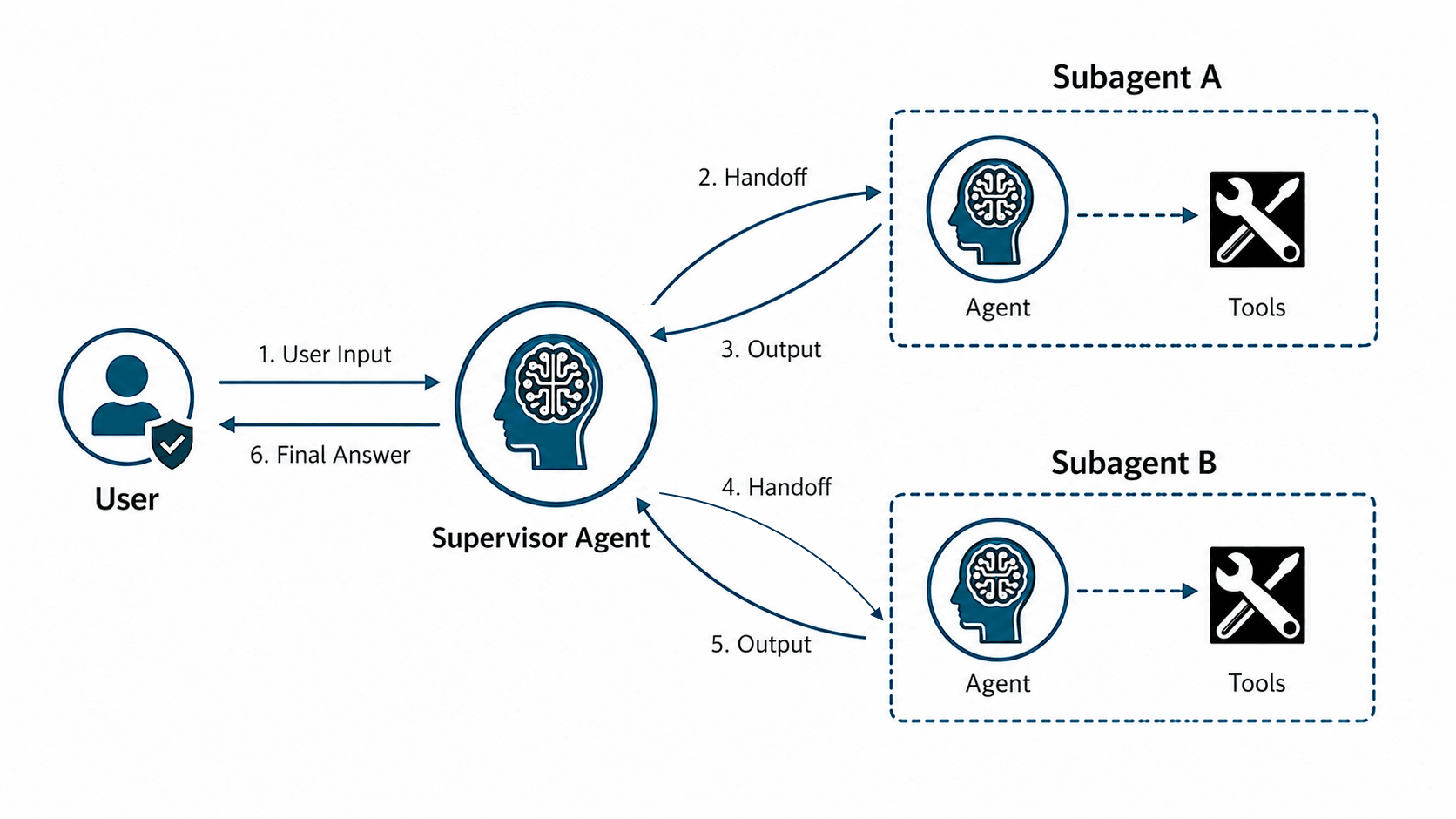
A Select AI supervisor agent is the Select AI agent object that controls a supervisor-led agent team at runtime. The supervisor agent object receives the user prompt, selects the worker agent-task pair that should handle each subtask, passes the required context, waits for that worker result, and continues to select the next agent-task pair until it can return a final answer.
The following image illustrates Select AI supervisor agent pattern.
When to Use a Supervisor Agent
Use the supervisor pattern when the team must determine the appropriate workers or run order at run time. A supervisor-led team can help when a request requires different workers, in different orders, depending on the user’s intent and the intermediate results. The supervisor decides which worker agent-task pair to call next, passes a self-contained subtask, waits for the result, and continues until it can produce one coordinated final answer.
A supervisor agent is suitable for:
- Workflows that span distinct business or technical domains.
- Requests that require different agents, tools, or data sources.
- Agent teams that require a single entry point for routing and coordinating requests.
- Workflows in which the supervisor must manage the interaction sequence and consolidate subagent responses.
About Select AI Supervisor Agent Teams
Understand how a Select AI supervisor agent team coordinates worker agents, controls task routing, preserves context, and returns one final response.
A supervisor agent team is an orchestration pattern for a Select AI agent team. In that team, one Select AI agent object is identified as the supervisor by setting its supervisor attribute to true, and the team names that object in the supervisor_agent attribute. Worker agents keep focused responsibilities, such as account lookup, payment retrieval, report generation, or notification delivery. The supervisor agent object decides which worker to call, prepares a self-contained request for that worker, and adds the worker result back into the supervisor context.
Subtask processing is sequential: one worker subtask must finish before the supervisor delegates the next subtask. The supervisor waits for the worker result, adds the result to the supervisor context, and then decides whether to call another worker, request more information, explain a worker failure, or return the final answer. Worker agents use separate conversation threads, so the supervisor must include enough context in each delegated request.
The feature adds supervisor-related attributes to existing DBMS_CLOUD_AI_AGENT APIs. Use the supervisor agent attribute to mark a Select AI agent object as the supervisor. Use the supervisor_agent team attribute to name that supervisor agent object for a team. A supervised team contains one supervisor agent object and one or more worker agent-task pairs. The agents team attribute lists the worker agent-task pairs available for delegation. Each worker task can use its configured tools. The supervisor agent object delegates to worker agent-task pairs; the Oracle-maintained delegation tool is not user-configurable.
See Example: Build and Run a Customer Support Supervisor Team for an end-to-end example of using a supervisor agent.
Select AI Supervisor Agent Architecture
A supervised Select AI agent team runs as a single team with one supervisor agent object and one or more worker agent-task pairs. The team definition names the supervisor agent object in supervisor_agent; the worker list names the agent-task pairs to which the supervisor can delegate. Tools are configured on worker tasks, not on the team.
In a supervisor-led team, process is still set to sequential, but the configured worker order is not the workflow plan. The supervisor dynamically selects one worker agent-task pair at a time, waits for the result, and then decides whether another worker is needed.
The supervisor agent object uses an Oracle-maintained delegation tool internally to delegate to a worker agent-task pair. The delegation tool is part of the supervisor execution model and is not listed as a user-configurable team attribute.
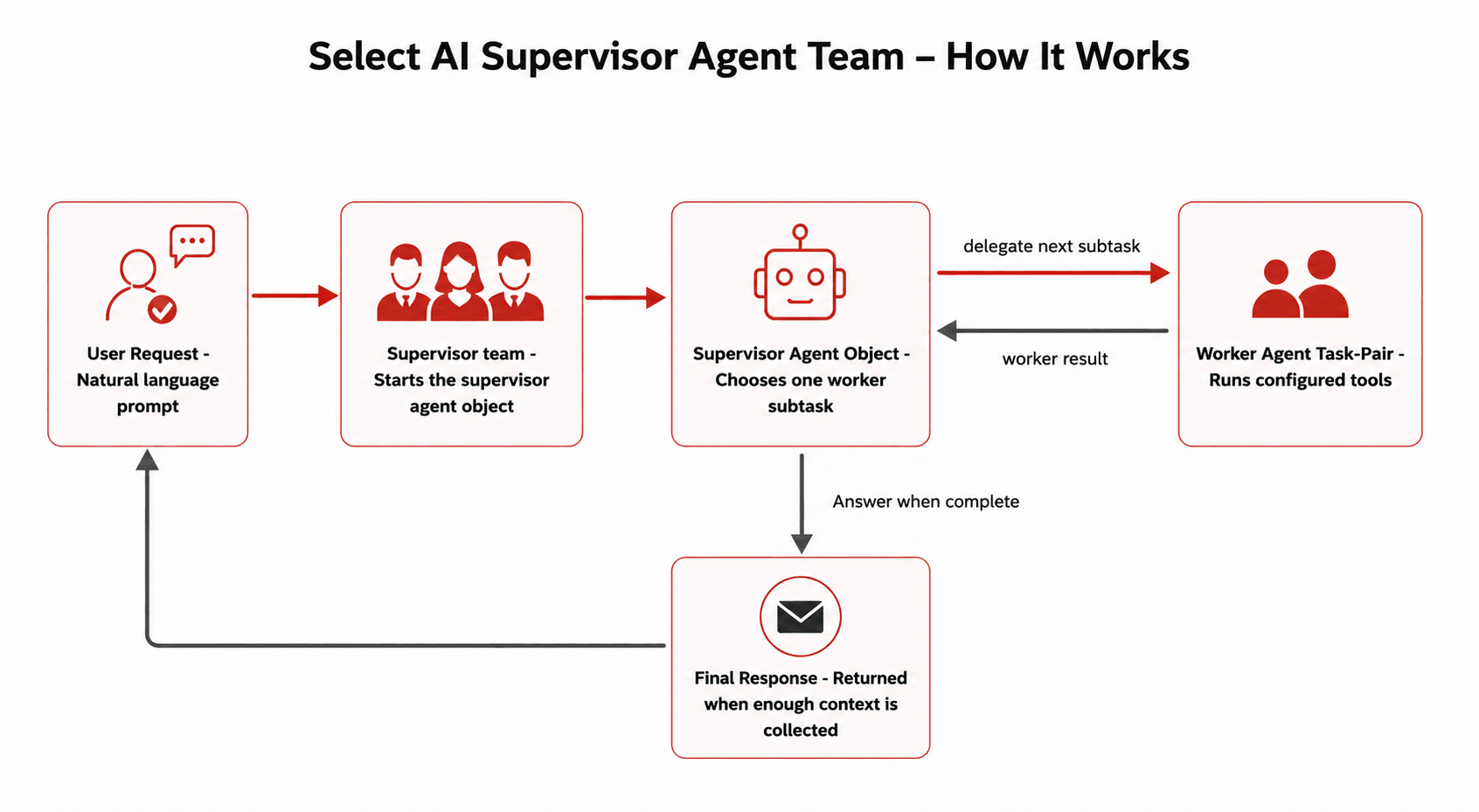
The supervisor owns the overall request and runs in its own conversation thread. Each worker agent runs in a separate conversation thread. A worker does not inherit the full supervisor context. The supervisor must create a self-contained subtask request for each worker. The worker returns only its final result to the supervisor. The supervisor adds the returned result to its own context and decides the next action.
| Phase | Input | Processing | Output |
|---|---|---|---|
| Request submission | User natural-language request submitted to the team | The supervised team activates the supervisor agent first. | Supervisor conversation thread starts for the request. |
| Supervisor reasoning loop | User request and current supervisor context | The supervisor decides whether it has enough information to answer or must delegate a subtask. | Final answer or one delegated worker request. |
| Task delegation | Selected worker agent-task pair and self-contained subtask context | The supervisor calls the Oracle-maintained delegation tool for the selected worker agent-task pair and waits. | Worker task starts in its own conversation thread. |
| Task processing | Delegated subtask and worker task configuration | The worker uses the tools configured on its task. If it needs user input, then the team waits for the user response. | Worker result, worker failure result, or a human-input request. |
| Supervisor continuation | Returned worker result, failure result, or user response | The supervisor adds the returned result to its context and continues reasoning. Failure follows the same return path as success; the supervisor decides whether to retry, call another worker, request more information, explain the failure, or return the final answer. |
Runtime Behavior in Supervisor-Led Teams
Learn how supervisor-led teams pause for user input, handle worker failures, and pass self-contained context between supervisor and worker conversations.
Human Input Handling
When a worker requests human input, the entire supervisor-led team pauses while waiting for the user response. The user continues in the same conversation to provide the requested information.
After the user responds, the worker resumes, completes the task, and returns the result to the supervisor. The supervisor then decides whether to delegate another subtask or return the final answer.
Failure Handling
Worker failures follow the same return path as successful results. The supervisor receives the failure result and decides the next action, such as retrying the task, calling another worker agent-task pair, requesting additional input, or returning a final answer.
Context Passing Model
Each worker operates in its own conversation thread and does not inherit the full supervisor context. The supervisor must provide a self-contained subtask request that includes all required information for the worker to complete the task.
Use Cases for Supervisor Agent
Apply supervisor-led Select AI teams when one request may require several specialized agents, conditional routing, or a staged response.
- Answer a customer-support request that needs account details, payment history, and a final combined response.
- Route a data analysis prompt to the right worker based on the data source, then combine worker results in one answer.
- Ask a worker to pause for human confirmation before sending a notification or completing a business action.
- Use one supervisor team for requests that sometimes require one worker and sometimes require several workers in sequence.
- Track worker handoffs and returned results for audit, testing, and troubleshooting.
Benefits
Use supervisor-led teams to route multi-step requests, keep worker agents focused, and record delegation paths for Select AI agent framework activity.
- Dynamic task routing: The supervisor selects the next worker based on the current request and returned context.
- Focused worker design: Each worker handles a bounded task area, which keeps prompts and tool mappings easier to maintain.
- Context control: The supervisor passes only the context needed for each worker subtask.
- Traceability: Team and task history views can show the delegation path and returned worker results.
- Incremental team growth: Add new worker agents for new tasks without redesigning every existing worker.
How to Use Select AI Supervisor Agent Teams
Create the agent to serve as the supervisor and designate it as a supervisor, create worker agents, add the supervisor to the team attributes, and run user prompts against the team.
- Grant the required privileges. The database user must have
EXECUTEprivilege onDBMS_CLOUD_AI_AGENT, access to required credentials, and the required network ACLs for external provider calls. See Prerequisites for Using Select AI Agent for more information. - Create the tools that worker agents use, such as PL/SQL functions for lookup, update, notification, or reporting tasks. See DBMS_CLOUD_AI_AGENT Package and Examples of Using Select AI Agent for more information.
- Create worker agents and tasks. Keep each worker role specific so the supervisor can select the right worker for each subtask. See CREATE_TASK Procedure and CREATE_AGENT Procedure.
- Create a supervisor agent with the
supervisorattribute set totrue. See CREATE_AGENT Attributes. - Create the team with
supervisor_agentset to the supervisor agent name andagentsset to the worker agent-task pairs. See CREATE_TEAM Procedure. - Set the team for the session and submit natural language prompts with the Select AI Agent framework. See SET_TEAM Function.
- Review history views to confirm worker routing, returned results, worker failures, and human-input wait states. If a worker task requests human input, the team pauses until the user responds. The entire supervisor-led team pauses during this time. Continue the same conversation to provide the requested input. After the user responds, the worker resumes, completes the task, and returns the result to the supervisor. The supervisor then decides the next action. See DBMS_CLOUD_AI_AGENT Views.
Do not include the selected supervisor from the array of worker agents. The supervisor controls the team, while the array lists only worker agent-task pairs available for delegation. A worker task can use its own configured tools; the team attribute does not list tool names.
Note: Supervisor-led teams process worker subtasks sequentially. The supervisor waits for each worker result before delegating another subtask. Parallel worker execution is not part of this release.
Allowed Supervisor Agent Team Configurations
Review supported configurations and guidance for defining supervisors, worker agent-task pairs, tools, and processing in a Select AI agent team.
| Configuration | Allowed? | Guidance |
|---|---|---|
supervisor_agent names an agent created with supervisor set to true |
Yes | Use this pattern for supervised teams. |
The selected supervisor is also listed in the worker agents array |
No | An agent designated as a supervisor cannot be included in the worker array. The design validation rejects supervisor-enabled agents in the agents array. |
| The same worker agent is assigned to more than one task | Yes | The same agent can perform multiple tasks by assigning the same agent to different task names. |
Tools are listed in the team agents array |
No | Define tools on tasks with CREATE_TASK. The team attribute lists worker agent-task pairs, not tool names. |
supervisor_agent names an agent that does not have "supervisor": true |
No | Select an agent with supervisor set to true. If the named agent is not a supervisor, team creation or validation fails; check the returned database error details. |
| More than one supervisor is defined for a team | No | A team supports exactly one supervisor. Define a single agent with "supervisor": true and reference it in supervisor_agent. |
| A supervisor delegates to another supervisor-led team | No | Supervisor-to-supervisor delegation is not supported in this release. A supervisor can delegate only to worker agents in the same team. |
| An agent designated as a supervisor in one team can be used as a worker in another team | Yes | You can reuse the same supervisor agent in multiple teams with different roles (supervisor or worker). Define the role through the team configuration. |
Note:
- The framework does not enforce a maximum number of conversation turns. For a task run, the framework limits retries for failed tool calls to 10 attempts per task.
- The framework does not introduce new views for monitoring. You can review team, task, and tool execution history by using the existing Select AI Agent framework history views. See DBMS_CLOUD_AI_AGENT History Views for more information.
Troubleshooting Supervisor-Led Teams
Identify likely causes and fixes for common Select AI supervisor-led team configuration, delegation, context, notification, and human-input problems.
Team Creation Fails
Problem: Team creation fails.
Likely Cause: supervisor_agent does not name an agent with "supervisor": true.
Fix: Recreate the agent with the supervisor attribute, and then create the team again.
The Supervisor Calls the Wrong Worker
Problem: The supervisor calls the wrong worker.
Likely Cause: Worker task descriptions are too vague or overlap.
Fix: Make task instructions more specific and mutually exclusive. The supervisor selects worker agent-task pairs based on agent names, task names, descriptions, and task instructions.
Use these guidelines when defining worker tasks:
- Define a clear domain boundary for each worker.
- Use specific task names such as
ACCOUNT_MANAGEMENT_TASKorPAYMENT_LOOKUP_TASK. - Avoid overlapping instructions between workers.
- Include expected input parameters in the task instruction.
- Specify when the worker should request human input.
- Define the format of the result returned to the supervisor.
A Worker Lacks Context
Problem: A worker lacks context.
Likely Cause: The supervisor did not pass enough detail in the delegated subtask.
Fix: Add instructions telling the supervisor to send self-contained subtasks. Define a clear supervisor role to guide delegation behavior.
Example:
{
  "profile_name": "<AI_PROFILE_NAME>",
  "supervisor": true,
  "role": "You orchestrate requests. Choose the appropriate worker agent-task pair for each subtask. Send self-contained requests with all required context. Return one concise final answer."
}
Email Does Not Send
Problem: Email does not send.
Likely Cause: The credential, network ACL, sender, or recipient configuration is missing or incorrect.
Fix: Verify the SMTP credential, ACL, sender, and recipient settings.
The Prompt Waits for User Input
Problem: The prompt waits for user input.
Likely Cause: A supervisor or worker requested human confirmation.
Fix: Continue the same conversation with the requested information.
Compare Sequential Workflow and Supervisor Patterns
Select the appropriate Select AI agent-team pattern based on how the team must select workers and coordinate tasks.
Select the sequential workflow pattern when the team must run configured agent-task pairs in a known order. Select the supervisor pattern when the team must select workers at run time based on the request, intermediate results, failures, or requests for more information.
| Characteristic | Sequential Workflow Pattern | Supervisor Pattern |
|---|---|---|
| Run plan | Fixed. The agents array defines the workflow order. |
Variable. The supervisor selects the next worker at run time. |
| Entry point | The first configured agent-task pair. | The supervisor agent. |
| Task selection | The team runs configured agent-task pairs in order. | The supervisor calls one or more workers as needed. |
| Context passing | Task dependencies pass prior task output to downstream tasks. | The supervisor sends each worker a self-contained subtask. |
| Best suited for | Predictable pipelines with known stages. | Variable requests that need conditional routing or coordination. |
| Parallel runs | Not supported. Tasks run one at a time. | Not supported. Worker subtasks run one at a time. |
The following table provides differences between Sequential pattern and Supervisor pattern that can help you decide your workflow.
| Sequential Pattern | Supervisor Pattern |
|---|---|
| Fixed workflow | Dynamic Orchestration |
| Every step runs in order | Only the needed steps run |
| Good for linear pipelines | Good for branching enterprise requests |
| Less decision logic | Less manual routing logic, more runtime judgement |