Cache Messages with Singleton Pipes
Singleton Pipe is an addition to the DBMS_PIPE package that allows you to cache and retrieve a custom message and share the message across multiple database sessions with concurrent reads.
About Caching Messages with Singleton Pipes
The DBMS_PIPE package has extended functionality on Autonomous AI Database to support Singleton Pipes.
A Singleton Pipe in DBMS_PIPE:
-
Provides in-memory caching of custom data using Singleton Pipe messages.
-
Supports the ability to cache and retrieve a custom message of up to 32,767 bytes.
-
Supports sharing a cached message across multiple database sessions with concurrent reads. This provides high throughput and supports concurrent reads of messages across database sessions.
-
Supports Read-Only and Read-Write databases.
-
Supports several cache invalidation methods:
-
Explicit cache invalidation controlled by user.
-
Cache invalidation after a user specified time interval (in seconds). This invalidation method is controlled by the message sender, using the
shelflifeparameter, instead of by message readers. This avoids the common pitfalls due to incorrect use of cache by readers.
-
About Standard Pipes and Singleton Pipes
The DBMS_PIPE Package allows two or more database sessions to communicate using in-memory messages. Pipe functionality has several applications such as external service interface, debugging, independent transactions, and alerts. See DBMS_PIPE in Oracle Database 19c PL/SQL Packages and Types Reference or Oracle Database 26ai PL/SQL Packages and Types Reference for more information.
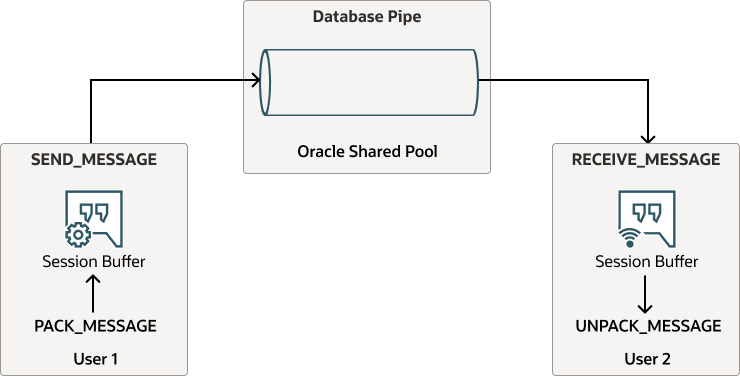
Description of the illustration database-pipe-messages-singleton-pipes.png
A Singleton Pipe can be any one of the supported DBMS_PIPE types:
-
Implicit Pipe: Automatically created when a message is sent with an unknown pipe name using the
DBMS_PIPE.SEND_MESSAGEfunction. -
Explicit Pipe: Created using the
DBMS_PIPE.CREATE_PIPEfunction with a user specified pipe name. -
Public Pipe: Accessible by any user with
EXECUTEpermission onDBMS_PIPEpackage. -
Private Pipe: Accessible by sessions with the same user as the pipe creator.
Singleton Pipes provide the ability to cache a single message in the memory of the Autonomous AI Database instance.
The following shows the general workflow for using singleton pipes.
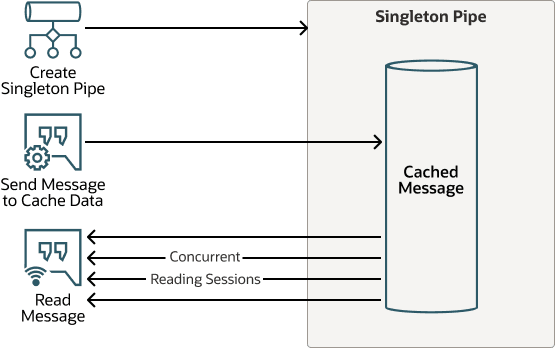
Description of the illustration singleton-pipe-workflow.png
Singleton Pipe Overview and Features
-
Singleton Messages
-
A Singleton Pipe can cache one message in the pipe, hence the name “singleton”.
-
The message in a Singleton Pipe can be comprised of multiple fields, up to a total message size of 32,767 bytes.
-
DBMS_PIPEsupports the ability to pack multiple attributes in a message usingDBMS_PIPE.PACK_MESSAGEprocedure. -
For a Public Singleton Pipe, the message can be received by any database session with execute privilege on
DBMS_PIPEpackage. -
For Private Singleton Pipe, the message can be received by sessions with the same user as the creator of the Singleton Pipe.
-
-
High Message Throughput for Reads
-
Singleton Pipes cache the message in the pipe until it is invalidated or purged. Database sessions can concurrently read a message from the Singleton Pipe.
-
Receiving a message from a Singleton Pipe is a non-blocking operation.
-
-
Message Caching
-
A message is cached in a Singleton Pipe using
DBMS_PIPE.SEND_MESSAGE. -
If there is an existing cached message in the Singleton Pipe, then
DBMS_PIPE.SEND_MESSAGEoverwrites the previous message to maintain only one message in the Singleton Pipe.
-
-
Message Invalidation
-
Explicit Invalidation: purges the pipe with the procedure
DBMS_PIPE.PURGEor by overwriting the message usingDBMS_PIPE.SEND_MESSAGE. -
Automatic Invalidation: a message can be invalidated automatically after the specified
shelflifetime has elapsed.
-
-
No Eviction from Database Memory
-
Singleton Pipes do not get evicted from Oracle Database memory.
-
An Explicit Singleton Pipe continues to reside in database memory until it is removed using
DBMS_PIPE.REMOVE_PIPEor until the database restarts. -
An Implicit Singleton Pipe stays in database memory until there is one cached message in the pipe.
-
Singleton Pipe Operations
| Operation | DBMS_PIPE Function or Procedure |
|---|---|
| Create an Explicit Singleton Pipe | CREATE_PIPE Function |
| Cache a message in Singleton Pipe | PACK_MESSAGE Procedures in Oracle Database 19c PL/SQL Packages and Types Reference or Oracle Database 26ai PL/SQL Packages and Types Reference |
| Read a cached message from Singleton Pipe | RECEIVE_MESSAGE Function, UNPACK_MESSAGE Procedures in Oracle Database 19c PL/SQL Packages and Types Reference or Oracle Database 26ai PL/SQL Packages and Types Reference |
| Delete a message in Singleton Pipe | PURGE Procedure in Oracle Database 19c PL/SQL Packages and Types Reference or Oracle Database 26ai PL/SQL Packages and Types Reference |
| Remove an Explicit Singleton Pipe | REMOVE_PIPE Function in Oracle Database 19c PL/SQL Packages and Types Reference or Oracle Database 26ai PL/SQL Packages and Types Reference |
Automatic Refresh of Cached Message with a Cache Function
The DBMS_PIPE package allows you to automatically populate a Singleton Pipe message using a user-defined cache function.
By default, after a message is invalidated with either Singleton Pipe explicit or implicit invalidation, a subsequent DBMS_PIPE.RECEIVE_MESSAGE results in no message being received. To add a new message to the pipe, the message must be explicitly cached by calling DBMS_PIPE.SEND_MESSAGE. To avoid this case, where no message is available when you read from a Singleton Pipe, you can define a cache function. With a cache function defined, the cache function is automatically invoked when you receive a message in following scenarios:
-
When the Singleton Pipe is empty.
-
When the message in a Singleton Pipe is invalid due to the
shelflifetime elapsed.
To use a cache function define the cache function and include the cache_func parameter with DBMS_PIPE.RECEIVE_MESSAGE. A user-defined cache function provides the following:
-
The cache function can be specified when reading a message from a Singleton Pipe using
DBMS_PIPE.RECEIVE_MESSAGE. -
When there is no message in the Singleton Pipe,
DBMS_PIPE.RECEIVE_MESSAGEcalls the cache function. -
When the message
shelflifetime has elapsed, the database automatically populates a new message in the Singleton Pipe.
Using a cache function simplifies working with Singleton Pipes. You do not need to handle failure cases for receiving a message from an empty pipe. In addition, a cache function ensures there is no cache-miss when you read messages from a Singleton Pipe, providing maximum use of the cached message.
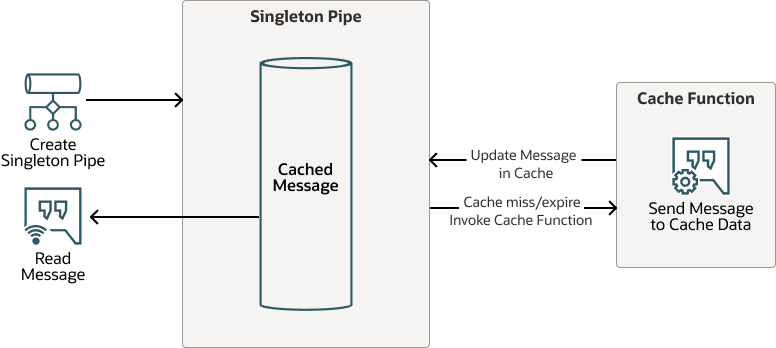
Description of the illustration automatic-cache-refresh-cache-function.png
When you define a cache function, the function name must be fully qualified with the owner schema:
-
OWNER.FUNCTION_NAME -
OWNER.PACKAGE.FUNCTION_NAME
Define a cache function with the following signature:
CREATE OR REPLACE FUNCTION *cache_function_name*(
       pipename  IN VARCHAR2
) RETURN INTEGER;
The typical operations within a cache function are:
-
Create a Singleton Pipe, for an Explicit Pipe, using
DBMS_PIPE.CREATE_PIPE. -
Create a message to cache in the Singleton Pipe.
-
Send the message to the pipe specified in the cache function, optionally specifying a
shelflifefor the implicit message.
To use a cache function, the current session user that invokes DBMS_PIPE.RECEIVE_MESSAGE must have required privileges to execute the cache function.
See RECIEVE_MESSAGE Function more information on defining a cache function.
Create an Explicit Singleton Pipe
Describes the steps to create a Singleton Pipe with a specified pipe name (an Explicit Singleton Pipe).
First, for this example create the receive_message helper function to repeatedly call DBMS_PIPE.RECEIVE_MESSAGE. This allows you to test singleton pipe functionality.
CREATE OR REPLACE FUNCTION msg_types AS
       TYPE t_rcv_row IS RECORD (c1 VARCHAR2(32767), c2 NUMBER);
       TYPE t_rcv_tab IS TABLE OF t_rcv_row;
END;


CREATE OR REPLACE FUNCTION receive_message(
      pipename    IN VARCHAR2,
      rcv_count   IN NUMBER DEFAULT 1,
      cache_func  IN VARCHAR2 DEFAULT NULL)
   RETURN msg_types.t_rcv_tab pipelined
    AS
       l_msg    VARCHAR2(32767);
       l_status NUMBER;
 BEGIN
      FOR i IN 1..rcv_count LOOP
           l_status := DBMS_PIPE.RECEIVE_MESSAGE(
            pipename   => pipename,
            cache_func => cache_func,
            timeout    => 1);
         IF l_status != 0 THEN
              raise_application_error(-20000,
             'Message not received for attempt: ' || to_char(i) || ' status: ' ||
            l_status);
         END IF;

         DBMS_PIPE.UNPACK_MESSAGE(l_msg);
             pipe row(msg_types.t_rcv_row(l_msg));
     END LOOP;
 RETURN;
END;-
Create an explicit singleton pipe named
PIPE_TESTwithshelflifeparameter set to 3600 (seconds).DECLARE l_status INTEGER; BEGIN l_status := DBMS_PIPE.CREATE_PIPE( pipename => 'MY_PIPE1', private => TRUE, singleton => TRUE, shelflife => 3600); END; /See CREATE_PIPE Function for more information.
-
Verify the singleton pipe is created.
SELECT name, singleton, type
     FROM v$db_pipes WHERE name= '&pipename' ORDER BY 1;
NAME SINGLETON TYPE -------------------- ---------- ------- PIPE_TEST YES PRIVATE -
Pack and send a message on the singleton pipe.
EXEC DBMS_PIPE.PACK_MESSAGE('This is a real message that you can get multiple times');

SELECT DBMS_PIPE.SEND_MESSAGE(pipename => '&pipename') status FROM DUAL;
STATUS ---------- 0See PACK_MESSAGE Procedures in Oracle Database 19c PL/SQL Packages and Types Reference or Oracle Database 26ai PL/SQL Packages and Types Reference and SEND_MESSAGE Function for more information.
-
Receive a message from a singleton pipe.
 SELECT * FROM receive_message(
     pipename => '&pipename',
     rcv_count => 2);
MESSAGE -------------------------------------------------------------------------------- This is a real message that you can get multiple times This is a real message that you can get multiple timesThe
receive_messagefunction is a helper function that callsDBMS_PIPE.RECEIVE_MESSAGE. -
Purge the message and remove the pipe.
EXEC DBMS_PIPE.PURGE('&pipename');
SELECT DBMS_PIPE.REMOVE_PIPE('&pipename') status FROM DUAL;
Create an Explicit Singleton Pipe with a Cache Function
Describes the steps to create a Singleton Pipe with a specified pipe name, an Explicit Singleton Pipe, and provide a cache function. A cache function allows you to automatically populate the message in a singleton pipe.
-
Create a cache function,
test_cache_messagefor a singleton pipe.CREATE OR REPLACE FUNCTION test_cache_message( pipename IN VARCHAR2) return NUMBER AS l_status NUMBER; l_data VARCHAR2(4000); BEGIN l_status := DBMS_PIPE.CREATE_PIPE( pipename => pipename, private => TRUE, singleton => true, shelflife => 600); IF l_status != 0 THEN RETURN l_status; END IF; DBMS_PIPE.PACK_MESSAGE('This is a placeholder cache message for an empty pipe'); l_status := DBMS_PIPE.SEND_MESSAGE(pipename => pipename); RETURN l_status; END; /Note: The current session user invoking
DBMS_PIPE.RECEIVE_MESSAGEmust have required privilege to execute the cache function. -
Receive with a cache function and confirm the message populates in pipe. The pipe must exist as a private pipe created in the cache function.
SELECT * FROM receive_message(
     pipename => '&pipename',
     rcv_count => 1,
     cache_func => 'TEST_CACHE_MESSAGE');
MESSAGE --------------- This is a placeholder cache message for an empty pipeThe
receive_messagefunction is a helper function that callsDBMS_PIPE.RECEIVE_MESSAGE. See Create an Explicit Singleton Pipe for thereceive_messagedefinition.See CREATE_PIPE Function for more information.
-
Receive without the cache function to confirm the message persists in the pipe.
SELECT * FROM receive_message(
     pipename => '&pipename',
     rcv_count => 2);
MESSAGE --------------- This is a placeholder cache message for an empty pipe This is a placeholder cache message for an empty pipeThe
receive_messagefunction is a helper function that callsDBMS_PIPE.RECEIVE_MESSAGE. See Create an Explicit Singleton Pipe for thereceive_messagedefinition.See CREATE_PIPE Function for more information.