Connect to Oracle Autonomous AI Database Using JDBC Without a Build Tool
You can establish a connection to Oracle Autonomous AI Database manually without any build tool.
Prerequisites
The following sections provide information about the tasks that you need to perform before connecting your Java applications to Oracle Autonomous AI Database using Oracle JDBC driver and Universal Connection Pool. Refer to the appropriate prerequisites depending on the authentication type selected during provisioning of your Autonomous Exadata VM Cluster (AVMC). By default, one-way TLS connections are enabled when you provision an AVMC. See Create an Autonomous Exadata VM Cluster for more information.
You can find the authentication type on the Details page of your AVMC. See View Details of an Autonomous Exadata VM Cluster for instructions.
Provision an Oracle Autonomous AI Database Instance
You need access to an Oracle Autonomous AI Database. Refer to Before You Begin with Autonomous AI Database on Dedicated Exadata Infrastructure if you have no provisioned one already.
Remember the password that you used for ADMIN user. For the demonstration purpose, we will be using ADMIN user, but our recommendation is to create other database users either using Oracle SQL Developer or Database Actions.
Install JDK 8
Download latest JDK 8 or a higher JDK versions.
Note: Ensure that you use JDK8u162 or a later version. Use java -version to check the JDK version that you have installed. To check the JDBC driver version, type java -jar ojdbc8.jar.
Download a Sample Program from Github
-
Download the ADBQuickStart.java file from Github. This sample application uses the Sales History (SH) sample schema and displays 20 records from the
SH.CUSTOMERStable. -
Modify the ADBQuickStart.java file to include your Oracle Autonomous AI Database connection information:
-
DB_USER: You can use
ADMIN, the user created by default when the Oracle Autonomous AI Database is created (if you create another OracleAutonomous AI Database user, you can use that user instead). -
DB_PASSWORD: Use the database user's password. If connecting as the
ADMINuser, set this to the password you chose during the Create Autonomous AI Database step while provisioning Oracle Autonomous AI Database. For security reasons, you need to enter the password through the console when you run the sample. -
DB_URL: Obtain the connection string for your Autonomous AI Database by following the instructions in View Connection Strings for an Autonomous AI Database. If you are directly using in the Java program, you need to escape “ in the connection string with \
A sample quick start Java file looks like this:
DB_URL = "jdbc:oracle:thin:@jdbc:oracle:thin:@(description= (retry_count=20)(retry_delay=3)(address=(protocol=tcps)(port=1521)(host=adb.us-sanjose-1.oraclecloud.com))(connect_data=(service_name=g13ec47eade81f7_demodb_low.adb.oraclecloud.com))(security=(ssl_server_cert_dn="CN=adb.us-sanjose-1.oraclecloud.com, OU=Oracle ADB SANJOSE, O=Oracle Corporation, L=Redwood City, ST=California, C=US")))" DB_USER="ADMIN" and DB_PASSWORD="your_password" -
-
Save changes to the
ADBQuickStart.javafile.
Troubleshooting and Debugging: If you encounter any error, refer the Troubleshooting Tips page for some helpful hints.
Provision an Oracle Autonomous AI Database Instance
You need access to an Oracle Autonomous AI Database. Refer to Before You Begin with Autonomous AI Database on Dedicated Exadata Infrastructure if you have no provisioned one already.
Remember the password that you used for ADMIN user. For the demonstration purpose, we will be using ADMIN user, but our recommendation is to create other database users either using Oracle SQL Developer or Database Actions.
Obtain Client Credentials
-
Download a wallet file from the Autonomous AI Database instance to obtain a zip file that contains the client security credentials and network configuration settings required to access an Autonomous AI Database instance.
Obtain the client security credentials (
wallet.zipfile):-
ADMIN user: On the Oracle Cloud Infrastructure Console, click Database connection. See Download Client Credentials.
-
Other user (non-administrator): Obtain the Oracle Wallet from the administrator for your Autonomous AI Database instance.
Note: Protect the
wallet.zipfile and its contents to prevent unauthorized database access. -
-
Unzip the client credentials file (
wallet.zip).
Install JDK 8
Download latest JDK 8 or a higher JDK versions.
Note: Ensure that you use JDK8u162 or a later version. Use java -version to check the JDK version that you have installed. To check the JDBC driver version, type java -jar ojdbc8.jar.
Procedure
- Download the 19c version of ojdbc8-full.tar.gz from OTN and unzip the contents to your classpath.
Note: ojdbc8-full.tar.gz contains the latest JDBC driver ojdbc8.jar, ucp.jar (required JAR for using UCP as a client side connection pool), oraclepki.jar, osdt_core.jar, osdt_cert.jar. These JARs are required for using Oracle Wallets while connecting to Oracle Autonomous AI Database.
-
Compile the Java program. Make sure to provide the correct path for the required JARs in the classpath:
javac -classpath ./lib/ojdbc8.jar:./lib/ucp.jar:/lib/oraclepki.jar:./lib/osdt_core.jar:./lib/osdt_cert.jar com/oracle/jdbctest/ADBQuickStart.java -
Run the sample Java program. Make sure to provide the correct path for the required JARs in the classpath:
java -classpath ./lib/ojdbc8.jar:./lib/ucp.jar:/lib/oraclepki.jar:./lib/osdt_core.jar:./lib/osdt_cert.jar:. com.oracle.jdbctest.ADBQuickStartSample Output:
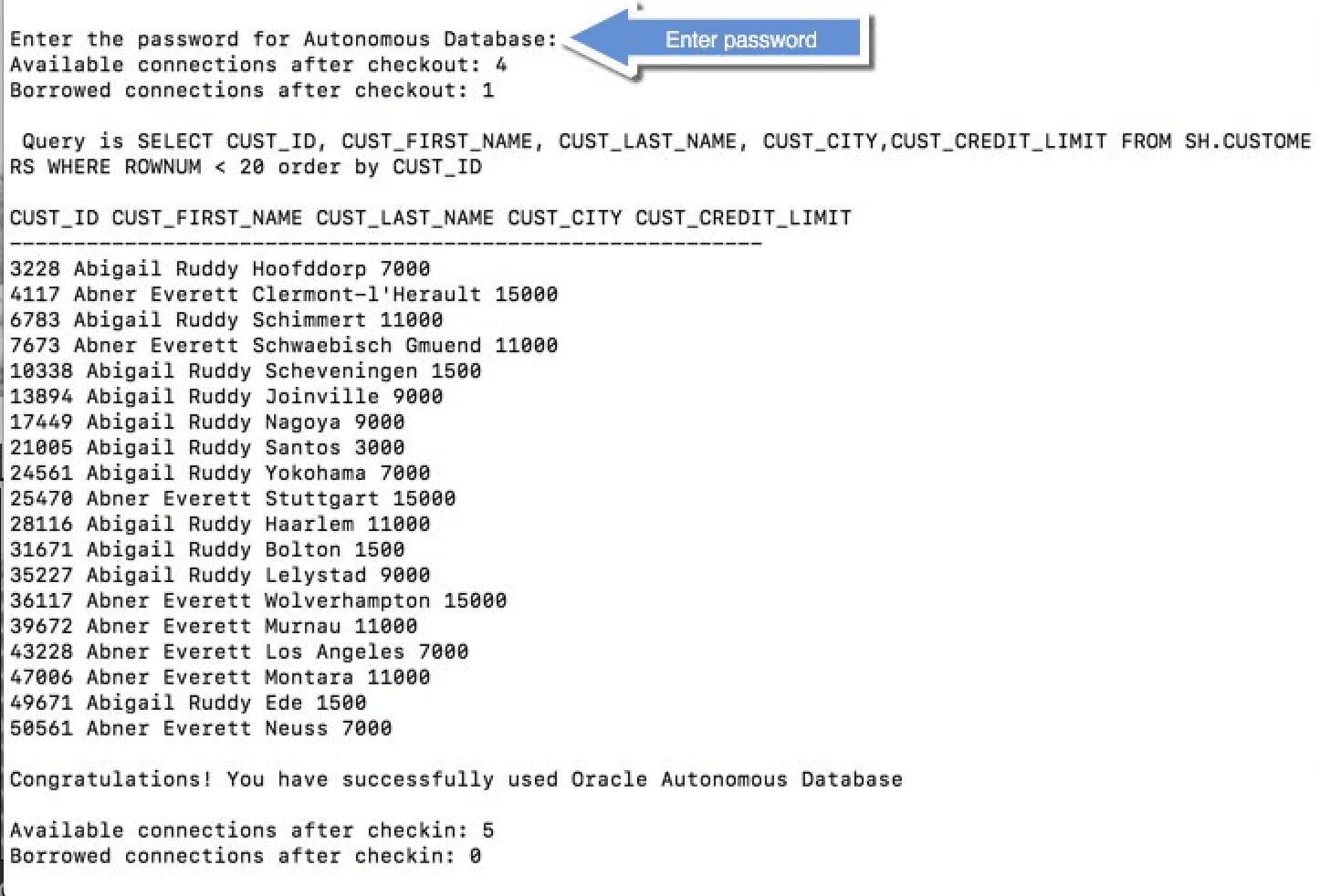
The queried rows along with a success message are displayed, as shown in the following screen:
Note: If you connect to Oracle Autonomous AI Database from behind a firewall, you will likely encounter a connection timeout error. Make sure to be outside the firewall while running this sample or update the
tnsnames.orafile to use an HTTPS proxy.