Plan and Observe Capacity for Autonomous AI Database on Dedicated Exadata Infrastructure
You can observe and plan the compute and storage resources of your Autonomous AI Database on Dedicated Exadata Infrastructure for efficient usage and optimal billing.
Oracle Autonomous AI Database provides dashboards and visualizations to help you track resource allocation and usage for your service.
Resource Terminology
It is important to understand the various terms used with resource allocation and usage on the Oracle Cloud Infrastructure (OCI) console and understand what they mean:
-
Available CPUs: CPUs available for allocation to provision new Autonomous AI Databases or scale existing Autonomous AI Databases.
-
Provisioned CPUs: Total CPUs allocated for all the Autonomous AI Databases within an Autonomous Exadata VM Cluster (AVMC).
-
Reserved CPUs: Total CPUs reserved to support auto-scaling of Autonomous AI Databases, Autonomous AI Database failover on node failure, and life-cycle management of empty Autonomous Container Databases (ACDs).
-
Reclaimable CPUs: Total CPUs from all terminated and scaled down Autonomous AI Databases in all the Autonomous Container Databases (ACDs) within an Autonomous Exadata VM Cluster (AVMC). Reclaimable CPUs are not returned to the Available state until the ACD is restarted.
Tip: See Compute Management in Autonomous AI Database for a detailed explanation about the CPU types with examples.
-
Provisionable ACDs: Number of Autonomous Container Databases that can be created in an Autonomous Exadata VM Cluster (AVMC).
-
Provisioned ACDs: Number of Autonomous Container Databases that have been created in an Autonomous Exadata VM Cluster (AVMC).
-
Non-provisionable ACDs: Number of Autonomous Container Databases that cannot be created because of a shortage of available CPUs in an Autonomous Exadata VM Cluster (AVMC).
-
Total Storage (in TBs): Total storage allocated to an Autonomous Exadata VM Cluster (AVMC).
-
Available Storage (in TBs): Storage available for Autonomous AI Databases’ use in an Autonomous Exadata VM Cluster (AVMC).
-
Used Storage (in TBs): Storage currently used by Autonomous AI Database(s) in an Autonomous Exadata VM Cluster (AVMC).
-
Memory per CPU (in GBs): Memory allocated to the Autonomous Exadata VM Cluster (AVMC) per CPU.
Resource Limits
The following table lists the resource limits for Autonomous AI Database on Dedicated Exadata Infrastructure deployments on Oracle Public Cloud and Exadata Cloud@Customer.
Resource Limits (Maximum)
-
The number of Available CPUs determines the maximum number of Autonomous AI Databases that you can create. The smallest Autonomous AI Database can be created with 2 ECPUs or 0.1 CPUs. Therefore the maximum number of Autonomous AI Databases that can be created is half times the amount of Available ECPUs or ten times the amount of Available OCPUs.
-
The maximum number of Autonomous Container Databases per Autonomous Exadata VM Cluster (AVMC) is 16.
Recommended Resource Limits (Maximum)
| Resource | Recommended Limit |
|---|---|
| Autonomous AI Databases per Autonomous Container Database | 200 |
| Autonomous AI Databases per Autonomous Container Database with Autonomous Data Guard Configured | 25 |
Note: It is possible to provision more Autonomous AI Databases than those mentioned in the above recommended limits table, especially with CPU overprovisioning. However, this implies compromising the Service Level Objectives (SLOs) to return an application online following an unplanned outage or a planned maintenance activity. To know the SLO details for Autonomous AI Database on Dedicated Exadata Infrastructure deployments, see Availability Service Level Objectives (SLOs).
Limits for Autonomous Exadata VM Clusters
You can create multiple Autonomous Exadata VM Clusters (AVMCs) on an Exadata Infrastructure resource. There are no hard limits on the number of AVMCs or Autonomous Container Databases (ACDs) you can provision on your Exadata Infrastructure. The AVMCs and ACDs have a minimum resource requirement, and you can create them as long as the minimum amount of resources is available.
To create an Autonomous Exadata VM Cluster, the minimum resources required are 40 ECPUs per node, 120GB Memory per node, and 338.5GB Local Storage per node, and 6.61TB Exadata Storage. Similarly, the minimum resources needed per node to create an ACD are 8 ECPUs or 2 OCPUs and 50GB Local Storage. As long as your Exadata Infrastructure has these minimum resources available, an AVMC and ACD can be created.
The following example shows the minimum X9M Exadata Infrastructure resources required to provision an AVMC (configured with 2 DB servers) with different number of ACDs.
Note: The default values for Database memory per ECPU (GB) and Database storage (TB) are set to 5GB and 5TB, respectively. However, you can set the Database memory per ECPU to be within a range of 2-5GB.
| Property | 1 ACD | 2 ACDs | 3 ACDs | 16 ACDs |
|---|---|---|---|---|
| ECPU Count | 80 | 80 | 96 | 512 |
| Memory (GB) | 320 | 320 | 368 | 1616 |
| Local Storage (GB) | 677 | 780 | 883 | 2222 |
| Exadata Storage (TB) | 6.61 | 6.73 | 6.86 | 8.45 |
Resource Usage Tracking
The compute (CPU) and storage resources allocated to an Autonomous Exadata VM Cluster (AVMC) or Autonomous Container Database (ACD) vary as you provision and run Autonomous AI Databases in them. The number of allocated, provisioned, reserved, reclaimable CPUs and total, available and used storage change through the life-cycle of ACDs and Autonomous AI Databases in an AVMC. As you provision, run, and terminate Autonomous AI Databases or provision, delete, and restart ACDs, the compute and storage resources move into different categories as explained in Compute Management in Autonomous AI Database.
Tracking resource usage for an AVMC or ACD across tenancies is critical in planning the capacity for your Autonomous AI Database on Dedicated Exadata Infrastructure. To simplify resource usage tracking, Oracle Autonomous AI Database provides insights in graphical and tabular formats from the Oracle Cloud Infrastructure (OCI) console.
Autonomous AI Database on Dedicated Exadata Infrastructure supports resource usage tracking at two levels:
- Autonomous Exadata VM Cluster (AVMC): You can view the resource usage details of an AVMC from its Details page on the OCI console. In-depth information on the resources is presented in a graphical and tabular format for the AVMC, and each ACD provisioned in the AVMC.
Refer to View Resource Usage for an Autonomous Exadata VM Cluster for step-by-step instructions and explanation.
-
Autonomous Container Database (ACD): Similar to AVMC, you can also view the resource usage details of an ACD from its Details page on the OCI console. Comprehensive information on the resources in this ACD is provided on this page in graphical and tabular formats.
Refer to View Resource Usage for an Autonomous Container Database for step-by-step instructions and explanation.
Resource Usage Visualizations
The resource usage metrics are presented on the OCI console in chart and tabular formats, for Autonomous Exadata VM Cluster (AVMC) and Autonomous Container Database (ACD).
You can access these resource visualizations in either chart or table format the OCI console, by following the instructions outlined in:
Tip: You can choose to see this information either in the graphical or tabular view by selecting Chart view or Table view from the drop-down list at the top-right corner of this section.
This section has graphical and tabular representations of the AVMC’s resource usage.
Chart View
Chart view is the default view. In this view, you can see 4 graphical visualizations that provide usage details for different resources:
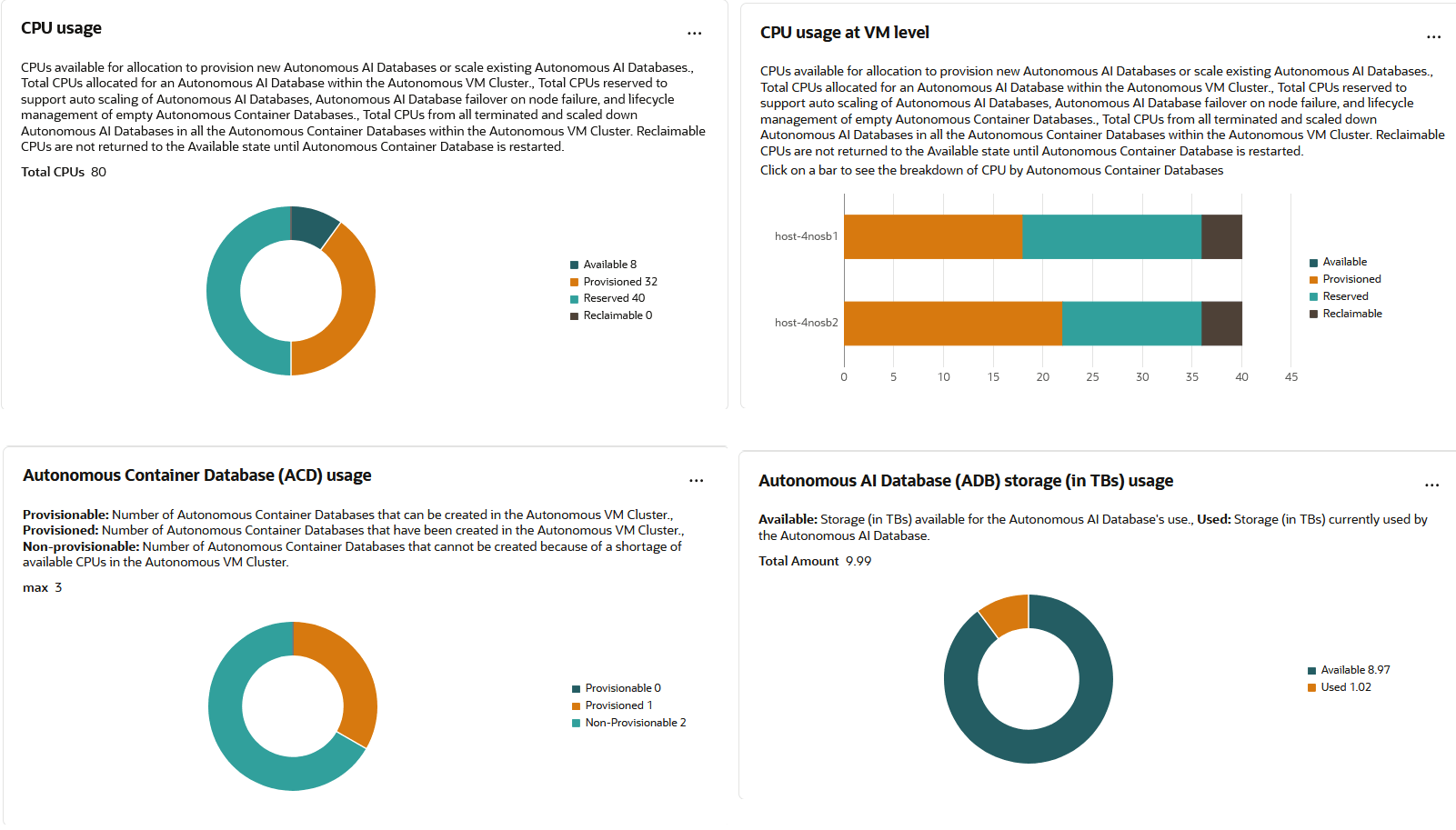
Description of the illustration avmc_reschart.png
The four charts depict:
-
CPU usage: Depicts the Total number of CPUs allocated to this AVMC and how many of those CPUs are reclaimable, available, provisioned, and reserved. This is a doughnut-chart with the total number of CPUs shown in the center of the chart.
-
CPU usage at VM level: This is a horizontal bar graph giving a break-down of the CPU usage for each VM in the cluster. You find a horizontal bar for each VM. Each bar shows the number of reclaimable, available, provisioned, and reserved CPUs for that VM with color-coding. Hovering on each colored part of the horizontal bar displays the number of reclaimable, available, provisioned, and reserved CPUs for that specific VM. Clicking the reclaimable, provisioned and reserved bars will open a new panel with the break down of those CPU components by ACDs.
-
Autonomous Container Database (ACD) usage: Depicts the Total number of ACDs that can be created in this AVMC along with a break-up of Provisionable ACDs, Provisioned ACDs, and Non-provisionable ACDs. Please see Resource Terminology to understand what each of these mean. This is a doughnut-chart with the total number of ACDs shown in the center of the chart.
-
Autonomous AI Database storage (in TBs) usage: This is a doughnut-chart depicting the available, used, and total Autonomous AI Database storage in TBs. The total storage value is shown in the center of the chart with available and used storage values shown on the chart in different colors.
Table View
To see the resource usage details of an AVMC in table view, select Table View from the drop-down list at the top-right corner of the Resource usage visualizations section. The table view shows the exact same details as the chart view, in the form of tables.
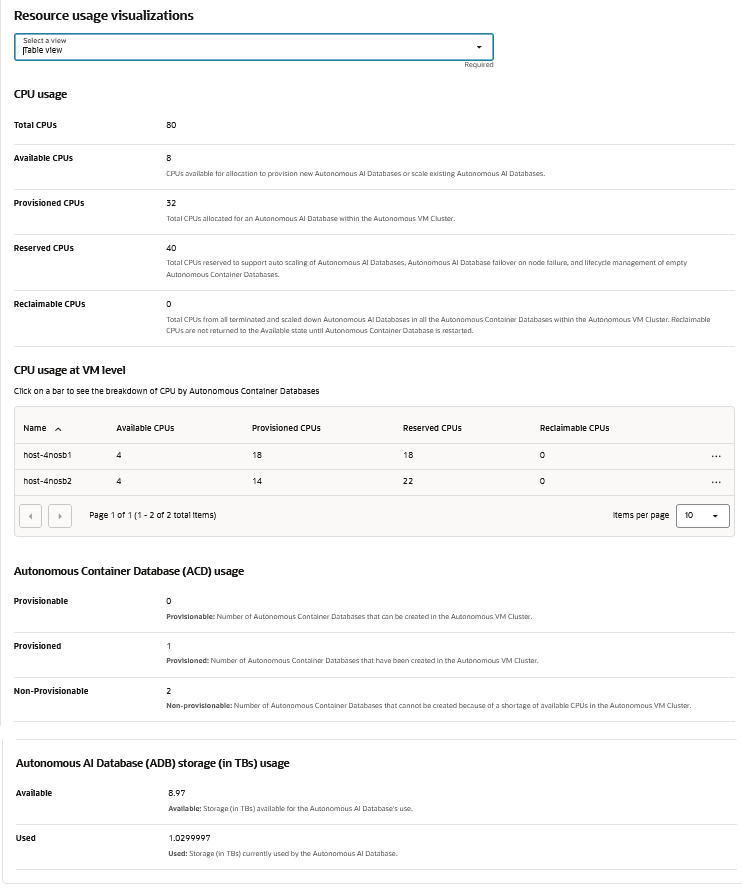
Description of the illustration avmc_restable.png
The four tables you can see are:
-
CPU usage: Lists the number of total, available, provisioned, reserved, and reclaimable CPUs in this AVMC.
-
CPU usage at VM level: Lists the number of available, provisioned, reserved, and reclaimable CPUs for each VM in this VM cluster.
-
Autonomous Container Database (ACD) usage: Lists the number of provisionable, provisioned, and non-provisionable ACDs in this AVMC.
-
Autonomous AI Database storage (in TBs) usage: Shows the available and used Autonomous AI Database storage in TBs.
This section has graphical and tabular representations of the ACD’s resource usage.
Chart View
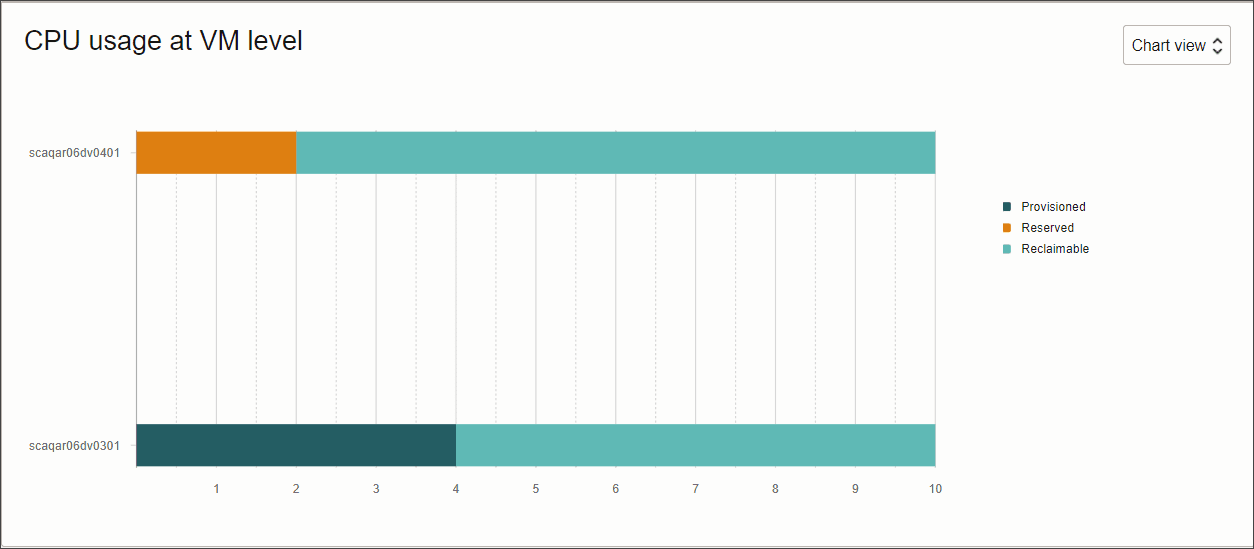
Description of the illustration acd_reschart.png
Chart view is the default view. In this view, you can see a horizontal bar graph giving a break-down of the CPUs used by this ACD in each VM. Each bar shows the number of provisioned, reserved, and reclaimable CPUs for that VM with color-coding. Hovering on each colored part of the horizontal bar displays the number of provisioned, reserved, and reclaimable CPUs for that specific VM.
Table View
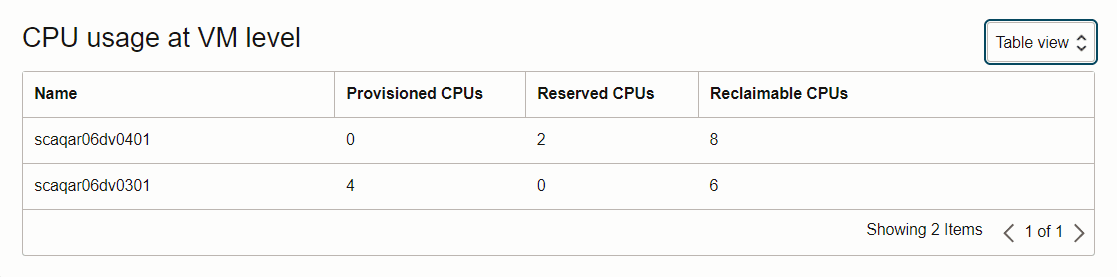
Description of the illustration acd_restable.png
To see the resource usage details of an ACD in table view, select Table View from the drop-down list at the top-right corner of the CPU usage at VM level section. The table view shows the exact same details as the chart view, in the form of a table. It lists the number of provisioned, reserved, and reclaimable CPUs for each VM allocated to the ACD from the parent VM cluster.
Exadata System Shapes
Autonomous AI Database on Dedicated Exadata Infrastructure can be provisioned on different Exadata System models such as Oracle Exadata X11MV, X11M, X10M, X9M, X8M, or base system models. The same Exadata models as supported by Exadata Database Service. Each model comes in different shapes as explained below. Each Exadata System Shape is equipped with a fixed amount of memory, storage, and network resources.
Note: As of June 30, 2026 , the X11MV Exadata infrastructure model is available only for Autonomous AI Database on Oracle Public cloud and Multicloud deployments.
The total resources allocated to your Autonomous AI Database on Dedicated Exadata Infrastructure is determined by the Exadata System (and shape) used to provision your service.
A Base System is an entry-level configuration. Compared to other configurations, a Base System contains Oracle Exadata Storage Servers with significantly less storage capacity, and database servers with significantly less memory and processing power.
Tip: Refer to Characteristics of Infrastructure Shapes to view the specifications of each Exadata System model.
Autonomous AI Database on Dedicated Exadata Infrastructure is offered in the following Exadata System Shapes:
-
Base System: Contains two database servers and three Oracle Exadata Storage Servers.
-
Elastic: Starts with two standard memory (1390 GB) database servers and three Oracle Exadata Storage Servers, and can be expanded up to a maximum of 32 database servers and 64 storage servers.
X11M and X10M systems on Exadata Cloud@Customer deployments are offered in the following Exadata System Shapes:
-
Elastic Base System: Contains two database servers and three Oracle Exadata Storage Servers and can be expanded up to a maximum of 16 servers by adding additional base database servers and base storage servers.
-
Elastic: Starts with two standard memory (1390 GB) database servers and three Oracle Exadata Storage Servers, and can be expanded up to a maximum of 32 database servers and 64 storage servers.
-
Elastic Large: Starts with two large memory (2090 GB) database servers and three Oracle Exadata Storage Servers, and can be expanded up to 32 large memory database servers and 64 storage servers.
-
Elastic Extra Large: Starts with two extra large memory (2800 GB) database servers and three Oracle Exadata Storage Servers, and can be expanded up to 32 large memory database servers and 64 storage servers.
X9M and X8M systems on Exadata Cloud@Customer deployments are offered in the following Exadata System Shapes:
-
Elastic Base System: Contains two database servers and three Oracle Exadata Storage Servers and can be expanded up to a total of 8 base database servers and 12 storage servers in a single rack.
-
Quarter Rack: Contains two database servers and three Oracle Exadata Storage Servers.
-
Half Rack: Contains four database servers and six Oracle Exadata Storage Servers.
-
Full Rack: Contains eight database servers and twelve Oracle Exadata Storage Servers.