Edit Automatic Backup Retention Period on Autonomous AI Database
You can change the backup retention period for automatic backups on Autonomous AI Database with a retention period between 1 day and up to 60 days.
Editing the backup retention period is only available for instances using the ECPU compute model. See Compute Models in Autonomous AI Database for more information.
Note: The storage for backups incurs additional costs. See ECPU Compute Model Billing Information for more information.
Perform the following prerequisite steps as necessary:
-
Open the Oracle Cloud Infrastructure Console by clicking the
 next to Cloud.
 -
From the Oracle Cloud Infrastructure left navigation menu click Oracle AI Database and then click Autonomous AI Database.
-
On the Autonomous AI Databases page select an Autonomous AI Database from the links under the Display name column.
To change the automatic backup retention period:
-
On the Autonomous AI Database Details page, under Backup, in the Automatic backup retention period field, click Edit.
Description of the illustration adb_backup_edit_retention_link.png
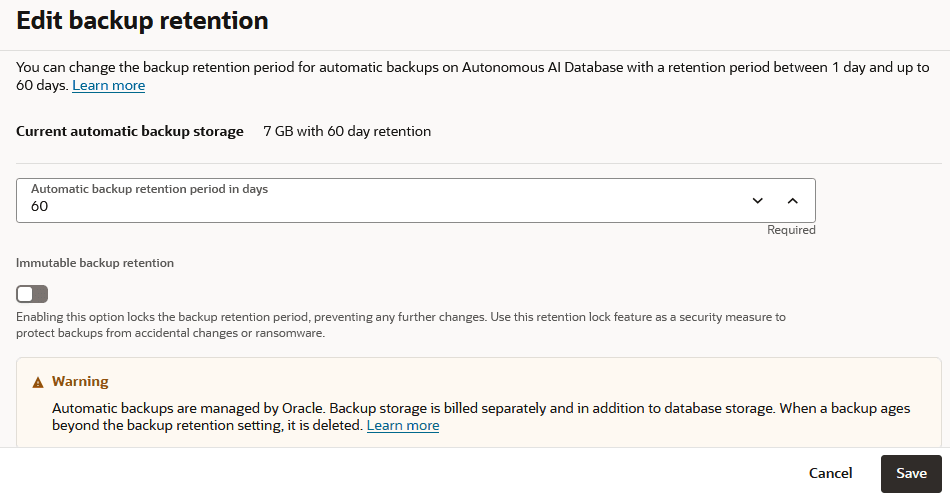
This displays the Edit backup retention panel.
-
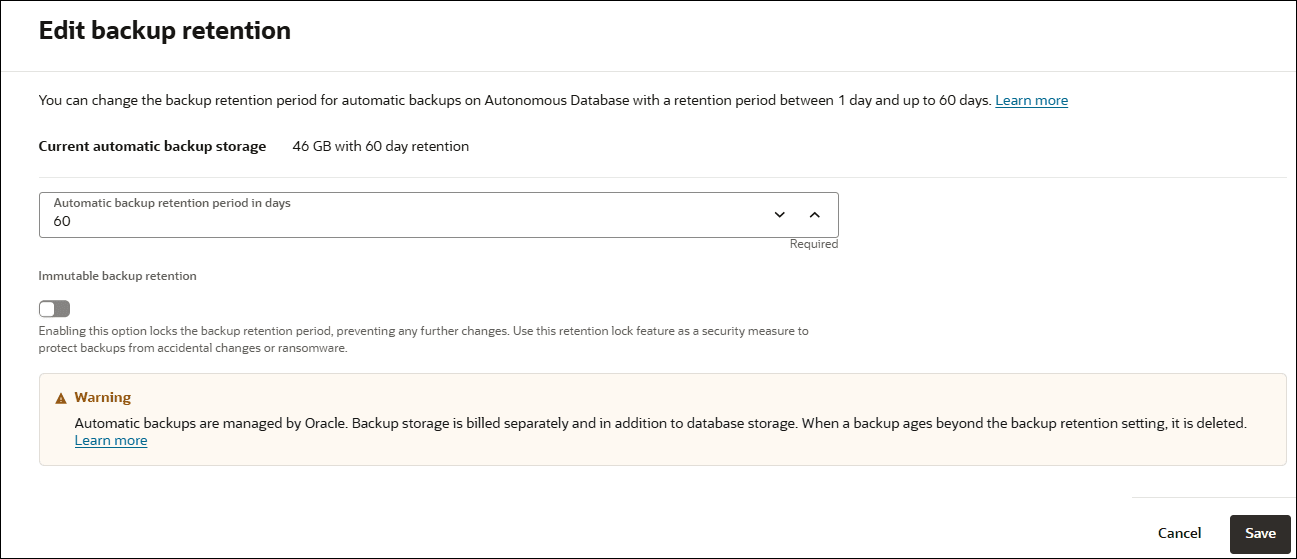
To edit the automatic backup retention period, enter the automatic backup retention period (in days).
Enter a value in the text field or use the arrows to increase or decrease the backup retention period.
Description of the illustration adb_edit_backup_retention.png
-
Select Backup Retention Lock to lock the backup retention period.
Once the backup retention lock option is set, you cannot disable this option or change the retention period.
For an exception case if you must disable backup retention lock once enabled or change the backup retention period, reach out to your organization's Oracle account team; they will validate the request and then direct the request to Oracle Support.
See About Backup and Recovery on Autonomous AI Database for more information.
-
Click Save.
Notes for specifying the automatic backup retention period:
-
The backup retention period specifies how many days automatic backups are retained and the period for which you are billed for the automatic backups that are retained. If you change the backup retention period to a shorter period and automatic backups exist that are older, you are no longer billed for the automatic backups with timestamps beyond the specified retention period (and Autonomous AI Database may delete the older automatic backups).
If you change the backup retention period to a longer period, for example if you change from 7 to 60 days, Autonomous AI Database starts retaining automatic backups up to 60 days, and billing for the retained backups. Automatic backup storage size varies based on several factors, including data size and transaction volume. As a general estimate, sixty (60) days of automatic backups may require three to four times (3–4X) the allocated data storage capacity, 30 days may require two to three times (2–3X) their allocated data storage size, and 15 days may require one to two times (1–2X) their allocated data storage size.
-
The backup retention period for a remote peer database follows that of the source Primary database. Automatic backups are only taken on a peer database when it becomes the Primary database after a switchover or after a failover.
See Use Standby Databases with Autonomous Data Guard for Disaster Recovery and Use Backup-Based Disaster Recovery for more information.