Create an OGC WMS Connection
You can create a new connection to an external OGC (Open Geospatial Consortium) WMS (Web Map Service) service.
This enables you to create an OGC WMS dataset which can be used in map visualizations.
Note that a WMS service or server typically offers many individual map layers that can be combined in different orders. The full list of available map layers, as well as many other important supported functionalities are all advertised by the WMS server through a standard WMS GetCapabilities response.
When you create a new WMS connection, Spatial Studio will be querying such capabilities against the external WMS server using the standard GetCapabilities call. Based on the result of such a query, you will later be able to choose the required WMS map layers that must be included when creating a new Spatial Studio WMS dataset.
You can perform the following steps to create an OGC WMS connection:
-
Navigate to the Connections page.
-
Click Create Connection.
The Create Connection dialog opens.
-
Select OGC Web Map Service as the connection type and click Next.
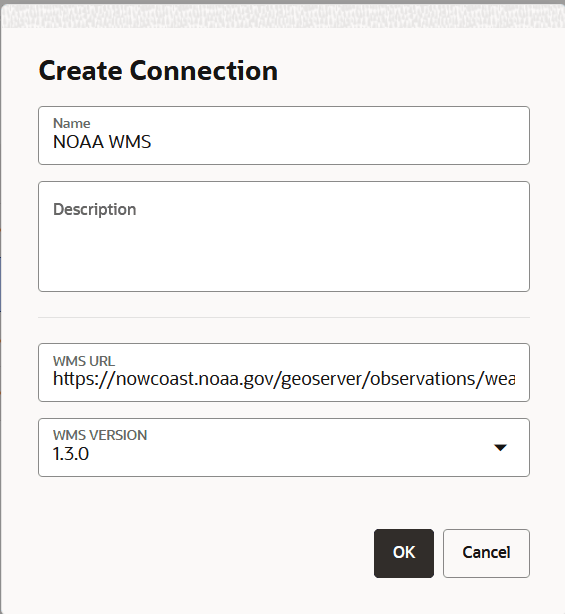
The Create Connection dialog open as shown:
-
Enter the connection Name.
-
Optionally, enter a Description.
-
Enter the WMS URL to connect to the WMS service.
Also, note the following:
-
Ensure that the WMS URL is added to the Safe Domains list.
-
You can use one of the following two formats for the WMS URL:
-
A complete
GetCapabilitiesrequest, including the version of the WMS specification (1.3.0 is recommended). For instance:https://nowcoast.noaa.gov/geoserver/observations/weather_radar/ows?SERVICE=WMS&VERSION=1.3.0&REQUEST=GetCapabilities -
The base URL of the WMS server. For instance:
https://nowcoast.noaa.gov/geoserver/observations/weather_radar/ows
-
-
-
Optionally, select the WMS VERSION.
-
Click OK.
The OGC WMS connection gets created. This wms type connection is displayed on the Connections page.
Also, the new WMS connection stores the names of all the available map layers (hosted by the WMS service) and a host of other information based on the GetCapabilities response as a part of its metadata.
-
Right-click on the newly created connection, select Test connection, and verify that the connection tests successfully.