Determine the N-Nearest Geometries
Using the SDO_NN_V2 filter, you can determine the N-nearest geometries to a geometry.
To find the N-nearest geometries, you must perform the following steps.
The instructions assume that you have the layer to be filtered and the map layer to be used as a filter displayed on your Active Project page.
-
Click
 against the map layer, whose coordinates needs to be filtered, in the Layers tab.
 -
Select Spatial Analysis.
The Spatial Analysis Operations slider opens.
-
Click on the Filter tab and select Return shapes nearest to another.
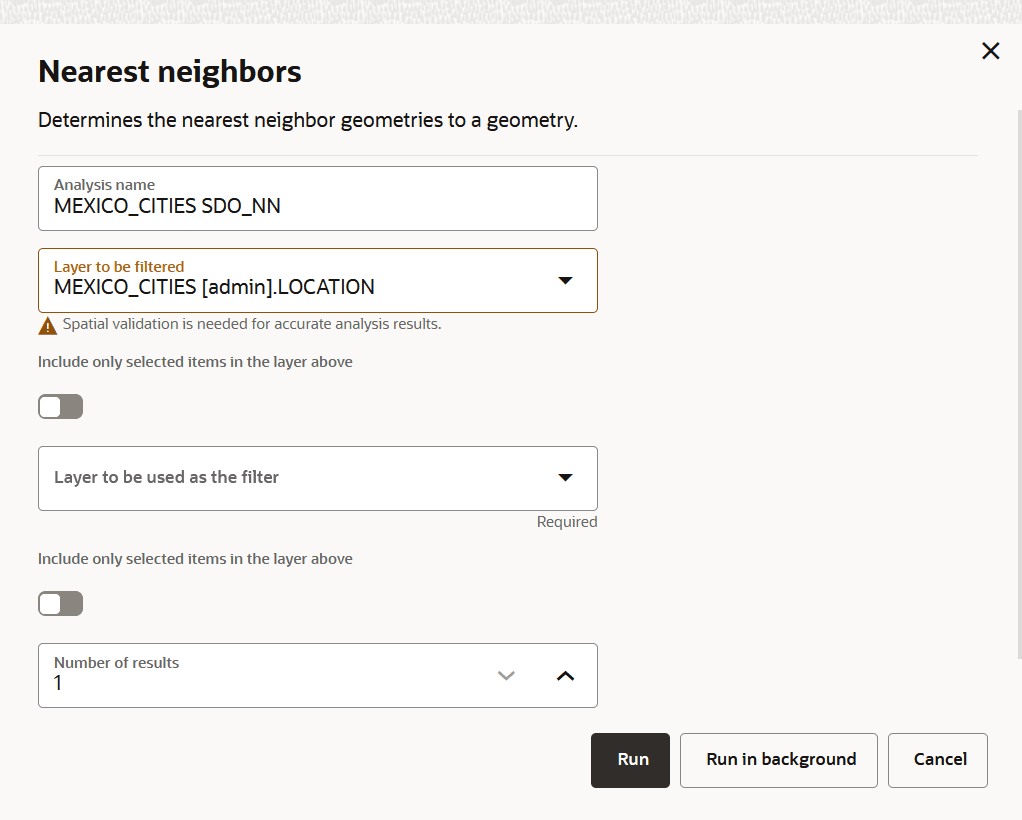
Nearest neighbors slider opens as shown:
-
Enter Analysis name.
-
Select the Layer to be filtered.
Note: Ensure that you have run spatial validations on the map layer to be filtered and the map layer to be used as the filter in order to obtain accurate analysis results.
-
Enter Number of results.
-
Click Run.
The Analysis result is listed under Analyses in the Data elements panel on the left pane of the Active Project page.
-
Drag and drop the analysis result on the map view.
This creates a new map layer highlighting the N-nearest neighbor geometries for a geometry.