Overview of Connections Page
The Connections page displays all the existing connections and also allows you to create a new OGC (Open Geospatial Consortium) WMS (Web Map Service) connection.
The following figure shows the Connections page:
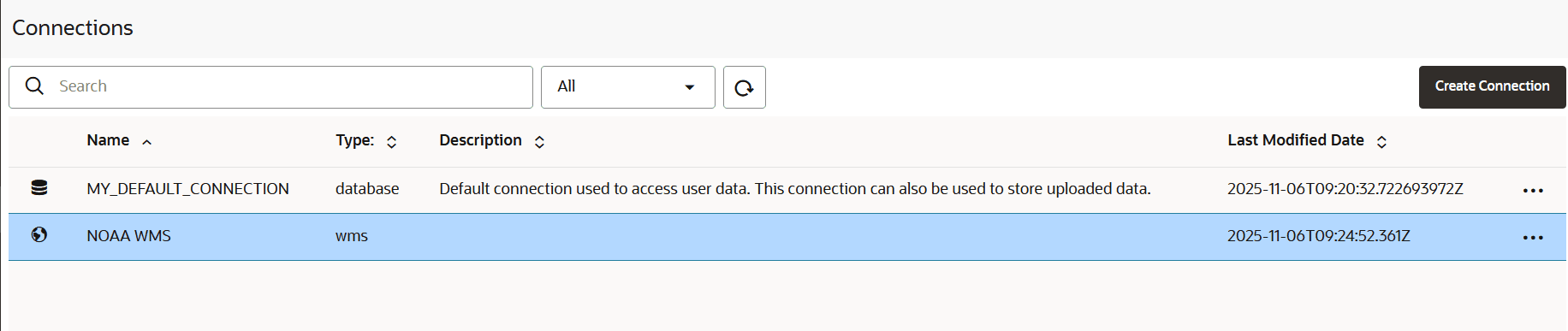
Description of the illustration connections_page.png
Spatial Studio automatically creates a default connection object (MY_DEFAULT_CONNECTION) through which you can access data on your Autonomous AI Database Serverless instance.
You can also create a new connection to an OGC WMS service.
When a new data source connection is created, GeoRaster will be automatically enabled if it was not already enabled in the database schema. You can also perform the following actions by clicking the hamburger icon against any displayed connection or by right-clicking a connection row:
-
Properties: To view the properties of the connection in the Overview tab.
You can control the generation of vector tiles and H3 hexagons with the Use on-DB Vector Tile Generation and Use on-DB H3 Generation toggles in the Settings tab.
Spatial Studio by default relies on the Autonomous AI Database server’s built-in capabilities to generate the vector tiles and H3 hexagons. Therefore, you must typically keep these toggles ON. In rare situations, you may want to switch OFF these toggles in order to debug potential bugs introduced by a new Autonomous AI Database patch. When set to OFF, Spatial Studio generates vector tiles and H3 hexagons in the mid-tier instead of within the database server.
-
Edit: To update the connection details.
Note: You cannot edit the
MY_DEFAULT_CONNECTIONobject on the Connections page. -
Test Connection: To validate the connection.
-
Delete: To delete the connection along with all its datasets.
Note: You cannot delete the
MY_DEFAULT_CONNECTIONobject.