Overview Jobs Page
The Jobs page displays details of all the background jobs that run in Spatial Studio.
The following figure shows a layout of the Jobs page:
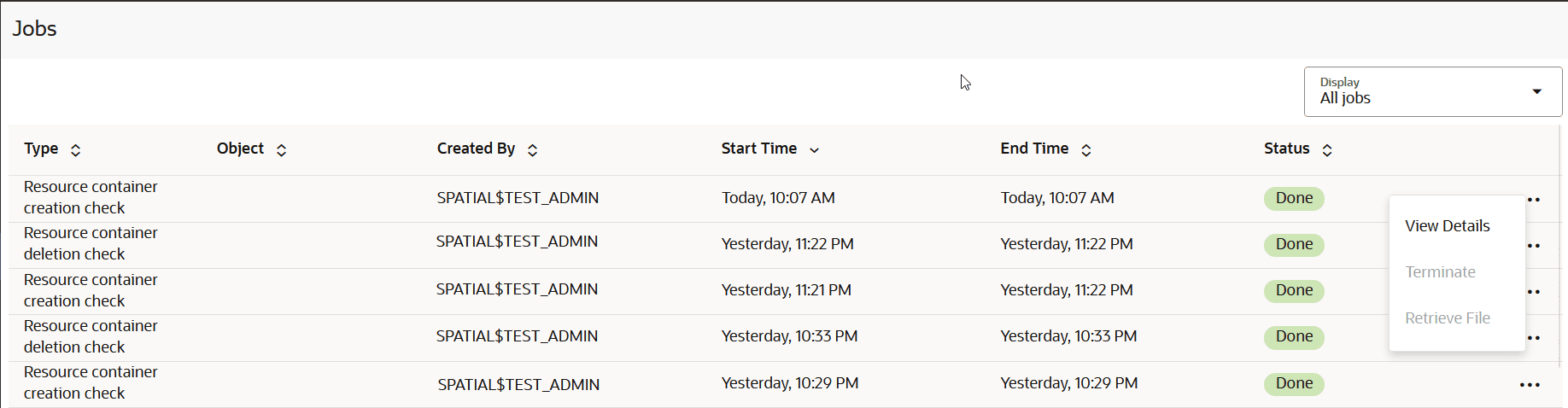
Description of the illustration jobs_page.png
You can perform the following actions on the Jobs page:
-
Select a job to be displayed in the grid: Active, Past or All.
-
View details of a specific job.
-
Terminate a job.
Also, note the following about terminating a job:
-
You can terminate a
ProcessingorPendingjob. -
You can terminate all job types except
Create lon-lat indexjobs. -
Upon termination of a job, partial execution results of the job are maintained. You can choose to clear the partial results. For example, you can perform
Clear Address Geocodeafter terminating aGeocodejob. -
Only jobs related to H3 aggregations such as
Build H3 Indexare completely rolled back when terminated.
-
The grid table displays the following properties for each job entry row:
-
Type: The job type, such as “
Geocode”, “Reverse geocode dataset” and so on. -
Object: The entity being altered by the job, which can be a Dataset, Table, Index or other.
-
Created by: The user that submitted the job. Note: System maintenance jobs are created by “
$system” account -
Start Time: The scheduled next run time for jobs with
Pendingstatus or the actual job start time for any other job status. -
End Time: The time at which a job completed.
-
Status: Indicates the state or progress of a job, which can be:
-
Pending -
Processing -
Done -
Error -
Terminating -
Terminated
-
By clicking  against any job row, you can perform the following actions :
-
View Details: To view extra information, such as the step at which a
Processingjob is currently running or error details forErrororTerminatedjobs. Also, you can terminate aProcessingjob by clicking Terminate when viewing the job details. -
Terminate: To terminate a
ProcessingorPendingjob directly. It remains disabled for any other job status.