About Wind Animation
You can create and visualize wind animations that depict the direction of flow between various locations.
Although commonly referred to as wind animation, this visualization applies for any movement-based visualization. For instance, it can be used to render wind speeds, depict tectonic plate movements, or other vector-based simulations. The following figure shows a sample wind animation in Spatial Studio:
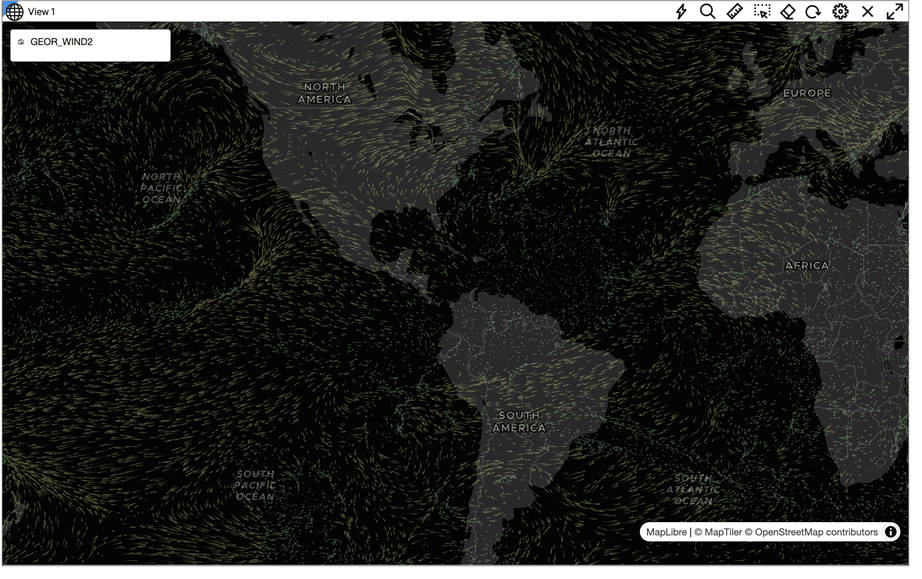
Description of the illustration sample_wind_map_viz.png
These visualizations rely on wind velocities along the x (u) and y (v) axes as input. These velocities are encoded within an image, where the red (R) and green (G) channels represent the x and y velocities, respectively. The values are scaled and mapped to an integer range of 0-255, with the R channel holding the u velocities and the G channel holding the v velocities.
The base image thus serves as a grid of u and v velocities at each integral longitude and latitude point within the specified bounding box (bbox). With this setup, the visualization generates random particles on the map, which are then animated according to the wind velocities, creating dynamic flowing visuals.
The following shows a sample base image that can be used to create a wind animation:
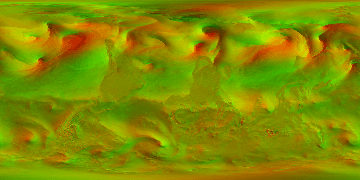
Description of the illustration sample_base_image.png
The base image for the wind animation can be generated from a NOAA dataset or from any other supported data providers (see Generate a Base Wind Image From a NOAA Dataset for an example). You can then load this image as GeoRaster to Oracle Database and create a wind animation dataset for visualization.