

Indexes
Indexes help Oracle VecDB find candidate records for similarity search and metadata filtering without scanning every record in a vector table.
Oracle AI Database creates and maintains vector and metadata indexes automatically by default.
In the usual workflow, create a vector table, load or upsert records, and query the table without calling an index operation. You can change the default settings when you need a different index type, explicit metadata paths, or a manual bulk-loading workflow.
For a first application, keep the defaults and measure the results before changing an index. Use the index API guide when you need to compare search speed and result quality or change how indexes are created.
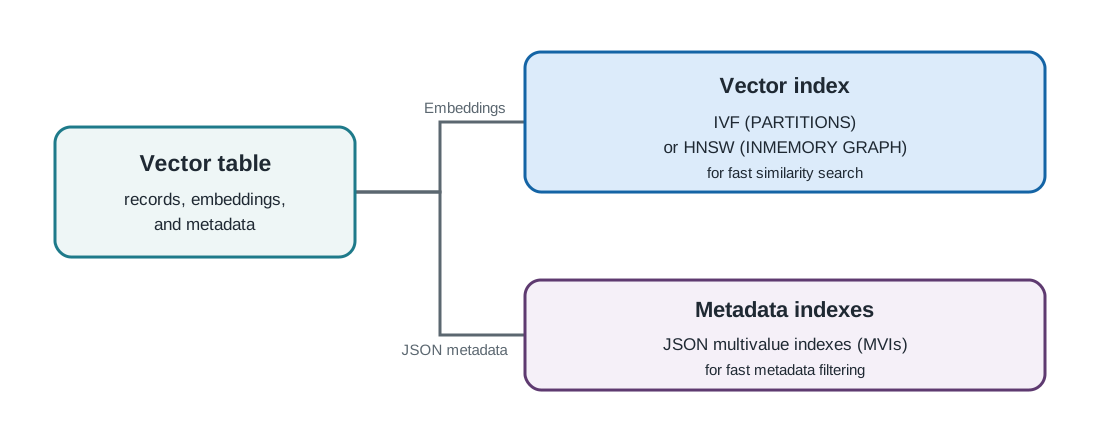
What gets indexed
The vector index covers the embeddings (dense vectors) stored in the table. Metadata indexes support filtering on scalar values in the JSON metadata during a vector query. Metadata can also contain arrays and objects, which remain available as stored metadata. The details of metadata-path selection are covered in the index API guide.
Vector indexes
Oracle AI Database supports two approximate nearest neighbor vector index types:
| Index type | How it works | Consider it when |
|---|---|---|
| IVF (default) | Groups vectors into partitions and searches the partitions closest to the query. | You want a general-purpose starting point, especially for a large table or when you need to limit memory use. |
| HNSW | Connects nearby vectors in a layered graph and searches the graph from broad routes to local connections. | You need quick search responses or expect many searches, and can provide more memory for the graph. |
If you omit vector_index_params.organization from the index_params you provide when creating a table or index, the SDK uses PARTITIONS, which creates an IVF index. Set organization to INMEMORY GRAPH when you want an HNSW index. Both index types reduce the amount of vector data that the database examines during an approximate search, and both require workload-specific testing when you tune for speed, memory, or recall.
For example, this creates an integrated-embedding table that uses HNSW. The embedding model must already be loaded in the database:
table = vecdb.create_vector_table(
    name="demo_hnsw",
    embed_params={
        "model": "all_MiniLM_L12_v2",
        "embed_metadata_jsonpath": "content",
    },
    index_params={
        "vector_index_params": {
            "organization": "INMEMORY GRAPH",
        }
    },
)
See the create_index reference for index construction, query tuning, HNSW and IVF parameters, diagrams, and examples.
Metadata indexes
Metadata in each vector-table record is stored as JSON. Oracle AI Database creates and maintains JSON multivalue indexes (MVIs) for scalar metadata paths used by filters, so those filters can be evaluated as part of a vector query. Objects and arrays remain available as metadata for application use, but are not themselves selected for VecDB metadata indexing.
For example, an application might store this metadata with a record:
{
  "tenant_id": "acme",
  "document_source": "handbook.pdf",
  "chunk_id": "42"
}
The fields tenant_id, document_source, and chunk_id can support filtering during a vector query.
See the index API guide for metadata-path selection, MVI operation, explicit index operations, and filtering examples.
Parent topic: Concepts