

Embedding and Reranking Models
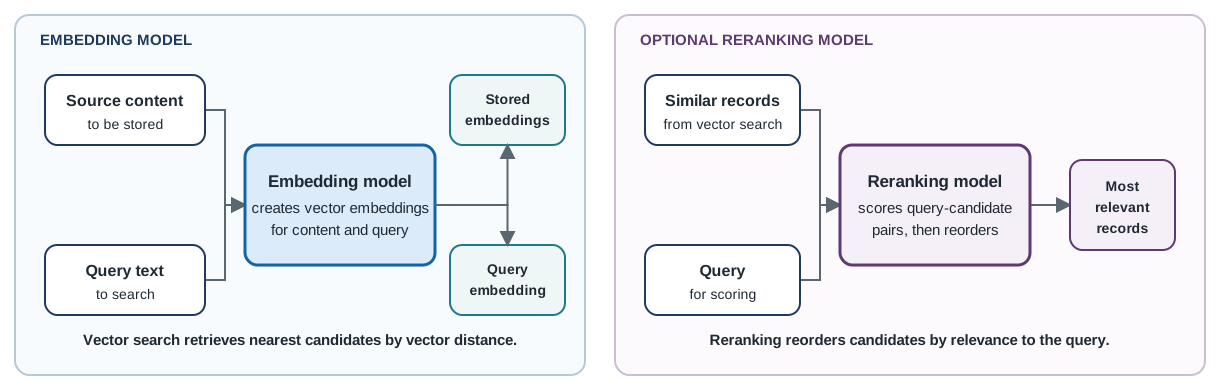
Oracle AI Vector Search uses embedding models to transform source content and query text into vector embeddings. Similarity search compares the query embedding with stored embeddings and retrieves the nearest candidate records by vector distance. An optional reranking model then scores the initial candidates against the query and reorders them by relevance.
Think of an embedding model as a translator that turns text into numbers so the database can compare meaning. A reranking model is an optional second pass that reads the query and each candidate together to improve the order of the results.
| Model type | What it does | When you need it |
|---|---|---|
| Embedding model | Transforms source content and query text into vector embeddings. | Required for both workflows. Integrated embeddings use a model loaded in Oracle AI Database; BYO uses a model hosted by your application or an external provider. |
| Reranking model | Scores query-candidate pairs and reorders the initial search results by relevance. | Optional when your application needs a second relevance pass. |
How the models work together
Embedding and reranking models serve different stages of semantic search and retrieval-augmented generation (RAG). The embedding model supports the initial vector search: it creates embeddings for stored content and the search query, and vector search compares their distances to retrieve the nearest candidates. A reranking model is applied after this initial search. It evaluates the query and each candidate together, assigns a similarity score, and reorders the initial result set by relevance.
This two-stage approach separates large-scale candidate retrieval from query-specific scoring:
| Difference | Embedding model | Reranking model |
|---|---|---|
| How it processes data | Transforms each input into a fixed-length vector embedding so the query and stored content can be compared by distance. | Evaluates the query and a candidate record together and returns a similarity score for the pair. Reranking models are also called cross-encoders or rerankers. |
| Role in search | Initial similarity search that retrieves the nearest candidate records. | Second-stage scoring that reassesses and reorders the initial search results by relevance. |
| Scale and cost | Content embeddings can be created ahead of time, stored, and indexed for efficient search across a large vector table. | Usually applied to the top-k candidates returned by vector search because scoring each query-candidate pair requires more computation. |
Embedding models
An embedding model is required for both workflows. With integrated embeddings, Oracle AI Database generates vector embeddings using a model loaded in the database. With BYO, your application or an external provider, such as OCI Generative AI, generates the embeddings using a model hosted outside Oracle AI Database.
The quickstart uses integrated embeddings with all_MiniLM_L12_v2. Load this model before you create the table, or replace it with the exact name of another model loaded in your database. Loading an embedding model is typically a one-time setup for the database user. After loading it, reuse the exact model name when you create an integrated-embedding table or generate an embedding. Use load_model for the complete operation definition, or follow generate_embedding to create vector embeddings with a loaded model.
For BYO, generate the content and query embeddings with the same externally hosted embedding model, then supply those embeddings to the SDK. The model does not need to be loaded in Oracle AI Database. For an example using OCI Generative AI, see the OCI Embedding Pipeline notebook.
Warning: Use the same embedding model to generate query embeddings that you used to generate the stored content embeddings. The model and its embedding configuration define the vector space; using a different model can make vector-distance comparisons invalid and produce incorrect search results.
Reranking models
Use a reranking model after vector search when you want to reassess and reorder the initial candidate results. The model scores each query-candidate pair and can produce a more relevant order. A reranking model is separate from the embedding model and does not replace vector search or its indexes.
You can load a supported ONNX embedding or reranking model from OCI Object Storage with load_model. For the complete conversion, upload, PAR, validation, and model-loading workflow, see load_model. After a reranking model is loaded, follow rerank.
Related samples
- Load and compare models for integrated embeddings and standalone inference in the Embedding & Ingest Patterns notebook.
- Generate application-supplied embeddings with OCI Generative AI in the OCI Embedding Pipeline notebook.
Next steps
- For the first working integrated-embedding example, run the Quickstart: Build Vector Search with Python.
- To create a table and load records, see create_vector_table and upsert_vectors.
- For application-supplied vectors, follow upsert_vectors.
- To add a second relevance pass, follow rerank.
Parent topic: Concepts