About Autonomous AI Vector Database
Oracle Autonomous AI Vector Database provides a fully autonomous database that is optimized for vector workloads.
Vector Database Workflow Overview
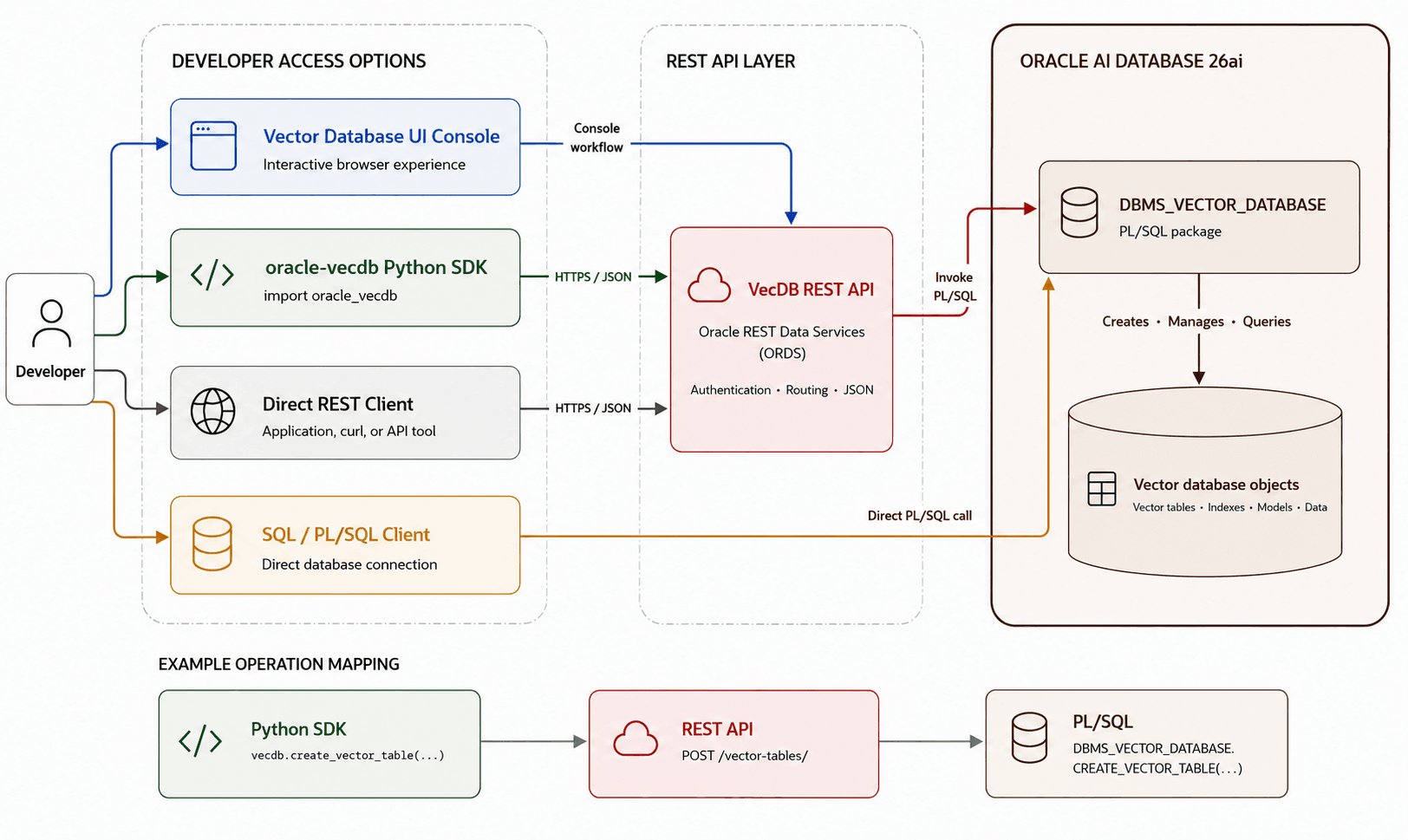
Description of the illustration vecdb_overview_workflow.png
Vector Database capabilities can be accessed through several entry points, as illustrated in the diagram. As a developer, you can interact with a Vector Database instance using the Vector Database console, through the oracle-vecdb Python SDK, using a direct REST client, or using SQL or PL/SQL with a direct database connection.
The Vector Database workload type offers the benefits of Autonomous AI Database in a configuration that’s designed for AI-powered applications. With Autonomous AI Vector Database, you can perform operations such as:
-
Store and retrieve vector embeddings efficiently for similarity search at scale.
-
Build semantic search, RAG pipelines, and agentic applications that require durable memory that can be queried.
-
Combine vector similarity search with metadata filtering for more accurate, real-world results.
-
Start quickly with low friction and then scale as needed. An upgrade path is available to broader Autonomous AI Database capabilities.
With support for these operations, Autonomous AI Vector Database is ideal for a number of use cases, including the following:
-
Semantic search over documents, tickets, policies, and product catalogs.
-
RAG for chatbots and knowledge assistants.
-
Recommendations and “similar items” experiences.
-
Agent memory management for long-running agents across sessions and tasks (dealing with, for example, episodic memory, semantic memory, and workflow memory).
In addition to the standard Database Actions available for all Autonomous AI Database’s, the Vector Database Console provides access to a set of vector-specific operations that simplify management. This includes loading embedding models, creating tables with vector data, and performing semantic search in a convenient query playground.