VCN and Subnets
This article describes how to manage virtual cloud networks (VCNs) and the subnets in them.
Overview
A VCN is a software-defined network that you set up in the Oracle Cloud Infrastructure (OCI) data centers in a particular region. A subnet is a subdivision of a VCN.
Before you set up a DB system, you must set up a VCN and other Networking service components.
DB systems support subnets configured with either IPv4-only or IPv4/IPv6 dual stack addresses.
To launch a DB system, you must have:
- A VCN in the region where you want the DB system.
- At least one subnet in the VCN (either a public subnet or a private subnet).
- Connectivity to the Oracle Services Network.
- Custom route table with appropriate rules.
- Security rules.
Note: Oracle recommends using the internet gateway for public subnets and service gateway for private subnets along with the appropriate security list and routing table rules.
You could use availability domain specific subnets or regional subnets which span all availability domains in the region.
Note:
- Oracle recommends using regional subnets, which span all availability domains in the region.
- Certain details of the VCN and subnet configuration depend on your choice for DNS resolution within the VCN.
For more information on:
- VCN and subnets, see Overview of VCNs and Subnets.
- Networking, see Networking Overview.
- DNS, see DNS for the DB System.
IPv4/IPv6 Dual Stack Network Support
You can now provision DB systems with IPv4/IPv6 dual stack networking. This enables applications to scale seamlessly by leveraging the expanded IPv6 address space, addressing IPv4 exhaustion concerns, and ensuring readiness for future growth without network limitations.
Base Database Service supports GUA, BYOIP, and ULA IPv6 prefixes. While provisioning a DB system, a subnet should have only one IPv6 prefix. Base Database Service does not support subnets with multiple IPv6 prefixes. For more information, see IPv6 Addresses.
Virtual IPs (VIPs) and Single Client Access Names (SCANs) will be configured for IPv4 and IPv6 networks. The Oracle Clusterware private interconnect continues to use IPv4 only. For more information, see Requirements for IP Address Space.
The following are supported for this release:
- Provision a new DB system on the subnet configured with dual stack addresses.
- Clone a DB system from an IPv4-only network configuration to a dual stack network configuration and vice versa.
- Data Guard association can exist between DB systems in IPv4-only networks and dual stack networks. Oracle recommends having open traffic for both IPv4 and IPv6 for Data Guard peers.
- A DB system in an IPv4-only network can be migrated to a dual stack network using Oracle Data Guard. For detailed steps, see Migrate to a Dual Stack Network.
- Dual stack networking for single-node DB systems with Grid Infrastructure is available for Oracle AI Database versions 26ai and 19c starting with the 23.8.0.25.04, 19.27.0.0, and later release updates (RU) only.
- For a DB system in an IPv6 network, the Grid Infrastructure can be upgraded to version 23.8.0.25.04 or later only.
Private Subnet with Service Gateway
You can connect to the Oracle Services Network using the service gateway for private subnets. The subnet is private and cannot be reached from the internet. Oracle recommends this option for a production system. The following image provides the architecture for private subnet with service gateway.
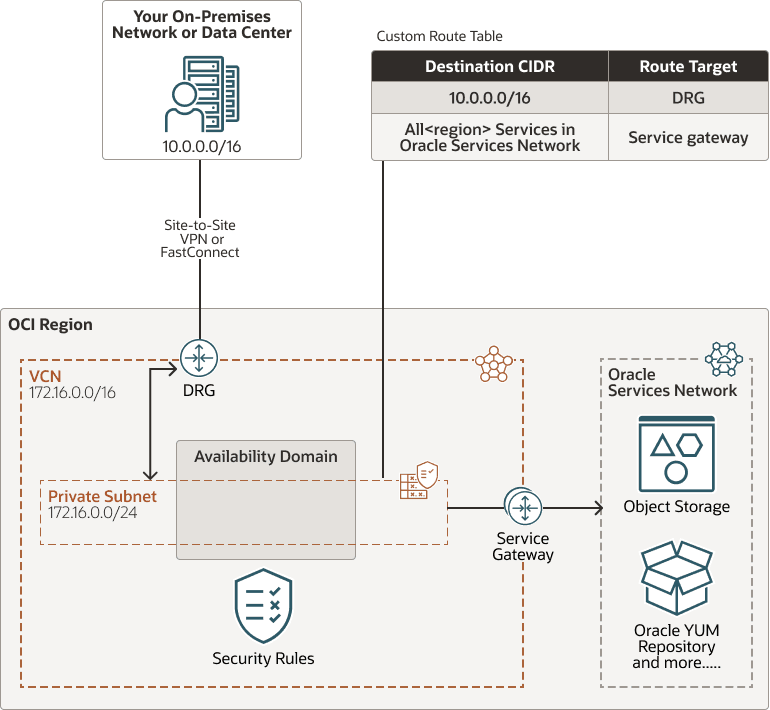
Description of the illustration network_dbsystem_private.png
Perform the following steps to setup private subnet with service gateway.
- Private subnet.
- Gateways for the VCN:
- Dynamic Routing Gateway (DRG), with a FastConnect or Site-to-Site VPN to your on-premises network.
- Service gateway to reach Oracle Services Network for database provisioning, backups and patching, and to reach Oracle YUM repos for OS updates.
- Route table: A custom route table for the subnet, with these rules:
- A route for the on-premises network’s CIDR, and
target = DRG. - A rule for the CIDR label called
All *\<region>* Services in Oracle Services Network, andtarget = the service gateway.
- A route for the on-premises network’s CIDR, and
- Security rules to enable the required traffic to and from the DB system nodes.
- The following rule enables the DB system to communicate with the Oracle services (for public subnet with internet gateway), or with the Oracle Services Network, which includes all the Oracle services (for private subnet with service gateway). It is redundant with the general egress rule for basic connectivity (and in the default security list). It is optional but recommended in case the general rule (or default security list) is inadvertently changed.
- Stateless: No (all rules must be stateful)
- Destination Type: Service
- Destination Service:
- When using public subnet (with internet gateway), use the CIDR
0.0.0.0/0 - When using private subnet (with service gateway), use the CIDR label called
All *\<region>* Services in Oracle Services Network
- When using public subnet (with internet gateway), use the CIDR
- IP Protocol: TCP
- Source Port Range: All
- Destination Port Range: 443 (HTTPS)
- Description: An optional description of the rule.
- The following rule enables the DB system to communicate with the Oracle services (for public subnet with internet gateway), or with the Oracle Services Network, which includes all the Oracle services (for private subnet with service gateway). It is redundant with the general egress rule for basic connectivity (and in the default security list). It is optional but recommended in case the general rule (or default security list) is inadvertently changed.
For more information on:
- private subnet, see Private Subnet.
- service gateway, see Access to Oracle Services: Service Gateway.
- Dynamic Routing Gateway, see Dynamic Routing Gateway (DRG).
- FastConnect, see FastConnect.
- Site-to-Site VPN, see Site-to-Site VPN.
- route table, see Route Table.
- security rules, see Security Rules and Security Rules for the DB System.
- networking, see Networking Overview.
Public Subnet with Internet Gateway
You can connect to the Oracle Services Network using the internet gateway for public subnets. You can use this setup in production if you want to use an internet gateway with the VCN, or if you have services that run only on a public network and need access to the database. This option can be useful when doing a proof-of-concept or development work. The following image provides the architecture for public subnet with internet gateway.
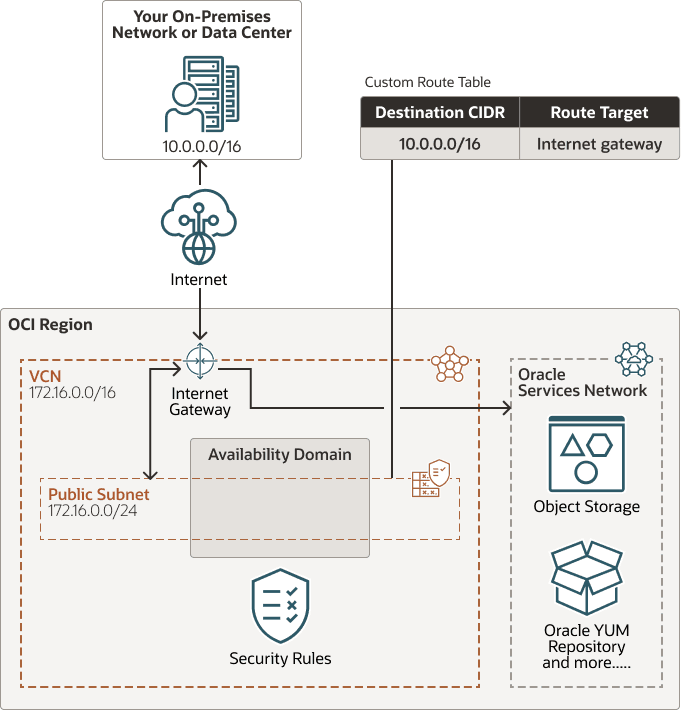
Description of the illustration network_dbsystem_public.png
Perform the following steps to setup public subnet with internet gateway.
- Public subnet.
- Internet gateway.
- Route table: A custom route table for the subnet, with a rule for CIDR
0.0.0.0/0, andtarget = internet gateway. - Security rules to enable the desired traffic to and from the DB system nodes.
For more information on:
- public subnet, see Public Subnet.
- internet gateway, see Internet Gateway.
- route table, see Route Table.
- security rules, see Security Rules and Security Rules for the DB System.
Note: See this known issue for information about configuring route rules with service gateway as the target on route tables associated with public subnets.
Requirements for IP Address Space
If you are setting up DB systems (and thus VCNs) in more than one region, make sure the IP address space of the VCNs does not overlap.
The subnet you create for a DB system cannot overlap with 192.168.16.16/28, which is used by the Oracle Clusterware private interconnect on the database instance.
Caution:
Any change in the VCN may impact RAC DB functionality. Oracle recommends that you assess the changes required on the CRS side before making any changes in the VCN.
For more information, see How to Modify Public Network Information including VIP in Oracle Clusterware (Doc ID 276434.1).
Note: While the subnet itself uses 192.168.16.0/24 as default, the actual addresses the Oracle Clusterware private interconnect uses is 192.168.16.16/28. Effectively, even though you cannot deploy a DB system using 192.168.16.0/24, the private interconnect will be able to communicate with hosts using these addresses if you modify the private interconnect subnet to 192.168.16.16/28.
The following table lists the minimum required subnet size.
Note:
The Networking service reserves three IP addresses in each subnet. Allocating a larger space for the subnet than the minimum required (for example, at least /25 instead of /28) can reduce the relative impact of those reserved addresses on the subnet’s available space.
For more information, see IP Addresses Reserved for Use by Oracle.
| DB System Type | # Required IP Addresses | Minimum Subnet Size |
|---|---|---|
| 1-node virtual machine | 1 + 3 reserved in subnet = 4 | /30 (4 IP addresses) |
| 2-node RAC virtual machine | (2 addresses * 2 nodes) + 3 for SCANs + 3 reserved in subnet = 10 | /28 (16 IP addresses) |
VCN Creation Wizard
Note: Oracle recommends not to use this VCN creation wizard for production.
The Networking section of the Console includes a wizard that creates a VCN along with related resources. It can be useful if you just want to try launching an instance. However, the wizard automatically creates a public subnet and an internet gateway. You may not want this for your production network, so Oracle recommends you create the VCN and other resources individually yourself instead of using the wizard.
For more information on the wizard, see Virtual Networking Quickstart.