
 Access Oracle Big Data Manager
 Before You Begin
This 10-minute tutorial shows you how to access Oracle Big Data Manager that is running on either a local on-premises Oracle Big Data Appliance, or on Oracle Cloud.
Background
How you sign in and access Oracle Big Data Manager depends on where Oracle Big Data Manager resides. Oracle Big Data Manager may reside either on a local on-premises Oracle Big Data Appliance or on Oracle Cloud.
What Do You Need?
- Access to either an instance of Oracle Big Data Cloud Service or an Oracle Big Data Appliance, and the required login credentials.
- Access to Oracle Big Data Manager, either on an instance of Oracle Big Data Cloud Service or on an Oracle Big Data Appliance, and the required sign in credentials. A port must be opened to permit access to Oracle Big Data Manager, as described in Enabling Oracle Big Data Manager.
 Access Oracle Big Data Manager on the Cloud
Access Oracle Big Data Manager from a URL
You can sign in to your Oracle Big Manager that is running on Oracle Big Data Cloud Service instance by using a URL. The URL should reference the host name of the cluster node where Cloudera Manager is running. By default, this is the third node in the Hadoop cluster, using port 8888. For example, if your host name of the third node in the cluster where Cloudera Manager is running is named node03, then the URL that you use to access Oracle Big Data Manager might be as follows:
https://node03.oraclecloud.com:8888
The Quick start view of the Oracle Big Data Manager Home page is displayed.
Access Oracle Big Data Manager from the console
- Sign in to Oracle Cloud and open your Oracle Big Data Cloud Service console.
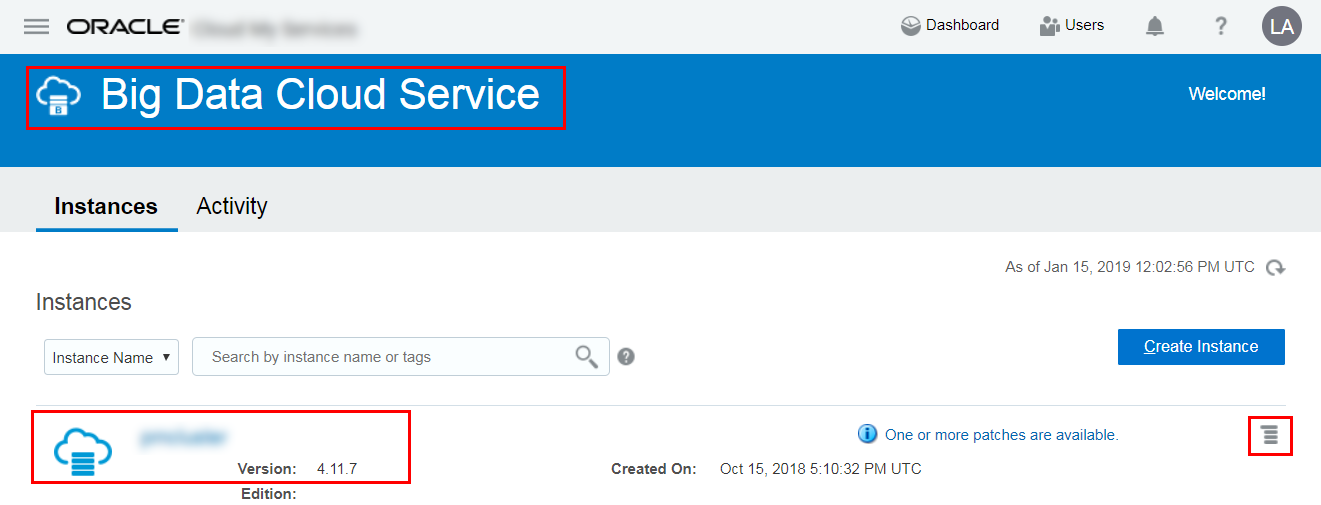
Description of the illustration bdcs-console.png - In the row for the cluster, click Manage this instance
 , and then click Oracle Big Data Manager console from the context menu to display the Oracle Big Data Manager Home page. If you are prompted to sign in to Oracle Big Data Manager, enter your credentials, and then click OK.
 Access Oracle Big Data Manager on Oracle Big Data Appliance
You can sign in to your Oracle Big Manager that is running on an Oracle Big Data Appliance by using a URL. The URL should reference the host name of the cluster node where Cloudera Manager is running. By default, this is the third node in the Hadoop cluster, using port 8889. For example, if your host name of the third node in the cluster where Cloudera Manager is running is named node03, then the URL that you use to access Oracle Big Data Manager might be as follows:
https://node03.oracle.com:8889
The Quick start view of the Oracle Big Data Manager Home page is displayed.
 Want to Learn More?