Oracle Data Safe Events in the Events Service
By using the Events service in Oracle Cloud Infrastructure (OCI), administrators can configure the Oracle Data Safe service to emit events in OCI. Events are structured messages that indicate changes in resources.
To configure events, you create rules that specify which events can trigger actions. Actions include publishing messages to a stream via the Streaming service, broadcasting a notification message to subscribers via the Notifications service, or invoking functions in Oracle Functions. For example, you can trigger a notification message when a user registers a target database with Oracle Data Safe.
Note: Any Oracle Data Safe event for User Assessment or Security Assessment that you created in the past that uses an old event type name, for example, com.oraclecloud.datasafe.securityassessmentrefresh.begin, needs to be dropped and recreated so that it uses the new friendly name, for example, Security Assessment Refresh Begin; otherwise, the event will not work.
To learn more about events, see Overview of Events in the Oracle Cloud Infrastructure documentation.
Rule Conditions
When you create a rule, you start by configuring a condition. The first condition specifies the event type(s) for which you want to be notified. If you want to set filters on the event types, you can add more conditions that specify attributes and tags.
Let’s look at a simple example. Suppose you want to be notified when an alert is generated in Oracle Data Safe. To do this, in the event rule, you select the Alert Generated event type for the first condition. Because you are interested in a particular database, you add a second condition to the rule with a filter on the attribute targetId. For its value, you enter the OCID of your target database. Now, if an alert is generated for your target database, you will be notified. The following screenshot shows you the Create Rule page in Oracle Cloud Infrastructure with these conditions configured.
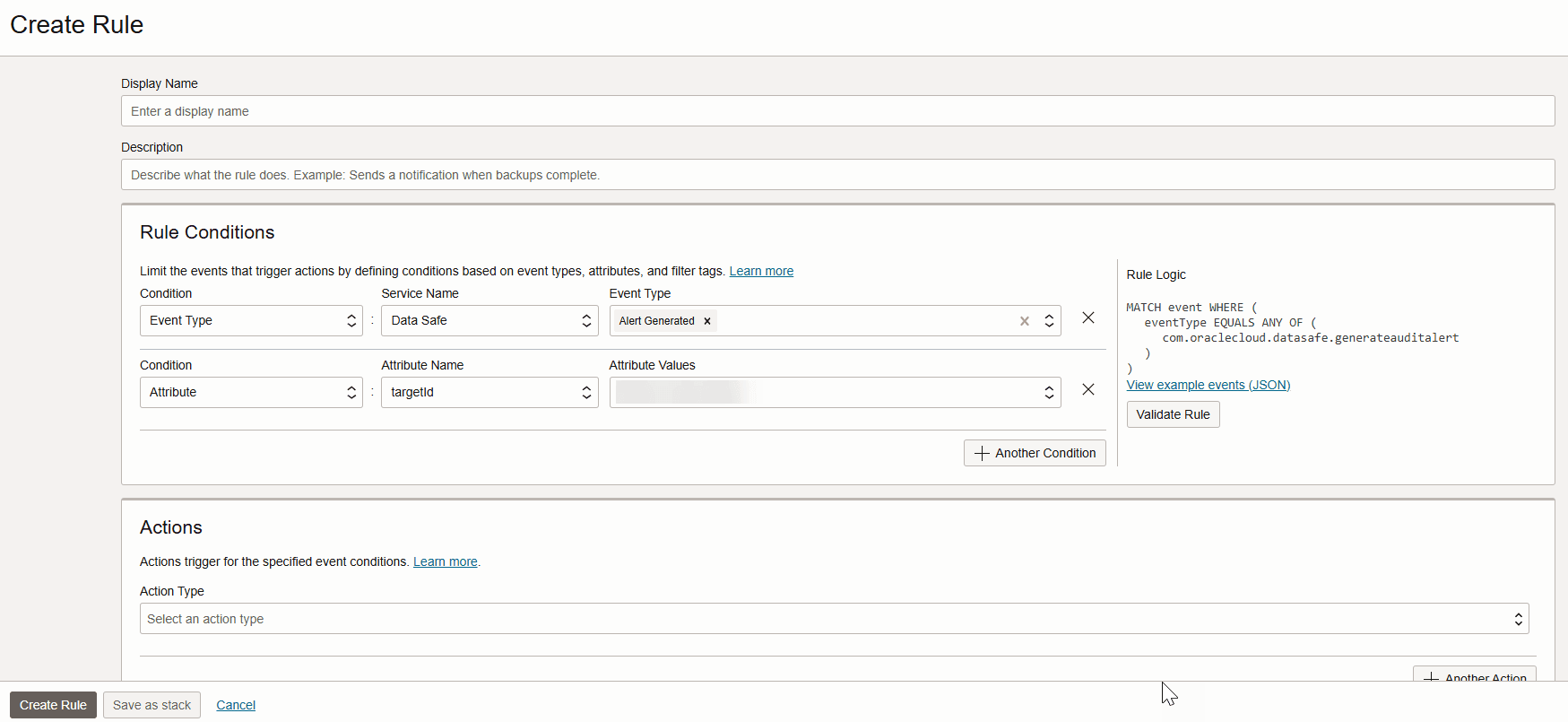
Description of the illustration s-create-rule2.png
Notification Text
Notification text is in JSON format. From the Create Rule page in Oracle Cloud Infrastructure, you can preview the text. Simply click the View example events (JSON) link and select an Oracle Data Safe event type. The following is an example for the Alert Generated event type:
{
  "eventType": "com.oraclecloud.datasafe.generateauditalert",
  "cloudEventsVersion": "0.1",
  "eventTypeVersion": "2.0",
  "source": "DataSafe",
  "eventTime": "2020-09-29T16:03:41.293Z",
  "contentType": "application/json",
  "data": {
    "compartmentId": "ocid1.compartment.oc1..unique_ID",
    "compartmentName": "example_compartment",
    "resourceName": "alerts",
    "resourceId": "ocid1.datasafealert.oc1.phx.unique_ID",
    "availabilityDomain": "availability_domain",
    "additionalDetails": {
      "status": "OPEN",
      "displayName": "Failed logon by Admin user",
      "description": "Failed logon by Admin user was detected",
      "severity": "HIGH",
      "targetId": "ocid1.datasafetargetdatabase.oc1.phx.unique_ID",
      "targetName": "target_sa",
      "policyId": "ocid1.datasafealertpolicy.oc1.iad.unique_ID",
      "ruleName": "Failed-logon-by-Admin-user-Rule",
      "timeCreated": "2020-09-29T16:03:31.293Z",
      "timeUpdated": "2020-09-29T16:03:42.736Z",
      "osUserName": "dscs",
      "operationTime": "2020-09-29T15:29:51.404Z",
      "operation": "Login on target database",
      "operationStatus": "Success",
      "clientHostname": "jobsvm3002.jobsvm.stestvcn.oraclevcn.com",
      "clientIPs": "...",
      "clientId": "ORACLE$_DATA_SAFE#",
      "clientProgram": "JDBC Thin Client",
      "userName": "user1",
      "violationType": "SQL",
      "objectType": "UNIFIED_AUDIT_TRAIL",
      "object": "MY_TABLE",
      "targetOwner": "SYS",
      "commandText": "SELECT * FROM AUDSYS.UNIFIED_AUDIT_TRAIL WHERE "EVENT_TIMESTAMP"<=:1 AND "EVENT_TIMESTAMP">:2 \u0000",
      "commandParam": " #1(31):02-JUL-21 12.42.15.044000000 PM #2(31):02-JUL-21 12.34.22.509000000 PM",
      "eventCategory": "Failed Logins by Admin User",
      "alertURLInConsole": "https://console.$region.oraclecloud.com/data-safe/alerts/reports/ocid1.datasafereportdefinition.oc1..unique_ID/alert/ocid1.datasafealert.oc1..unique_ID/true"
    }
  },
  "eventID": "unique_ID",
  "extensions": {
    "compartmentId": "ocid1.compartment.oc1..unique_ID"
  }
}
Each event type has its own set of additional details, and some do not have any. In the example above, the additionalDetails node shows you target database name and start date.