Updating Global Active tables using Terraform
You can use Terraform to modify an existing Global Active Table
Add a regional replica
You can add a regional replica of an existing Global Active Table.
mr_test already exists and has a regional replica in the Canada Southeast(Montreal) region. To add a regional replica of this table in another region Canada Southeast(Toronto), use the following nosql.tf file.
Note:
The definitions of the table (CREATE TABLE IF NOT EXISTS mr_test...) and the existing replicas must always be included in the terraform script even if the table and replicas already exist. Removing the CREATE TABLE definition from the terraform script drops the table from the region. Similarly removing the existing replica definition from the terraform script drops the regional table replica.
variable "compartment_ocid" {
}
variable "table_ddl_statement" {
  default = "CREATE TABLE IF NOT EXISTS mr_test(id INTEGER,
             name STRING, info JSON,PRIMARY KEY(id))
             using TTL 10 days with schema frozen"
}
resource "oci_nosql_table" "mr_test" {
  #Required
  compartment_id = var.compartment_ocid
  ddl_statement  = var.table_ddl_statement
  name           = "mr_test"
  table_limits {
    #Required
    max_read_units = 51
    max_write_units = 51
    max_storage_in_gbs = 2
  }
}
resource "oci_nosql_table_replica" "replica_montreal" {
  table_name_or_id = oci_nosql_table.mr_test.id
  region = "ca-montreal-1"
  #Optional
  max_read_units     = "60"
  max_write_units    = "60"
}
#add a regional replica
resource "oci_nosql_table_replica" "replica_toronto" {
  compartment_id = var.compartment_ocid
  table_name_or_id = "mr_test"
  region = "ca-toronto-1"
  depends_on = [oci_nosql_table.mr_test]
}terraform applyDo you want to perform these actions? Terraform will perform the actions described above. Only 'yes' will be accepted to approve. Once you confirm, Terraform will add the new regional replica of the Global Active table in the Toronto region. Since there are no read and write units explicitly provided for the replica in this region, the values are taken over from the mr_test table in US East (Ashburn) region. In the above example, the read and write units of the replica table in Canada Southeast(Toronto) region would be 51.
Drop a regional replica
You can drop a regional replica of an existing Global Active Table.
mr_test already exists and has a replica in the region Canada Southeast(Montreal) and Canada Southeast(Toronto). To drop the replica from the Canada Southeast(Toronto) region, use the following nosql.tf file where you need to comment (or remove) the code pertaining to adding the replica in Canada Southeast(Toronto).
Note:
The definition of the table (CREATE TABLE IF NOT EXISTS mr_test...) must always be included in the terraform script even if the table already exists. Removing the CREATE TABLE definition from the terraform script drops the table from the region.
variable "compartment_ocid" {
}
variable "table_ddl_statement" {
  default = "CREATE TABLE IF NOT EXISTS mr_test(id INTEGER,
             name STRING, info JSON,PRIMARY KEY(id))
             using TTL 10 days with schema frozen"
}
resource "oci_nosql_table" "mr_test" {
  #Required
  compartment_id = var.compartment_ocid
  ddl_statement  = var.table_ddl_statement
  name           = "mr_test"
  table_limits {
    #Required
    max_read_units = 51
    max_write_units = 51
    max_storage_in_gbs = 2
  }
}
resource "oci_nosql_table_replica" "replica_montreal" {
  table_name_or_id = oci_nosql_table.mr_test.id
  region = "ca-montreal-1"
  #Optional
  max_read_units     = "60"
  max_write_units    = "60"
}
#resource "oci_nosql_table_replica" "replica_toronto" {
#  compartment_id = var.compartment_ocid
#  table_name_or_id = "mr_test"
#  region = "ca-toronto-1"
#  depends_on = [oci_nosql_table.mr_test]
#}terraform applyDo you want to perform these actions? Terraform will perform the actions described above. Only 'yes' will be accepted to approve.Once you confirm, Terraform will drop the replica in Canada Southeast (Toronto) region.
Change the TTL and table limits of a Global Active Table
You can change the read units, write units, storage capacity, and table TTL for a Global Active table using Terraform.
In a Global Active table, changing the read capacity limit or write capacity limit applies only to the region where it is changed. However, changing the storage capacity or changing the table level TTL value applies the changes to the local table as well as all the regional replicas of the table.
mr_test table, use the following nosql.tf file.variable "compartment_ocid" {
}
variable "table_ddl_statement" {
default = "CREATE TABLE IF NOT EXISTS mr_test(id INTEGER,
name STRING, info JSON,PRIMARY KEY(id))
using TTL 15 days with schema frozen"
}
resource "oci_nosql_table" "mr_test" {
#Required
compartment_id = var.compartment_ocid
ddl_statement = var.table_ddl_statement
name = "mr_test"
table_limits {
#Required
max_read_units = 70
max_write_units = 70
max_storage_in_gbs = 2
}
}
resource "oci_nosql_table_replica" "replica_montreal" {
table_name_or_id = oci_nosql_table.mr_test.id
region = "ca-montreal-1"
#Optional
max_read_units = 60
max_write_units = 60
}
resource "oci_nosql_table_replica" "replica_toronto" {
compartment_id = var.compartment_ocid
table_name_or_id = "mr_test"
region = "ca-toronto-1"
depends_on = [oci_nosql_table.mr_test]
}terraform applyDo you want to perform these actions? Terraform will perform the actions described above. Only 'yes' will be accepted to approve.us-ashburn-1) are changed to 70. The table limits of the replicas in the other regions are not changed. However, the TTL value is changed to 15 days in both the local table and all the replicas.
Note:
A Global Active table has a symmetrical table definition including schema, index, TTL, and storage size in all the regional replicas. If you make a change to an index, TTL or storage size in one regional replica, it is automatically applied to all other regional replicas. So it is recommended that you manage these table definitions from one region only.Edit the table limits of a regional replica
The OCI provider in Terraform is configured for a single region. Since table limit updates are region-specific, you can manage the read and write units of a replica created in ca-toronto-1 only from the Toronto region. Similarly, if you want to manage the table limits of the different regions of your global active table, we recommend you to structure your modules in terraform as shown below. Here, Region 1, Region 2 etc. are directories within your Terraform directory. Terraform directory is the one that gets created when you install Terraform.
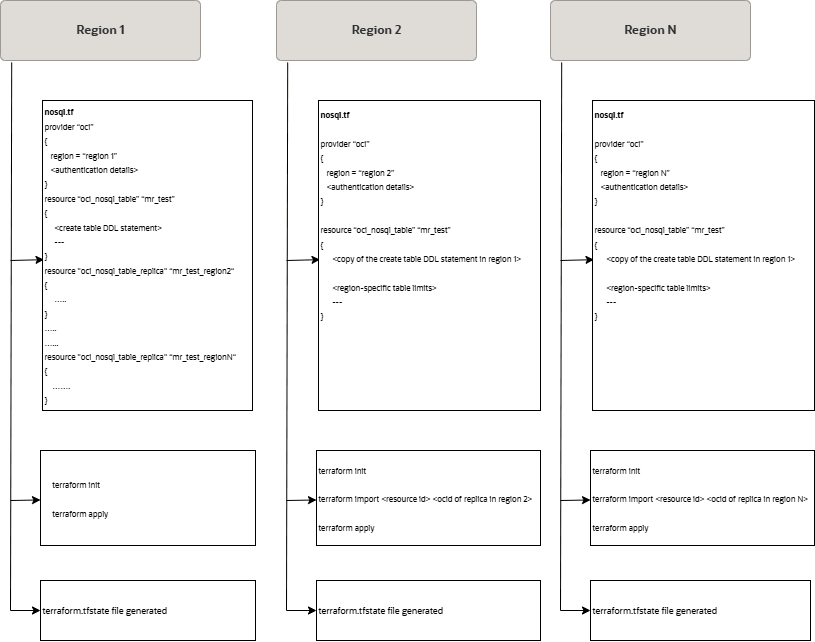
In the Terraform directory, maintain separate directories for each region and maintain the configurations (represented as nosql.tfin the above diagram) with region-specific table limits within them. The terraform state files (terraform.tfstate) are also created and managed separately for each region.
In our case, we would have three directories inside the Terraform directory corresponding to the three regions, us-ashburn-1, ca-montreal-1, and ca-toronto-1. Let us call the directories Ashburn, Montreal, and Toronto.
ca-toronto-1 region:
- Navigate to the
Torontodirectory. Create a Terraform configuration (here,nosql.tf) by duplicating theoci_nosql_tableresource definition from the configuration used in the US East (Ashburn) region. - Update the table’s read and/or write units as needed.
resource "oci_nosql_table" "mr_test" { #Required compartment_id = var.compartment_ocid ddl_statement = "CREATE TABLE IF NOT EXISTS mr_test(id INTEGER, name STRING, info JSON, PRIMARY KEY(id)) with schema frozen" name = "mr_test" table_limits { #Required max_read_units = 100 max_write_units = 90 max_storage_in_gbs = 1 } } - Import the existing table into your Terraform state. As shown in the diagram above, the state file is also region-specific and hence importing the table does not create any state conflict. You can get the
ocidof the replica table in Canada Southeast(Toronto) region from the OCI console.terraform import oci_nosql_table.mr_test <ocid-of-replica-table-in-ca-toronto-1> - Apply changes
terraform apply

Terraform shows the plan to be applied and prompts for confirmation as shown below.
Do you want to perform these actions?
Terraform will perform the actions described above.
Only 'yes' will be accepted to approve.
On confirming, the read and write units are modified respectively to 100 and 90 for the replica in
ca-toronto-1region.