Resize Layout
This page describe a new feature in version 4.7 that allows a user to resize the current layout to fit the current data.
In previous versions, the add-in would resize column widths and row heights of the layout after operations such as Download or Clear Layout.
However, certain data entry operations might introduce data that is longer than the current widths resulting in wrapping or truncating.
While the user can resize columns manually, the process can be tedious.
Version 4.7 of VBAFE adds a new button in the Advanced menu of the add-in Ribbon:
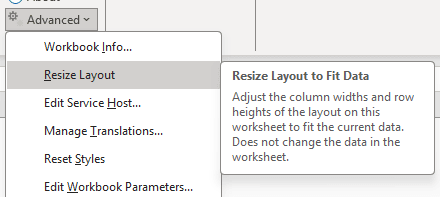
Figure 3-3 Resize Layout to Fit Data
When the user selects this menu item, the add-in resizes the column widths of the layout to fit the current data. No data is changed.
The add-in also resizes the row heights of the rows in the layout to the add-in's standard row height.