Configure Pagination for a Business Object
If the REST service supports pagination, you can download a large number of rows using multiple requests.
Imagine you need to download 10,000 rows of data. Downloading one row at a time is too time-consuming, and attempting to download all 10,000 rows in one request might result in a timeout error. Instead, download one page at a time where the page contains, for example, 500 rows.
Note: Pagination does not limit the total number of rows downloaded. All available rows are downloaded with or without pagination. Pagination controls how many rows are downloaded per request. In the example here, there would be 20 requests of 500 rows to download all 10,000 rows.
You can configure the pagination behavior using the Download tab in the Business Object Editor.
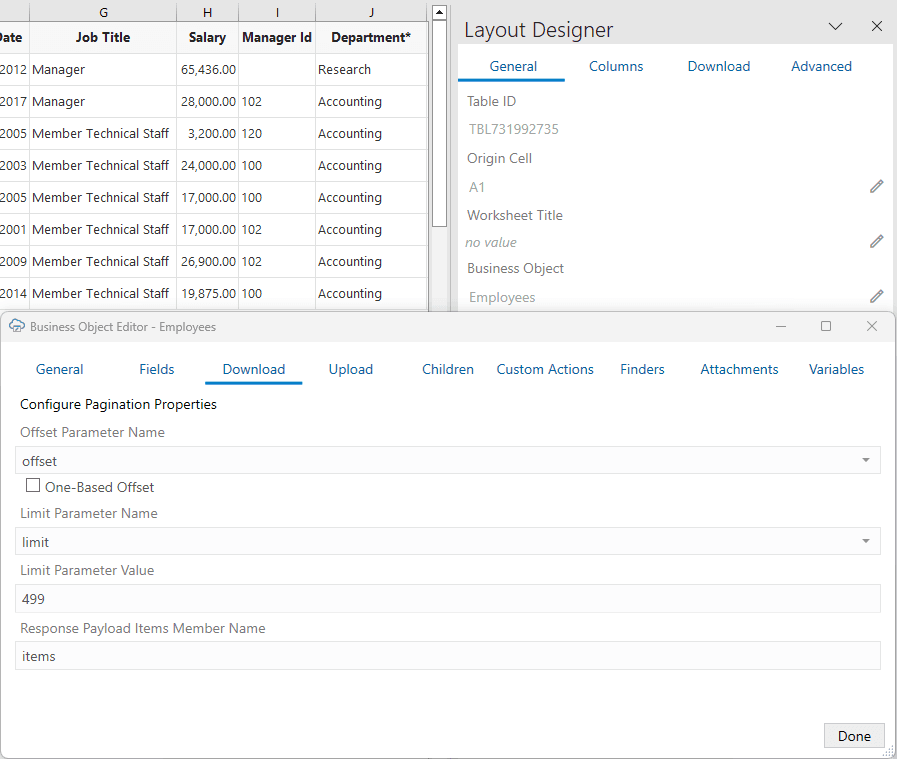
Description of the illustration vb-excel-download-prop.png
Configure the following as required:
- Offset Parameter Name: The name of the URL parameter that controls where to start the next page. When fetching the first page, the add-in uses a value of zero. When fetching the second page, the add-in uses a value of 499, assuming the limit value is 499.
- One-Based Offset: Controls whether the service starts counting from one. If this check box is unselected, the service assumes the service starts counting from zero.
- Limit Parameter Name: The name of the URL parameter that controls how many rows to fetch for each page.
- Limit Parameter Value: Controls the page size (number of rows that the add-in downloads).
For example, using the defaults for an ADF REST service, the add-in appends ?offset=0&limit=499 for the first download request.
For other service types, pagination may or may not be supported. If supported, the service may use parameter names like offset and limit or it may use other parameter names for the same purpose.
Consult the service API documentation to determine which parameters to use.
Refer to Download Data for more information.
Request Total Row Count for Download Progress
For some service types, the add-in can request a total row count at the start of a paginated download. If the service returns usable total-count metadata, the progress window can show percentage progress for the download. If the service doesn’t return usable total-count metadata, the download continues normally with indeterminate progress.
To enable this behavior, select Request total row count for download progress in the Business Object Catalog Editor’s Advanced tab. This option is available for ADF REST and Visual Builder Business Objects catalogs. The option is off by default because the initial download request can be slower for some services.
The add-in requests the total row count only on the first page request. This option doesn’t limit the total number of rows downloaded and doesn’t change the page size. Pagination still controls how many rows are downloaded per request.
If your workbook already configures a service-specific total-count request parameter, such as totalResults for ADF REST or VBBO, review the generated request in Network Monitor to confirm that the download request uses the values you expect.