Delete a Parent Row in a Form-over-Table Layout
If delete is enabled for the form, you can use the Delete Form Row option in the Form Changes menu to delete the parent row in a Form-over-Table layout.
-
Click Download Data to download data from the layout’s business objects.
-
If search is configured, search for the desired record.
-
In the Form Changes menu, select Delete Form Row.
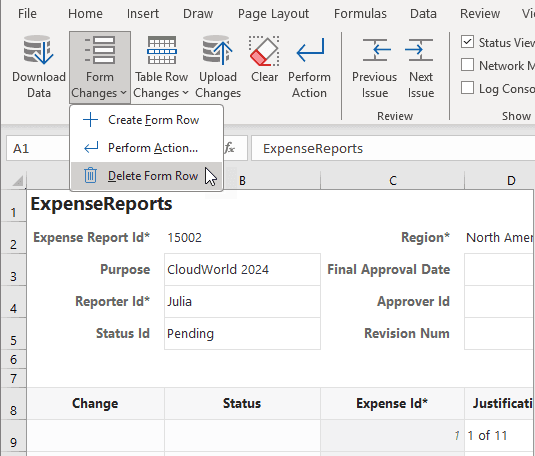
Description of the illustration delete-form-row1.png
You can only delete an existing form row (not a pending
Createrow). -
When prompted to confirm the form row delete, click Yes.
Once you confirm, the form row is immediately deleted (unlike a Mark for Delete action in a table that takes effect only during an upload).
-
Click OK.
After the form row is deleted, your layout is cleared of data; the Status Viewer also indicates that no form row exists.