Resize Layout
Use Resize Layout when you want to resize the current layout to fit the current data.
After operations such as Download Data or Clear Layout, the add-in can resize layout column widths and row heights.
However, certain data entry operations might introduce data that is longer than current widths, causing wrapping or truncation.
Although you can resize columns manually, the process can be tedious.
Use Resize Layout from the Advanced menu on the add-in ribbon:
Resize Layout to Fit Data
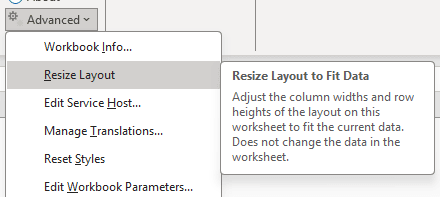
Description of the illustration resize.png
When you select this menu item, the add-in resizes the layout’s column widths to fit the current data. No data is changed.
The add-in also resizes the row heights of the rows in the layout to the add-in’s standard row height.