VM Build Executors
VM build executors are OCI VM Compute instances dedicated to run builds of jobs, which your organization’s members define in VB Studio projects.
A VM executor is always associated with a build executor template. When your organization’s members create jobs, they simply associate the appropriate executor template with the job. When the job’s build triggers, the VM executor that’s associated with the executor template starts automatically. Oracle charges you only when a VM executor is active, runs a build, or is preparing itself to run a build.
This table describes the different states of a VM executor:
| State | What does it mean? | Does it cost? |
|---|---|---|
| Pending | After you add a VM executor, it is in this state until it runs a build. When a VM executor starts from this state, it takes some time to install the operating system and software packages. |
No |
| Starting | The VM executor is starting. If the VM executor starts from the Pending state, VB Studio installs the operating system and software packages on the VM executor’s assigned boot volume. This takes time. If the VM executor starts from the Stopped state, VB Studio uses software packages and the operating system from the previous run’s saved boot volume. VB Studio periodically checks all executor templates for updates. If an executor template is found with new updates, VB Studio deletes the preserved boot volume of all stopped VM executors that reference the executor template and changes their status from Stopped to Pending. |
Yes |
| Available | Operating system and software packages are installed, and the VM executor is ready to run a build. | Yes |
| In Use | The VM executor is running a build. After the running build is complete, the VM executor returns to the Available state. |
Yes |
| Stopping | The VM executor is shutting down. Before shutting the VM executor down, VB Studio saves the operating system and software packages to the VM executor’s assigned boot volume. |
Yes |
| Stopped | The VM executor has shut down. | No |
| Error | There’s a hardware or a software issue on the VM executor. Check the VM executor’s log to find more about the cause. | No |
| Destroying | The VM executor is being deleted. | No |
| Error Unrecoverable | This state is most likely caused when a customer changes the Compute account’s OCI access so that control of the VM executor OCI resources are blocked. This state can also occur if the build executor is in an Error status and VB Studio is not able to remove all used OCI resources or if there is a temporary network glitch during the removal process. VB Studio tries once a day to clear OCI resources used by the VM executor in the Error Unrecoverable state. To manually clear these resources, you can also use the Try to Reset action. |
No |
Some key points to remember about VM executors:
- After creating a VB Studio instance, VB Studio creates a VM executor when you create your first project (assuming you don’t already have one). The VM executor is associated with the System Default OL7 for Visual Builder executor template in the connected OCI account.
- When you add a VM executor manually, you must specify the executor template, choose an OCI region from the connected OCI account’s subscribed regions, specify the OCI Compute VM’s shape, and select the VCN (optional).
-
Your OCI account may have some Compute instance limits set. When you add a VM executor, VB Studio looks into the specified OCI region’s Availability Domains, finds available OCPUs with the specified shape, calculates the number of Compute instances, and displays the number of Compute VM instances you can add from your OCI account’s set limit.
Here’s an example of the VB Studio’s Add VM Build Executors dialog box that displays the number of VM executors you can add with the VM.Standard.1.1 shape:
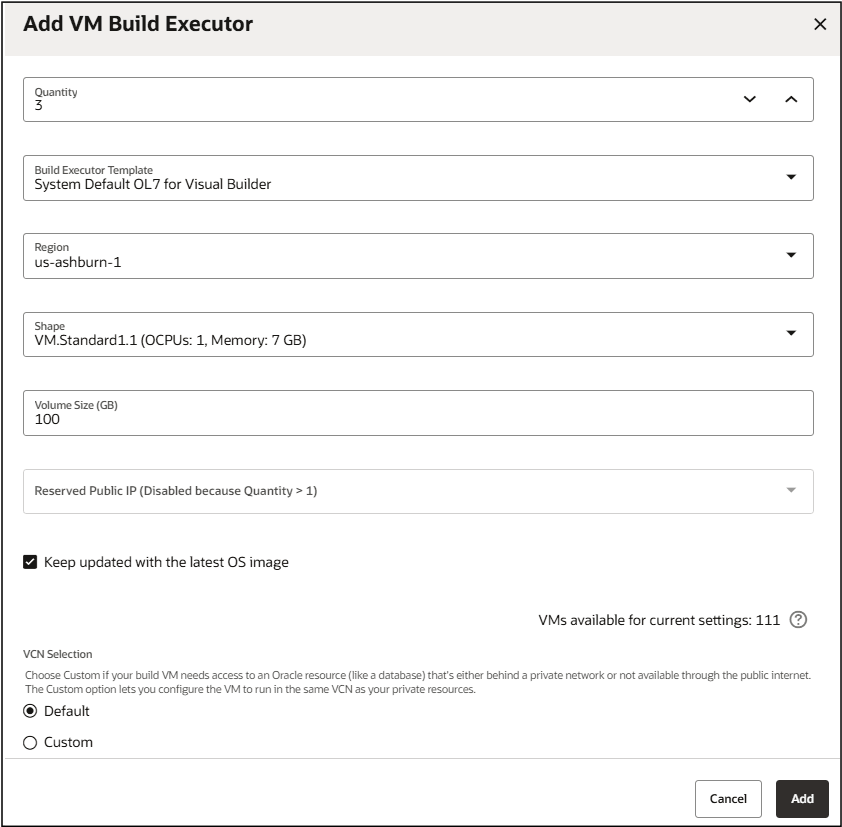
Description of the illustration add-vmbuildxecutor-withlatestos1.png
- When you add a VM executor, it is added in the Pending state and doesn’t cost you anything. You can add more VM executors than the number of available Compute VM instances.
Remember, VB Studio creates a Compute VM instance when a VM executor starts, not when you add it. - You can add standard and legacy VM shapes with these series:
- VM.Standard1
- VM.Standard2
- VM.Standard.E2
- VM.Standard3.Flex
- VM.Standard.E3.Flex
- VM.Standard.E4.Flex
- VM.Standard.E5.Flex
- VM.Standard.B1
- VM.Standard.Intel.Generic
- VM.Standard.x86.Generic
- VM.Standard.AMD.Generic
For more details about the above shapes, see Standard shapes and Legacy shapes.
- A VM executor can run one build at a time.
- When a job’s build runs, if VB Studio finds multiple VM executors allocated for the job’s executor template, it runs the build on any one of them. You can’t choose or specify a particular VM executor to use for the build.
- If you expect your organization’s members to run parallel builds of jobs that refer to a common executor template, add multiple VM executors for that executor template. If you’re not sure, you can start with one VM executor and add more VM executors later.
- While adding multiple VM executors that reference a common executor template:
- Add all VM executors in the same VCN. If you add VM executors with a common executor template in different VCNs (such as some VM executors in the default VCN and other VM executors in a custom VCN), your builds might behave unpredictably.
- Add all VM executors with the same shape. If you add VM executors with different shapes (such as some VM executors of the VM.Standard1.1 shape and some of the VM.Standard2.8 shape), your builds may run slow or fast depending on the VM executor it runs on.
- After a build is complete, a VM executor continues to be in the Available state and waits for some time for any queued builds. This wait time is called sleep timeout. If no builds run on the VM executors in this duration, VB Studio automatically stops the VM executors.
- The more VM executors you have running at a specific time, the higher the cost. To minimize the higher cost, configure the sleep timeout to stop inactive VM executors after some time. The sleep timeout setting applies to all your organization’s VM executors.
- If all VM executors are in an Error state for a given build executor template, the VM executor will attempt to rerun the build after successive delays of 2 minutes, 4 minutes, and 8 minutes. This is to allow enough time for the VM executors in the Error state to be deprovisioned, reprovisioned, and transition to the Pending state.