Work With Multiple VB Studio Instances
Before you begin working through the essential setup tasks, it’s important to understand how your Oracle Cloud Application and VB Studio instances are organized.
Oracle is in the process of provisioning multiple instances of Visual Builder Studio for each Oracle Cloud Applications customer. New customers will see this configuration as soon as they are provisioned with Oracle Cloud Applications; existing customers are being migrated to the new landscape over the next several months. In this new configuration, every TEST and DEV instance in your Oracle Cloud Application environment family receives its own instance of VB Studio, which in turn are tied together by a single VB Studio organization:
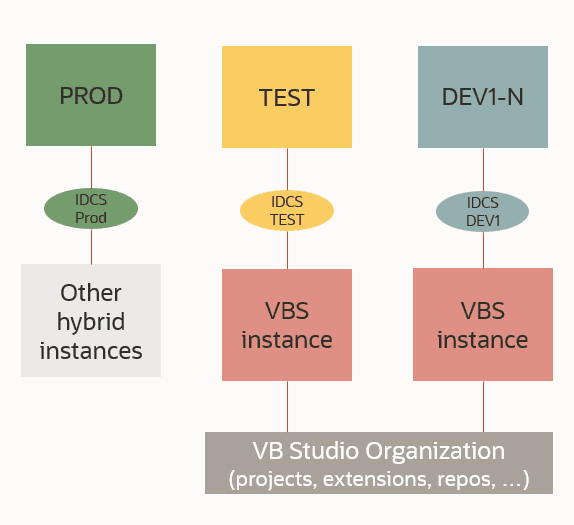
Description of the illustration shell-instances.png
By sharing a common organization, users working in VB Studio associated with a TEST instance, for example, are able to access the same projects, repositories, and extensions as users working in a completely different instance—say a DEV instance tied to a different VB Studio instance, or another TEST instance. They can see each other’s changes, review and approve each other’s merge requests, and collaborate on the same wikis, all as though they were in the same VB Studio instance.
Note If you don’t yet have multiple VB Studio instances and would like to, file a service request with Oracle Support.
Here are some important considerations to keep in mind when using multiple VB Studio instances:
- You can use different VB Studio instances for different purposes. For example, you might maintain one or more extensions using VB Studio in your TEST instance, while simultaneously evaluating new functionality in an upcoming Oracle Cloud Applications version using a different VB Studio (likely one associated with a DEV instance running the newer version).
-
Within your Oracle Cloud Applications environment, your identity is different on each VB Studio instance you’re working with. For example, in the development instance DEV1, your user name might be known as JoeSmith@<Oracle Cloud Applications-instance-name>-
DEV1to VB Studio; JoeSmith@<Oracle Cloud Applications-instance-name>-DEV2on the DEV2 instance, and so on. This means that your administrator may need to assign roles for you multiple times, one for each user name/identity. It also means that to work on the same project from both Dev1 and Dev2, both of your user names/identities must be added to that project.Note Because workspaces operate on a per-user basis, you’ll likely have more than one workspace, one for each user name/identity. If you’re going to work on the same set of files from more than one instance (that is, from more than one workspace), it’s important to publish (or merge) your changes from one workspace before switching to another. This helps to avoid merge conflicts and ensures that you have the very latest changes before you resume your work.
- Having multiple VB Studio instances gives you flexibility in case the instance where you normally work is unavailable for some reason. For example, suppose you usually work in Project A on the DEV1 instance, but DEV1 is down for maintenance. As long as your identity on DEV2 is also a member of Project A—and assuming that you’ve pushed your latest changes to Git—you can access the project through the VB Studio associated with DEV2 and pick up with your work from there. (See Set Up VB Studio Users for more about user identities.) Note that both DEV1 and DEV2 must be running the same release of Oracle Cloud Applications in order for this scenario to work properly.
- You must develop your extensions only in the VB Studio instance associated with the Oracle Cloud Applications instance you’re working in. That is, if you use DEV1 to build your extensions, make sure you’re using the VB Studio associated with DEV1, and not, say, the VB Studio instance associated with TEST, or a VB Studio instance in a completely different Oracle Cloud Applications environment family. Of course, you can deployextensions to any instance in any environment family, as long as you have a VB Studio environment defined to support that.
- To deploy an extension to a PROD instance (or to delete an extension when it’s no longer needed), you should always use the Manage Lifecycle Extension page. The only reason not to do so is if some of the extension’s work has been isolated in discrete branches, which means you’ll need to employ CI/CD; in this case, see Deploy to Production Through CI/CD Pipelines.
- If you are developing an extension in one instance and want to test it in another:
- Define a new environment. The easiest way is to go to the Environments tab in the VB Studio left navigator, then click Extension Lifecycle:
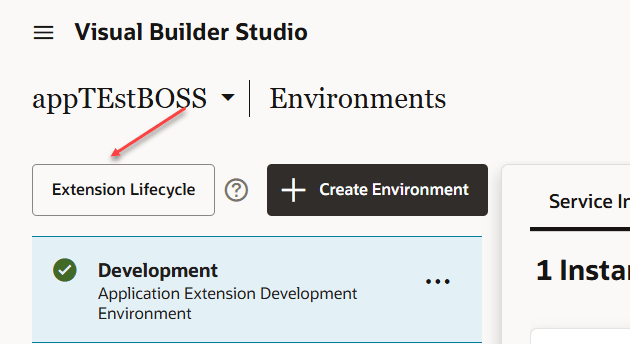 If you use the +Create Environment button instead, be sure to select OAuth 2.0 under Authorization Type:
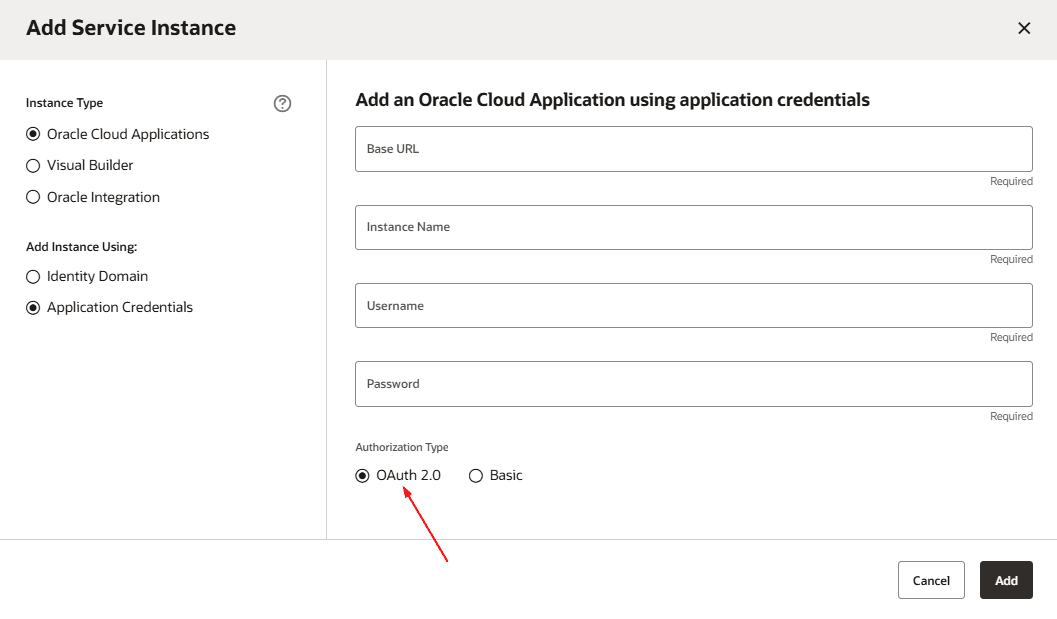 Regardless of the method you choose, enter the base URL, the name by which you want to refer to the instance, and the credentials of a user authorized to deploy to the instance. These credentials must be those of a local user, not a federated identity, and must not require multi-factor authentication. Once the instance is connected, these credentials are discarded; they’re needed only to set up the initial OAuth-based connection.
 - Back in the Designer, press the Publish button to commit the changes you made in the extension to the Git repository in VB Studio.
- Use the Manage Lifecycle Extension page to deploy the extension to the environment you just created, as well as to keep tabs on all of your deployments.
Note If you can’t see the deployments for a given instance, it’s probably because the instance wasn’t created using OAuth. To solve this issue, create a new environment that points to the instance, specifying OAuth 2.0 as the authentication method. (If you create the environment from the Manage Extension Lifecycle page, OAuth is used automatically.)
- Define a new environment. The easiest way is to go to the Environments tab in the VB Studio left navigator, then click Extension Lifecycle:
- As shown in the image above, each non-Prod instance in an Oracle Cloud App environment family is associated with its own VB Studio instance, which in turn is tied to a single organization. If you have the
DEVELOPER_ADMINISTRATORVB Studio role for any of these VB Studio instances, you’re considered a VB Studio organization administrator. In that capacity, any changes you make to the organization through any of the VB Studio instances are reflected on all the other instances in the environment family as well. - Similarly, if you have the OCI policies that allow you to administer VB Studio instances from the Oracle Cloud Console, any change you make through the console—say, enabling CI/CD for a single VB Studio instance—impacts the entire organization. That is, enabling CI/CD for one instance enables it for all instances in the environment family.
Want to create visual applications with one of the VB Studio instances provisioned alongside your Oracle Cloud Applications account? You can certainly do so, but you’ll need an instance of Visual Builder to deploy them to. In addition, because each instance of VB Studio is provisioned in the same identity stripe as its associated Oracle Cloud Applications instance (TEST, DEV1, DEVn, and so on), every visual app developer will need Oracle Cloud Application credentials to sign on to VB Studio. Also, should your Oracle Cloud Application instance be down for maintenance or some other reason, the associated VB Studio instance won’t be available either, which means visual app development will be halted.
Alternatively, you can use the Oracle Cloud Console to create your own instance of VB Studio to develop your visual apps, if you have the ability to do so, although you will still need a separate instance of Visual Builder to deploy to.