Add a Fire Data Provider Event Action
You add a Fire Data Provider Event action to dispatch an event on a data provider to reflect changes to your data. For example, a component using a particular ServiceDataProvider may need to render new data because new data has been added to the endpoint used by the ServiceDataProvider.
To add a Fire Data Provider Event action to an action chain:
-
Open the Actions editor, for example, at the page level.
-
Create an action chain, or open an existing action chain to add the action in the editor.
-
Drag Fire Data Provider Event from the Actions palette into the action chain.
You can drag the action onto the Add icon (
 ) in the action chain, or between existing actions in the chain. The Properties pane opens when you add the action to the chain.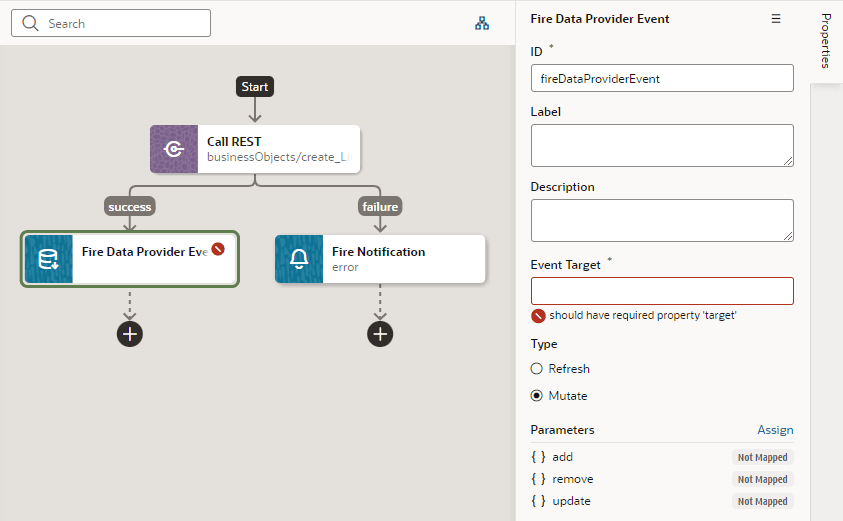
Description of the illustration add-fire-data-provider-event-action.png
-
Update the ID field in the Properties pane to make the action more easily identifiable.
-
Set the target of the event. Usually, this is a variable of type ServiceDataProvider or ArrayDataProvider.
-
Select the type of event you want to dispatch:
-
Refresh: Indicates a refresh event needs to be dispatched to the data provider identified by the target.
-
Mutate: Indicates a mutation event needs to be dispatched to the data provided identified by the target. Generally, a mutation event is raised when items have been added, updated, or removed from the data that the data provider represents.
-
-
If you chose a Mutate event, click Assign to map variables for the add, remove, and update operations.
A mutation event can include multiple operations (add, update, remove) as long as the id values between operations do not intersect.
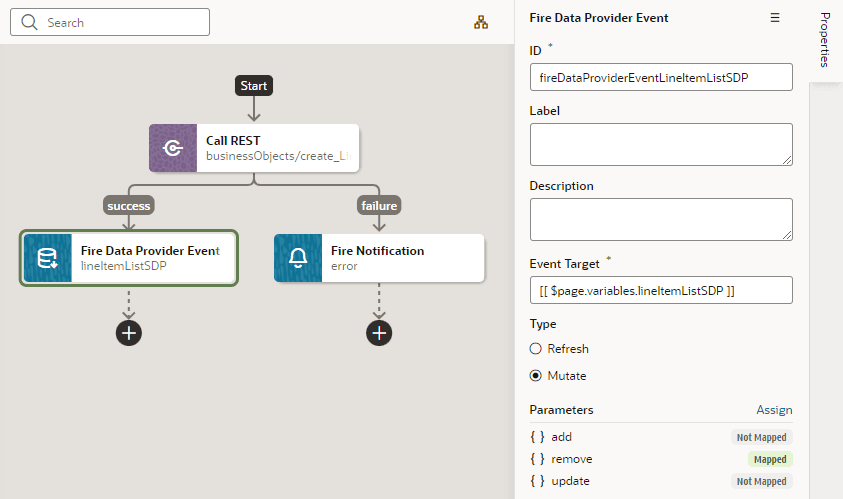
Description of the illustration add-fire-data-provider-event-action-result.png