Deploy Changes From the Remote Branch
Use the Deploy option to deploy the latest content from any branch in the remote repository to your workspace’s target environment. When you use Deploy instead of Publish, only content in the remote branch is deployed; unpublished changes remain in your workspace until you click Publish.
Note that Publish and Deploy are two distinct options in the Designer:
-
Click Publish to merge new changes in your workspace to a remote branch, and then deploy those changes to your target instance.
With this option, the method of deployment—either directly or via a CI/CD pipeline—depends on the Enable CI/CD pipeline setting for the remote branch.
-
Click Deploy if your changes already exist in a remote branch, and now you want to deploy those changes to your target instance.
With this option, deployment always happens directly without using a CI/CD pipeline, even if one exists and is enabled for the branch.
When might you need to deploy from a remote branch? It’s convenient, for example, if a merge request was already approved and merged, but a CI/CD pipeline doesn’t exist to automatically deploy those changes. In such cases, you can click Deploy to move those changes to your Visual Builder instance.
-
From the menu in the Designer’s header, click Deploy.
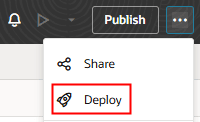
Description of the illustration deploy-action-designer-visapp.png
-
In the Deploy dialog, select the remote branch that you want to deploy your visual application from.
-
Click Deploy.