Set a Field to be Read Only
You can set a field to be Read Only when you don’t want its value to be changed by everybody. For example, you might want only managers to be able to change an employee’s hire date. You would then set the field to be Read Only in all layouts, except the one seen by managers.
-
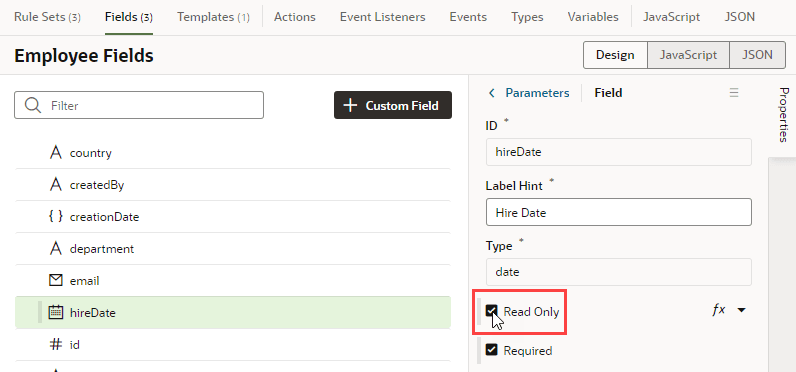
To edit a field’s Read Only property for all layouts:
-
In the layout’s Fields tab, select the field you want to work with.
-
Edit the field’s Read Only property in the Properties pane.
-
-
To edit a field’s Read Only property in a particular layout:
-
In the Rule Set editor, open the layout and select the field in the center pane.
-
Edit the field’s Read Only property in the Properties pane.
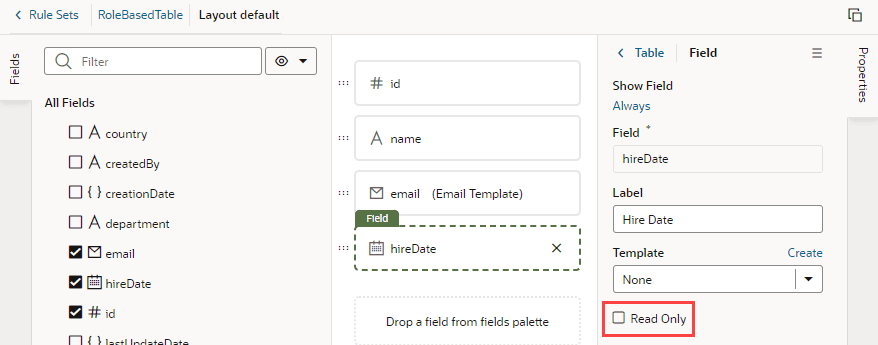
Description of the illustration readonly.png
If the field’s Read Only property was set in the Fields editor to apply to all layouts, you would see a warning as shown here when you try to edit the property in a particular layout:
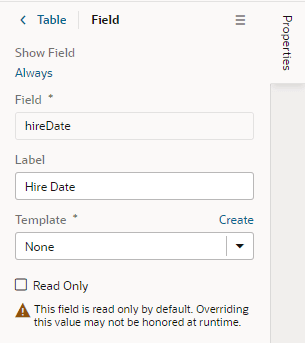
Description of the illustration readonly-override.png
The Read Only property might not be editable if you select a field that has a template applied to it. You would need to remove the template if you want to edit the property in the layout.
-